
What is gpt-image-2
4K + reasoning + 99% text rendering — why gpt-image-2 hit Image Arena #1 within 12 hours of launch with a +242 point lead.
4K + reasoning + 99% text rendering — why gpt-image-2 hit Image Arena #1 within 12 hours of launch with a +242 point lead.
A visual artifact with its brief, selected version and human edits recorded.
Verify text, brand, rights and destination crop before the asset enters the campaign case.
Making Xiaohongshu covers, WeChat MP headers, event posters — anyone who's used Midjourney knows the same drill: MJ generates the base → drop into Photoshop → manually add the Chinese title text → tweak position → tweak font size → revise five times. Why? One reason only: Midjourney can't render Chinese text. Throw in eight characters like "30 天学会 ChatGPT" and MJ v6/v7 spits out garbled strokes — getting one or two characters right is pure luck.
This bottleneck stuck around for two years. Flux 1.1 Pro handles Chinese a bit better but still isn't drop-in usable. DALL-E 3 misaligns long text constantly. Nano Banana sits at "mediocre and unstable" for Chinese. The whole ecosystem just accepted "AI generates the image + human adds the text" as the default — until 2026-04-21.
That day OpenAI shipped gpt-image-2 (product name: ChatGPT Images 2.0), pushing Chinese text rendering accuracy to 99%. The idea of "Chinese poster, one shot, ready to ship" only became real starting that day. This is Chapter 1 — let's lay out the basics.
The data, on one page
| Dimension | Data |
|---|---|
| Release date | 2026-04-21 |
| ChatGPT Plus / Pro available | From 2026-04-22 |
| Developer API open | Early 2026-05 |
| Backbone | GPT-5.4 (shares the reasoning pipeline with ChatGPT's text side) |
| Resolution ceiling | 4K (4096×4096) |
| Images per generation | Up to 8 coherent shots |
| Aspect ratios | Free range from 3:1 to 1:3 |
| Text rendering accuracy | ~99% (Latin / CJK / Hindi / Bengali) |
| API price (1024×1024) | Low $0.006 · Medium $0.053 · High $0.211 |
A few common misconceptions worth correcting up front: the ceiling is 4K, not 2K (lots of secondhand articles got this wrong, copying 2048 numbers from the GPT Image 1.5 era). It replaces DALL-E 3 but it's not called DALL-E 4. And pricing is tiered per image, not flat — Low/Medium/High differ by 35x, so picking the wrong tier blows up your API bill fast.
Term: Backbone — the large model that handles "understand the prompt + reason about intent" before generating the image. gpt-image-2 uses GPT-5.4, the same brain you chat with in ChatGPT. So its comprehension level matches ChatGPT's: complex instructions, multilingual prompts, implicit intent — all parsed.
What does +242 points mean
Within 12 hours of release, gpt-image-2 took the #1 slot on the Image Arena leaderboard (community blind-test voting), ahead of #2 by 242 points.
That number means nothing in isolation. Compare it though: the previous record-holding lead on Image Arena was 80–100 points — Midjourney v6 right after launch, Flux 1.1 Pro on its release day. 242 points means it pushed the gap between "top tier" and "everyone else" to more than double what was previously possible.
And those 242 points aren't lopsided toward one category. Realism, art, text, people, scenes — first place across all five evaluation dimensions. No model in Image Arena history has ever swept the board.
The practical takeaway is one thing: for covers, posters, infographics today, gpt-image-2 is the default. Other models become "use only for specific cases." This ranking hadn't changed for two years — MJ held #1, Flux occasionally tied — until 4/21 flipped it overnight.
Three real differentiators (not marketing fluff)
OpenAI listed a pile of features. But what actually pulls it ahead of MJ/Flux/Nano Banana boils down to these three.
1. Native reasoning: it "thinks" before generating
gpt-image-2 runs through the same reasoning pipeline as ChatGPT's text side: it figures out what you actually want, fetches reference images online if needed, then self-checks the output afterward.
Reasoning is like a teacher thinking on the blackboard, working through it as they write. Non-reasoning models just blurt out the answer — you say A, they give you B, and you have no idea where it went wrong.
Concrete example: write "draw a Shanghai Auto Show 2025 scene, BYD booth." MJ invents something that looks vaguely like an auto show — the booth is imagined, the lighting is generic studio, the floor is generic tile. gpt-image-2 will first search real Shanghai Auto Show photos as reference, then generate a booth whose style, lighting, and floor pattern match the actual event. Even the LED backdrop with BYD's typical marketing slogans comes out close to real. Midjourney / Flux / Imagen can't do this — their training cutoff is their knowledge ceiling.
2. 99% text: Chinese posters that finally work straight out of the box
99% accuracy spans Latin / CJK / Hindi / Bengali — four major writing systems — and stays stable in mixed-language layouts. TechCrunch's review put it bluntly: "surprisingly good at generating text."
Compare with MJ: stuff "30 天学会 ChatGPT" into the prompt and MJ v7 either spits out garbled strokes or turns it into Japanese katakana "だ". The Photoshop-add-text step? You can skip it in the gpt-image-2 era.
This one matters because it's the must-have differentiator for every Chinese content creator. Everything later in this guide about Xiaohongshu covers, WeChat MP headers, event KVs builds on this single capability.
3. Multi-turn editing: keeps context, only changes what you specify
After the first image lands, you just chat with it: "swap the background to sunset, leave everything else." The model preserves the figure, text, composition, color grading — and only swaps the background. Follow up with "scale the text up 30%" and it touches only the font size.
This turns gpt-image-2 from a "generation tool" into an "image collaboration partner." No more rewriting the prompt and rerolling 8 images each round. A 30-image carousel in the same style? Reference + short instructions chained together. MJ has vary region too, but that only repaints a local patch — it can't do semantic-level edits like "keep the person, swap the entire café background to a sunset beach."
What it is, and what it isn't
Quick note on what it isn't: it's not called DALL-E 4.
OpenAI shipped a transitional product mid-2025 called GPT Image 1.5, which ran for less than a year. gpt-image-2 replaces both DALL-E 3 and GPT Image 1.5, merging "the old DALL-E line" and "the transitional GPT Image 1.x line" into one — a new image product line rooted in the GPT series' text capabilities. So strictly speaking it's the third generation of OpenAI's image models, not DALL-E's fourth.
Why the rename? Because the backbone changed. DALL-E 3 used a standalone diffusion model — the GPT text side and the diffusion side were two separate things, with prompts having to be translated into diffusion-friendly format first. gpt-image-2 migrates the generation backbone to GPT-5.4, so reasoning capabilities from the text side flow directly into the image side. That's the actual root of "99% text rendering" and "native reasoning." The "-2" refers to the second generation of GPT's unified image architecture, not a continuation of DALL-E's numbering. Getting this matters for tool selection later: you're not picking DALL-E 4. You're picking the first GPT-native image model.
We used it for a week at JR Academy
By day 3 after release we'd already shifted part of our content pipeline to gpt-image-2. First test case: making the event KV poster for our late-April AI Engineer Bootcamp (landscape banner, Chinese headline "30 天从 0 到 1 上手 AI Engineering" + subhead + four course-highlight icons + cohort dates).
Old flow (Midjourney + PS): MJ for the base, 15 minutes (try 4–5 style versions) → PS for cutout, text, positioning, 25 minutes → internal review and text revisions, 5 minutes. 45 minutes per image.
gpt-image-2: write one prompt with role hints (headline / subhead / icon caption) → generate 4 in one shot → pick the cleanest → use multi-turn editing to change "AI Engineering" to "AI Engineer 训练营". 6 minutes per image.
39 minutes saved. Over the week we made roughly 20 event images, 12 course covers, and 8 WeChat MP headers — total time dropped from 30 hours to 4.
But there's an upfront cost that didn't go away. Day 1 we spent 2 hours figuring out the prompt formula (double-quote literal text, role hints to control hierarchy, front-load key elements in the first 50 words). The first event image took 7 attempts to nail "班期 04-30 启动" in the right spot. You have to pay this tax first. Chapter 2 will break the formula down — once you've got it, every image lands a usable version in 5–8 minutes.
There's also an unspoken side effect. Once your pipeline drops to 6 minutes per image, ops instinctively wants to "make a few more." A weekly budget of 5 event images becomes 30. On paper efficiency went up 6x; in practice the extra output all needs review and distribution, so ops time gets eaten right back. Week 2 we started rationing capacity: max 3 hero visuals per event. Don't flood your pipeline just because images got cheap.
What's next
The next chapter covers tool selection — when to use gpt-image-2, when Midjourney still has a slight edge, when Flux/Nano Banana is the smarter call. Not the lazy "gpt-image-2 wins everything" conclusion. Instead a real pass through four dimensions: text-heavy, ultra-realistic, artistic mood, free at scale.
If you just want to make your first image right now, jump to Ch 03 (5 minutes to your first image) and come back for the selection guide later.
Real outputs at a glance
Two real-world cases, sourced from awesome-gpt-image (CC BY 4.0). A direct feel for two of gpt-image-2's core capabilities: reasoning + web search, and text rendering.
Case 1: Apple keynote crowd shot (reasoning + web search for reference)
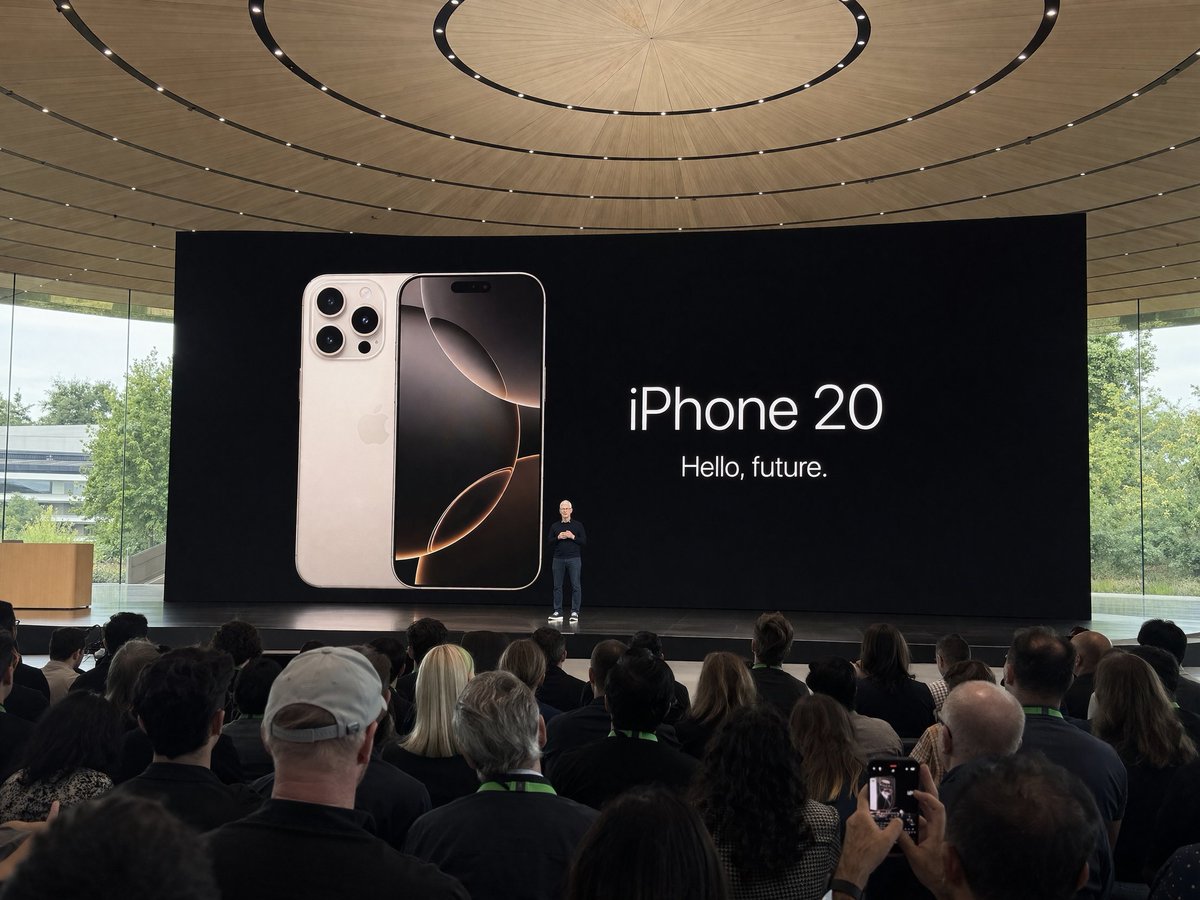
Prompt:
Amateur iPhone photo at Apple Park during the iPhone 20 keynote, Tim Cook presenting on stage. Shot from the crowd at a distance
Before generating, the model searched real Apple Park keynote photos for reference, then produced the "from the crowd" shot — composition, lighting, stage all close to the real event. This is native reasoning from §3 in action. MJ / Flux just don't have it.
Creator: @patrickassale · Curated by: awesome-gpt-image
Case 2: 100 tech topics in one grid (one shot, 100 different objects + accurate text)

Prompt (excerpt):
Create a 10 × 10 grid of 100 different topics representing recent technological progress.
Use a realistic, polished editorial illustration style.
Each topic should appear in its own square with a short clear label underneath.
10×10 = 100 different tech topics in one generation, each cell with its own correct text label. Pulling off "100 different small images + perfect text from a single prompt" is GPT-5.4 backbone reasoning + 99% text rendering working together.
Creator: @chetaslua · Curated by: awesome-gpt-image
❓ Common questions
Open a question to review the practical answer.
gpt-image-2 是什么?
OpenAI 2026-04-21 发布的图像生成模型,取代 DALL-E 3 和 GPT Image 1.5。底层 GPT-5.4 backbone,支持 4K 分辨率、99% 文字渲染准确率(含中文 / 日韩 / Hindi / Bengali)、单次最多 8 张连贯图,原生集成 reasoning + 多轮编辑。
gpt-image-2 价格多少?
1024×1024 三档价格:低 $0.006 / 中 $0.053 / 高 $0.211 每张。或 ChatGPT Plus $20/月、Pro $200/月包月不限张(有公平使用限制)。开发者 API 2026-05 初开放。
gpt-image-2 是 DALL-E 4 吗?
不是。它取代了 DALL-E 3 但不叫 DALL-E 4,是 OpenAI 图像模型第三代(基于 GPT 系列文本能力的统一架构)。"-2" 指 GPT 统一图像架构的第二代,不是 DALL-E 编号续接。