
What Is an AI-Native Product
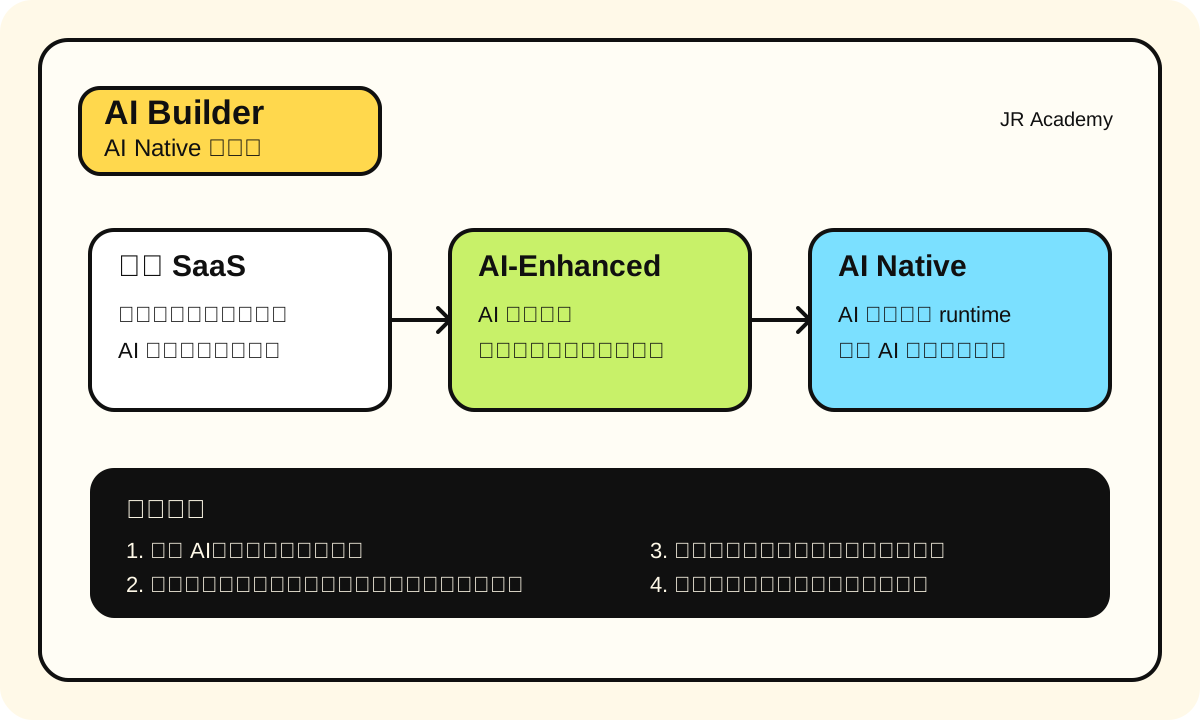
Honestly, nine out of ten startup pitch decks now say "AI-powered." But open the product and it's just a chatbot popup slapped onto an existing dashboard. That's not AI Native. That's putting ketchup on salad -- technically possible, but nobody actually does it.
Our team fell into this trap. Late 2023, we built an internal tool with the idea of "adding AI recommendations to the existing course management system." Three months later, the recommendation module was done. Users never clicked it. Why? Their workflow was "I know what course I want, I'll just search." Shoving a recommendation list in their face didn't change their habits.
And that's the fundamental difference between AI-enhanced and AI Native: the former patches old workflows, the latter redesigns workflows around AI capabilities.
First, Get the Concept Straight: AI Native
One-liner: The product's core experience can't exist without AI. It's not "better with AI" -- it's "useless without AI."
Analogy: Uber can't exist without GPS and real-time matching algorithms. It's not "a taxi company that added a map feature." AI Native products work the same way -- AI isn't a feature, it's the foundation. But here's the boundary of this analogy: not every product needs to be AI Native, just like not every trip needs Uber.
How to use this at work: When evaluating your product idea, ask yourself one question -- "If I ripped out the AI module entirely, would this product still have value?" If the answer is "yes, just slightly worse," you're building AI-enhanced.
Most common mistake: Treating AI as a selling point rather than an architectural decision. When investors ask "where's your AI?" and you point at a chat button saying "right there" -- that's not AI Native.
Real Comparison: Three Types of Products
| Dimension | Traditional SaaS (Notion) | AI-Enhanced (Notion AI) | AI Native (ChatGPT) |
|---|---|---|---|
| Core experience | Manually organize info | Manual organize + AI-assisted generation | Conversation is the product |
| Remove AI | Works perfectly | Works, minus a feature | Product doesn't exist |
| User mental model | "I need to organize notes" | "I need to organize notes, and maybe let AI help write" | "I need to ask AI a question" |
| Business model | Subscription, feature-based | Subscription + AI add-on $10/mo | Usage-based AI pricing |
| Tech architecture | Database + CRUD | Database + CRUD + API call to LLM | LLM is core runtime |
| Competitive moat | Product experience, ecosystem | Product experience + AI integration depth | Model capability, data flywheel |
A few more concrete examples:
| Product | Type | Why it's classified this way | Price reference |
|---|---|---|---|
| Figma | Traditional SaaS | AI is a bolted-on feature (Figma AI), core is still manual design | $15/editor |
| Canva | AI-Enhanced | Magic Design is AI, but most users still drag-and-drop templates | $13/mo |
| Midjourney | AI Native | Without the diffusion model this product doesn't exist | $10-60/mo |
| Linear | Traditional SaaS | Project management core is human workflow | $10/user |
| Cursor | AI Native | The editor is designed around AI completion and chat, remove AI and it's a slow VS Code | $20/mo |
| Grammarly | AI-Enhanced -> AI Native | Started as rule engine, now core is LLM, actively transitioning | $12-30/mo |
Fun fact: Grammarly is a great case study. It went from rule-based to AI-enhanced to AI Native over ten years. Most products don't need to and shouldn't take that path -- just figure out which category you're in from the start.
Mindset Shift: From Feature-Based to Capability-Based
Traditional PM thinking: what feature do users want -> draw mockups -> schedule development -> ship.
AI Native PM thinking is completely different: what can AI do -> what problems can this capability solve -> how to wrap this capability into user experience.
Here's an example. Traditional approach:
"Users need a resume scoring feature" -> Design scoring rules -> Build scoring logic -> Show the score
AI Native approach:
"LLMs can understand natural language and give structured feedback" -> User uploads resume, AI directly tells you what to fix, how to fix it, and what the result looks like -> Resume scoring is just one surface of AI capability
The difference? Traditional approach has a ceiling defined by how many rules you write. AI Native approach has a ceiling defined by model capability, and model capability improves every few months.
The impact of this mindset shift on product design is huge:
| Dimension | Feature-Based Thinking | Capability-Based Thinking |
|---|---|---|
| Demand source | Users say "I want XX feature" | Observe "AI can do XX, who needs it" |
| Product boundary | Defined by feature list | Defined by model capability boundary |
| Iteration method | Add new features | Swap better model / optimize prompt |
| Competition strategy | More features, better UX | Data flywheel, deep scenario understanding |
| Pricing logic | Feature-tier pricing | Usage-based / output-value pricing |
Data Flywheel: The Moat of AI Native Products
Traditional SaaS moats are network effects and switching cost. AI Native product moats are data flywheels.
What does that mean? Users use your product -> generate data -> data makes AI smarter -> smarter AI makes product better -> more users come. Once this loop starts spinning, latecomers can't catch up.
Real example: Spotify's recommendation algorithm. Every song a user listens to, skips, or saves trains the recommendation model. A user who's been on the platform for three years gets far more accurate Discover Weekly recommendations than a new user. That's the data flywheel -- the more you use it, the better it knows you, the less you want to leave.
But there's a prerequisite most people overlook: you need users first before the flywheel can spin. So at the MVP stage, don't count on the data flywheel. Get the core experience right first, attract your first batch of users.
Fun fact: A lot of pitch decks say "we have a data flywheel." But look closely -- they've got 200 users, which means roughly zero data. Flywheels need critical mass. A model trained on 200 users' data is probably worse than just calling the GPT-4o API directly.
Five Most Common Mistakes When Adding AI
I've seen too many teams crash on these:
Mistake 1: Build the product first, then figure out where to stuff AI
This is the most common one. Product is nearly done, boss says "add some AI," so they shoehorn in a chatbot. Users are confused.
Mistake 2: Using AI to replace something that was already simple
We had a scenario: users needed to select a city from a dropdown. Someone suggested "use AI to auto-detect user location." But clicking a dropdown takes 0.5 seconds. AI detection needs 2 seconds of loading and might get it wrong. That's not an improvement, that's a regression.
Mistake 3: Showing AI output directly to users without post-processing
LLM output format is unstable. Sometimes it returns markdown, sometimes plain text, sometimes with hallucinations. You need at minimum: format cleanup -> fact-checking (if data is involved) -> UI adaptation.
Mistake 4: No fallback plan
What happens when the OpenAI API goes down? What about rate limits? What if the model returns empty content? We've had OpenAI return 503 errors for three straight hours in production (June 2024). If your core feature depends entirely on one API, you need a fallback.
Mistake 5: Ignoring cost
GPT-4o API costs about $2.50/1M input tokens, $10/1M output tokens (early 2025 pricing). If your product burns an average of 2000 tokens per user request, 10,000 daily active users would cost roughly $1,500-3,000/month in API fees. A lot of people don't do this math during prototyping and only realize they can't afford it after launch.
How to Tell If Your Idea Is AI Native
Straight to the point, use this checklist:
| Question | "Yes" = AI Native signal |
|---|---|
| Remove AI -- does core product value survive? | No -> AI Native |
| Is the user's main interaction with AI conversation/generation? | Yes -> AI Native |
| Does the competitive moat depend on model capability or data flywheel? | Yes -> AI Native |
| Does the product experience automatically improve with model upgrades? | Yes -> AI Native |
| Does AI performance improve the more users use it? | Yes -> AI Native (data flywheel) |
If 3+ out of 5 questions get a "yes," you're most likely building an AI Native product.
If only 1-2 get a "yes," you're building an AI-Enhanced product -- and that's totally fine. Not every product needs to be AI Native. A well-executed AI-Enhanced product (like Canva) is worth ten thousand times more than a poorly-executed AI Native one.
The Laziest Way to Tell
Draw a user flow diagram of your product. Highlight all AI-involved steps in red.
- If red nodes are in the middle of the flow (core path), you're building AI Native
- If red nodes are on the side of the flow (auxiliary features), you're building AI-Enhanced
- If red nodes are only at the end of the flow (cherry on top), you're building a traditional product + AI gimmick
Honestly, the third scenario covers 80% of "AI products" on the market. Recognizing this isn't shameful. What's shameful is fooling yourself.
And here's another quick test: when describing your product to target users, if your first sentence is "this is an AI XXX," it's probably AI Native. If your first sentence is "this is an XXX, and we also added AI features," then it's AI-Enhanced. The user's first reaction will tell you the answer.
Next Steps
Once you've figured out your product positioning, the next step is turning a fuzzy idea into a structured PRD. But there's a trap here -- most AI-written PRDs are garbage. Next chapter we'll talk about how to use AI to write PRDs that actually work.