
From Idea to PRD (Writing PRDs with AI)
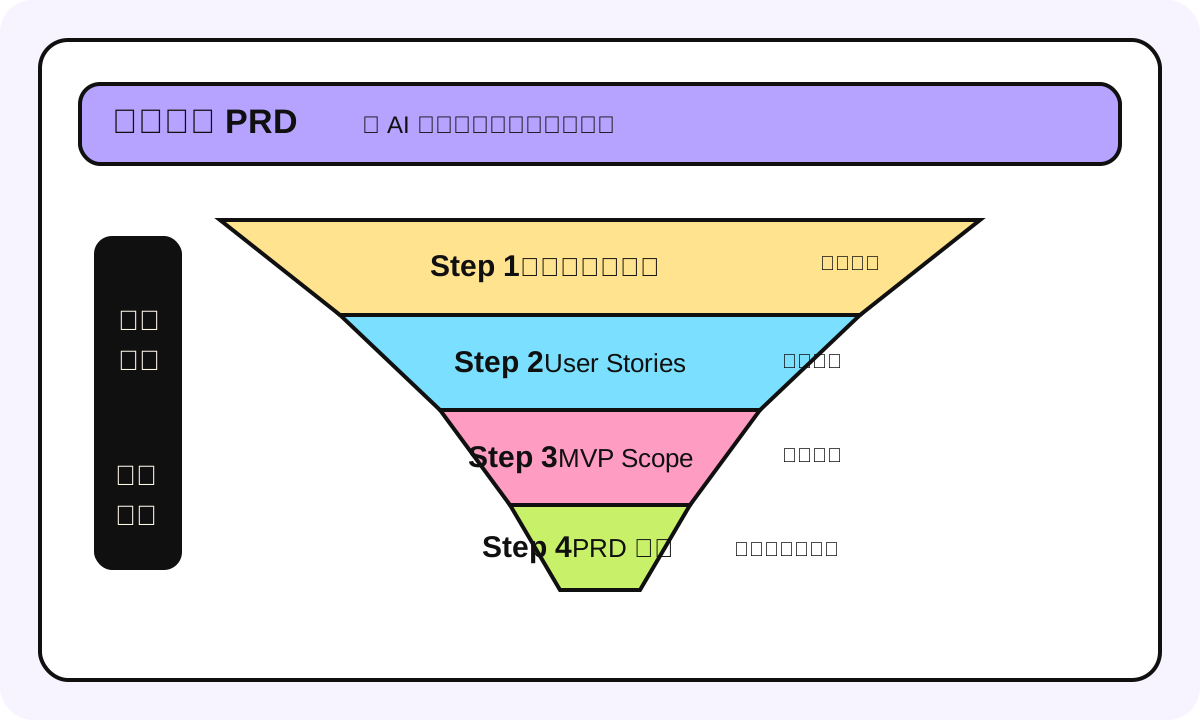
I've used ChatGPT to write probably 50+ PRDs. Straight verdict: about 45 of them were garbage.
Not AI's fault. The input I gave it was garbage. "Help me write a PRD for a social app" -- guess what AI outputs? Something that looks professional, has complete structure, but is completely unusable in any real project. Because it's missing all the context in your head that you never said out loud: who's the target user, what's the tech stack, how many people do you have, what's the deadline, who are the competitors.
This chapter is about how to take the fuzzy idea in your head and, through a structured process, turn it into something AI can actually help you write a good PRD for.
What Is a PRD
One-liner: Product Requirements Document. Tells the dev team "what to build, why to build it, what it should look like."
Analogy: A PRD is like architectural blueprints. You wouldn't tell a construction worker "build me a nice house" -- you need floor plans, dimensions, materials. PRDs work the same way. It's not an essay, it's a specification. But here's the boundary: changing blueprints is expensive, PRDs should be quickly iterable. Don't chase perfection in one draft.
How to use this at work: Solo developers might think PRDs are overkill -- "I'm building it myself, I know what I want." But come back three weeks later and you'll definitely forget why you made certain decisions. A PRD's biggest value isn't for others, it's for your future self.
Most common mistake: Writing a 20-page PRD nobody reads. Good PRDs should be 2-5 pages with key info visible at a glance.
Why Most AI-Generated PRDs Are Garbage
I've identified five anti-patterns:
| Anti-Pattern | Symptom | Why it's harmful |
|---|---|---|
| Hollow vision | "Build the next-gen AI-driven learning platform" | No concrete user stories, devs don't know what to build |
| Feature list dumping | Listed 30 features, no priority | Trying to do everything = doing nothing well |
| Missing constraints | Only says "what to do," never "what NOT to do" | Infinite scope creep |
| No success metric | No way to tell if it's done right | Can't validate, can't iterate |
| Over-engineering | MVP PRD specifies microservices, distributed caching | You have one person. Survive first. |
Honestly, I've fallen into all five. Especially #5 -- we had a side project whose PRD specified a Redis caching layer, WebSocket real-time push, and a GraphQL API. Turns out total users were 50. A SQLite + REST API would've been plenty.
Four-Step Process: Idea to PRD
Step 1: Compress Your Idea Into One Sentence
If you can't describe your product in one sentence, you haven't figured it out yet.
Template: [Target user] can use [product name] to [solve what problem], via [core capability/AI capability]
Examples:
- "International students can use ResumeAI to optimize English resumes, via LLM analyzing job descriptions and automatically adjusting resume wording"
- "Xiaohongshu bloggers can use ContentPilot to batch-generate multi-platform content, via AI rewriting one source article in different styles"
Prompt you can copy directly:
I have a product idea. Please help me distill it into a one-sentence value proposition.

My idea is: [describe your idea here, the more detail the better, including pain points you've observed, target users, solution you're thinking of]

Please output in this format:
[Target user] can use [product name] to [solve what problem], via [core capability]

Requirements:
1. One sentence, no more than 50 words
2. Must include a specific user group, not "everyone"
3. "Solve what problem" must be a user-perceivable pain point, not technical jargon
4. Give me 3 versions, indicate which you recommend and why
Step 2: Write User Stories
User Stories are not feature lists. The difference:
- Feature list: User can upload resume (this describes system capability)
- User Story: As a job-seeking international student, I want to upload my resume and get modification suggestions tailored to a specific JD, so my application match rate is higher (this describes user need)
Prompt template:
Based on the following product positioning, help me write User Stories.

Product one-liner: [paste Step 1 result]

Target user persona:
- Age range:
- Occupation/identity:
- Technical level:
- Usage scenario (when, where):
- How they currently solve this problem:

Please output in standard format:
As a [user role], I want to [do what], so that [why]

Requirements:
1. Sorted by priority (P0 = MVP must-have, P1 = v2, P2 = nice to have)
2. No more than 5 P0 stories
3. Add one line of "acceptance criteria" after each User Story (how to know it's done)
4. Don't write technical implementation details
Step 3: Define MVP Scope
This is the most critical step, and the one most people skip.
We've learned the hard way: one internal tool's PRD included user system, permissions management, analytics dashboard, AI recommendations, notification system. Two months later, the user system still wasn't done.
Bottom line: MVP scope should satisfy all and only the P0 User Stories. Everything else gets cut. Not "later" -- "doesn't exist right now."
Prompt template:
I need to define MVP scope. Here are my User Stories:

[paste Step 2 P0 User Stories]

Please help me:
1. Confirm whether these P0 stories are truly all MVP-essential (if any can be downgraded, tell me)
2. List the minimum feature set needed to implement these stories
3. Explicitly list "things MVP will NOT do" (Out of Scope)
4. Give a reasonable dev time estimate (assuming 1 full-stack developer)

Constraints:
- Tech stack: [your tech stack]
- Team size: [how many people]
- Target launch date: [deadline]
- Budget: [any server/API budget limits]
Step 4: Generate the Complete PRD
The output from the first three steps becomes the input for the PRD. At this point, AI has enough context to help you generate a solid document.
Prompt template:
Please generate a PRD document based on the following information.

## Product Positioning
[paste Step 1]

## User Stories (MVP scope only)
[paste Step 3 confirmed P0 stories]

## Technical Constraints
- Tech stack: [Next.js + Supabase / Python + FastAPI / etc.]
- Deployment: [Vercel / AWS / etc.]
- AI model: [GPT-4o / Claude 3.5 / etc.]
- Budget: [monthly API cost limit]

## Out of Scope
[paste Step 3 Out of Scope list]

PRD format requirements:
1. Total length 2-5 pages
2. Include: Overview, Target Users, User Stories, Feature Requirements (with priority), Non-functional Requirements, Technical Architecture (brief), Success Metrics, Timeline
3. Feature requirements in table format, with columns: Feature Name, Description, Priority, Acceptance Criteria
4. No fluff and hollow vision statements
5. Tone: concise and direct, written for engineers, not investors
What a Real PRD Looks Like
Here's a simplified example -- a small tool that helps users optimize resumes based on JDs:
# ResumeMatch MVP PRD

## Overview

Helps international students optimize English resume wording for specific Job Descriptions, improving ATS pass rate.

## Target Users

International students in Australia, looking for entry-level IT jobs, have a basic resume but application response rate < 5%.

## MVP Feature Requirements

| Feature           | Description                                            | Priority | Acceptance Criteria                                          |
| ----------------- | ------------------------------------------------------ | -------- | ------------------------------------------------------------ |
| Upload resume     | Support PDF upload, AI parses into structured data     | P0       | PDF parsing accuracy > 90%                                   |
| Paste JD          | User pastes Job Description text                       | P0       | Can extract key requirements                                 |
| AI match analysis | Compare resume vs JD, output match score + suggestions | P0       | Output includes specific modification suggestions, not fluff |
| One-click edit    | Auto-modify resume sections based on suggestions       | P0       | Grammar correct after edit, facts unchanged                  |
| Export PDF        | Modified resume can be exported as PDF                 | P0       | Format matches original resume                               |

## Out of Scope (MVP won't do)

-   User account system (anonymous use first)
-   Resume template library
-   Multi-language support
-   Batch applications
-   Interview prep features

## Technical Architecture

-   Frontend: Next.js + Tailwind CSS, deployed on Vercel
-   AI: Claude 3.5 Sonnet API (~$0.003/analysis)
-   PDF parsing: pdf-parse library
-   Storage: No user data stored (privacy first), everything completes within session

## Success Metrics

-   Users completing full flow (upload -> analyze -> edit -> export) rate > 60%
-   Average single-use duration < 5 minutes
-   User feedback "suggestions were useful" > 70%

## Timeline

-   Week 1: PDF parsing + JD parsing
-   Week 2: AI match analysis + suggestion generation
-   Week 3: One-click edit + PDF export
-   Week 4: Testing + launch
Fun fact: This PRD is about 40 lines. But it contains everything a developer needs to know: what to do, what not to do, how to tell when it's done, what tech to use, how long it takes. A hundred times more useful than a 20-page doc full of fluff.
Practical Tips
Tip 1: PRD version numbers matter
We use v0.1, v0.2 labels. Update the version number after every stakeholder alignment. Otherwise two weeks later someone shows up with an old PRD and you don't even know which version they're looking at.
Tip 2: Where AI hallucinates most when writing PRDs
- Technical architecture: AI frequently recommends over-complex solutions. You say "I'm building a small tool," it recommends Kubernetes + Redis + PostgreSQL. Stay vigilant.
- Time estimates: AI's estimates tend to be optimistic. Actual dev time is typically 1.5-2x AI's estimate.
- Success Metrics: AI loves writing "improve user satisfaction" -- unquantifiable. Always change it to specific numbers.
Tip 3: Claude or ChatGPT for PRDs
Honestly, either works. But if your PRD needs to handle lots of context (like pasting competitive analysis, user interview transcripts), Claude's long context processing is more stable. ChatGPT is a bit more creative in short conversations. My habit: Claude for structured analysis, ChatGPT for brainstorming.
As of early 2025: ChatGPT Plus $20/mo, Claude Pro $20/mo. API prices change frequently, check the latest yourself.
Tip 4: Don't ask AI to write the entire PRD at once
Follow Steps 1-4, review each step, confirm it's correct before moving on. The quality gap between one-shot full PRD generation and step-by-step iteration is massive.
Next Steps
PRD done. Next step is picking tools, scheduling a timeline, and starting the MVP. But there's a critical decision here: should you use Bolt, Lovable, v0, or Cursor? Picking wrong could waste two weeks. Next chapter we'll dig into tool selection.