匠人学院 JR Academy
By JR Academy · Desktop app
CareerOS app icon

CareerOS

你的职业操作系统Your Career Operating System

Don't just learn. Build your career.

CareerOS runs on your own computer and does real work through your own Claude Code or Codex. It starts by reading your resume and the role you want, and goes all the way to delivered work and application materials. Each step leaves versioned evidence an employer can check.

macOS release · Apple silicon and Intel · signed and notarized

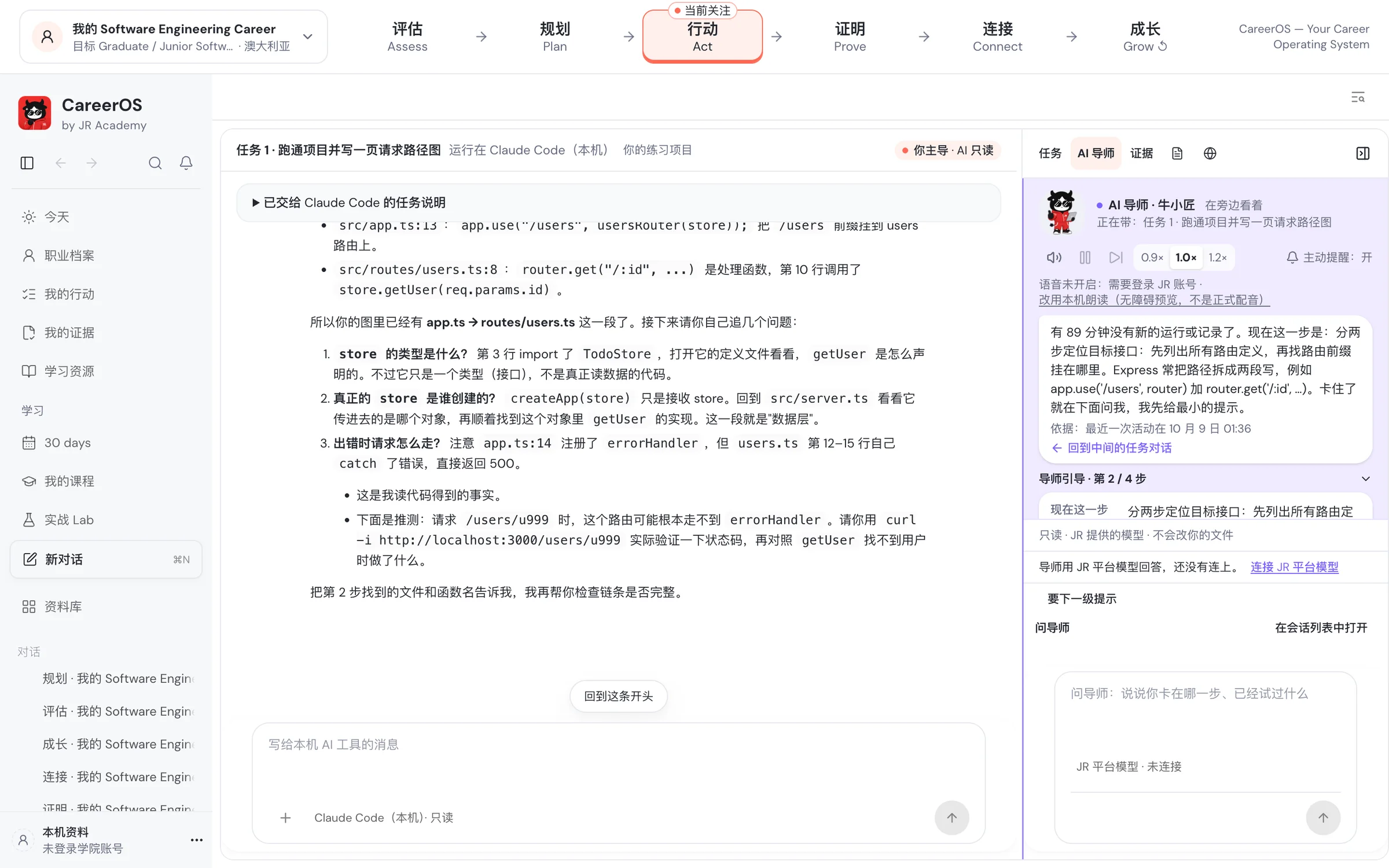
CareerOS Act stage: the career profile and six stages across the top, local Claude Code reading code in the middle, and the AI tutor suggesting the next step on the right
Real app screenshot · Act stage · demo data (the app UI is in Chinese)
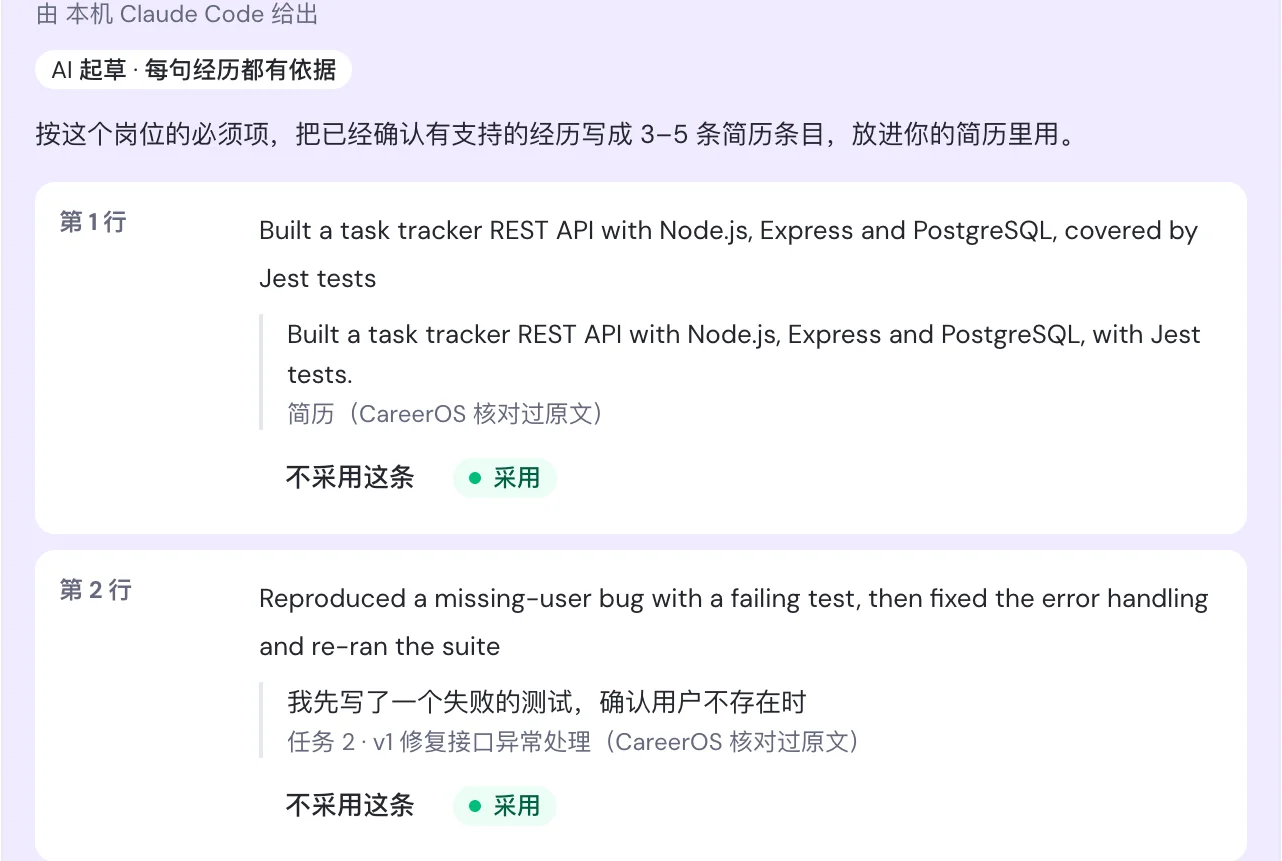
AI proposal · not applied yet
ProjectBuilt a task-tracker REST API with automated tests
“Built a task tracker REST API with Node.js, Express and PostgreSQL, with Jest tests.”Resume · Riley_Sample_Resume.pdf
Pinned · v1

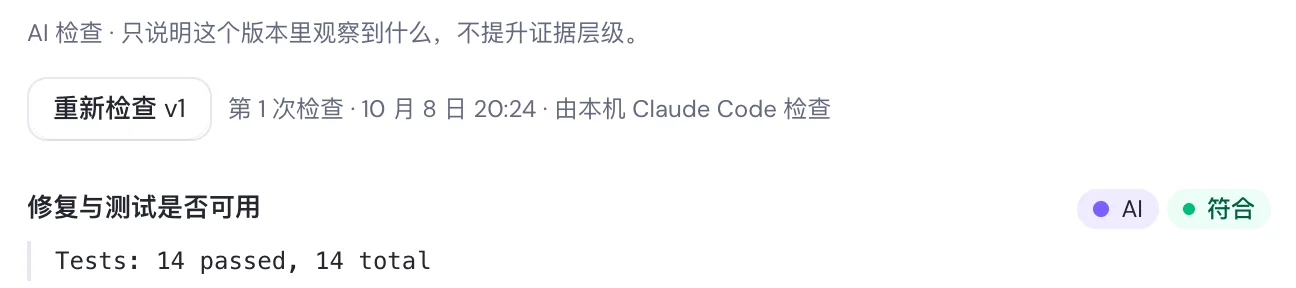
Task 2 · Fix API error handling

Tests: 14 passed, 14 total

The AI check only describes what it observed in this version

AI tutor · 牛小匠watching alongside you

Stuck? Ask me below and I'll start with the smallest hint.

  • Runs tasks with your local Claude Code / Codex
  • macOS version
  • First complete track: Junior Software Engineer
Why not just take another course

Courses build skills. CareerOS handles the whole route from where you are to the role you want.

  • Example · fictional

    You've learned a lot and still can't tell if it's enough

    CareerOS checks the job ad line by line against what you have, lists what's there and what's missing, and gives the source for each point.

    An accounting master's student wants a Junior Data Analyst role. The resume has no SQL; the ad asks for strong SQL.

  • Demo data

    Employers look at what you've built, not which courses you took

    In the CareerOS desktop app you work on tasks in a real project, and your code changes and test results become work an employer can check.

    Task 2 · Fix the API error handling · Tests: 14 passed, 14 total

  • Free

    AI is changing what roles ask for, so the direction itself needs a second look

    First check how much AI affects the job you do now, then look at the roles you could move into and what each one needs.

    Both are free to read: the AI impact on existing careers, and the new AI-era roles with steps for moving into them.

How CareerOS works

The first two steps are free on the web. The other four happen in the desktop app.

The order never changes: Assess, Plan, Act, Prove, Connect, Grow. After Grow you take the new feedback back to Assess.

Step one, Assess, and step two, Plan, are free on the JR Academy website. From step three, Act, Prove, Connect and Grow happen in the CareerOS desktop app.

  1. STEP 01 · ASSESS

    Assess

    Web · free

    What you doDescribe where you are and the role you want. Add your resume or a job ad and the picture gets sharper.

    What you end up withA list of where you stand and what's missing, each point with its source.

  2. STEP 02 · PLAN

    Plan

    Web · free

    What you doOrder the gaps and fit them into the hours you actually have each week, with the matching course, certification or project.

    What you end up withA week-by-week plan that says what each week produces.

  3. STEP 03–06 · ACT → GROW

    Act · Prove · Connect · Grow

    CareerOS desktop

    What you doWork on tasks in a real project, pin your code changes, test results and write-up as versions, match them against a job ad for your application, and log interview feedback.

    What you end up withA portfolio employers can check, and application material to go with it.

Demo · Assess stage

Drop your resume into the chat. The AI proposes with quotes. You confirm.

This is a demo of the Assess stage: you drop material into the chat, CareerOS reads it on your machine, and the AI turns where you stand into a card that quotes the source for every line. When you confirm, the steps on the right tick themselves off. The person and resume are fictional.

  • Material is read on your machine; original files are not sent to the AI
  • Every proposal quotes its source and is saved only after you confirm
  • Work rights are entered by you only; the AI never reads or guesses them
Assess · My Software Engineering CareerAnswered by local Claude Code · read-only, no tools
Demo
Send me your resume and the role you want — just drag them in. I'll turn where you stand into a card that quotes the source for every line. Nothing is saved until you confirm.

Illustrative animation, not a screen recording · fictional person and resume

The six-stage loop

Assess → Plan → Act → Prove → Connect → Grow, then around again

The top of the app always shows your career profile and these six stages. Open a stage and the centre becomes that stage's conversation, while the right panel lists the steps for it. Grow records interview results and feedback, then takes you back to Assess or Plan with new information.

评估 Assess

What you do here

Drop your resume (PDF or DOCX) and a job description into the chat. The AI summarises where you are, where you want to go and the gaps between, quoting the source for every item. You confirm each one.

What it leaves behind

A sourced picture of where you stand: strengths, unknowns, and constraints such as time and location.

Steps on the right

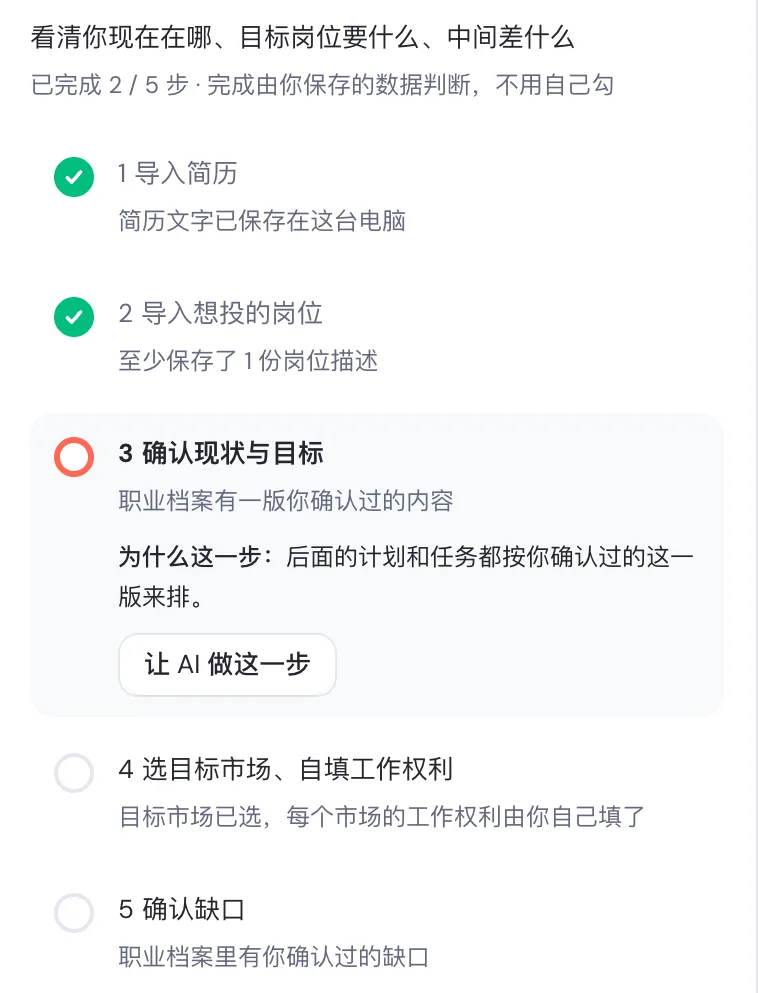
  1. 1Import your resume
  2. 2Import a role you want
  3. 3Confirm the AI's summary of current state and goal
  4. 4Choose target markets; you fill in work rights yourself
  5. 5Confirm the gaps
Assess step panel: resume and role imported, now confirming current state and goal
Who it's for

Built for people who already code and are heading for their first developer job

The first complete track is Junior Software Engineer: 12 tasks over about 5 weeks. These people are the best fit to start now.

Applying for Graduate or Junior developer roles

You have learned a back-end language and Git and built at least one course or personal project, and want to turn it into work an employer can open and check.

Moving into development, and already writing code

You can set a career change as your goal. CareerOS reads your past experience and the role you want, finds the gaps, then plans the tasks.

Chinese speakers interviewing in English

The tutor guides you in Chinese, while resume bullets and interview stories are prepared for English-language roles, such as a 180–230 word STAR interview script.

Not a fit yet
  • Never written code: start with JR Academy full-stack courses or hands-on Labs, then come back to this track.
  • Aiming for AI Engineer, Data or DevOps: only general skills exist for now, and results say they are not yet calibrated for your role and level.

How it differs from a course, or from chatting with ChatGPT / Claude

All three are useful. This table compares how they work, not which is better. CareerOS also maps your gaps to JR Academy courses, and runs tasks through your own Claude Code / Codex.

Compared onTaking a courseChatting with ChatGPT / ClaudeCareerOS
Starts from your target roleFollows the syllabus; everyone in the cohort gets the same contentPossible, depending on how you describe yourself and the role each timeStarts from your resume and the role you want, finds gaps, then plans
Work in a real projectAssignments and projects scoped by the courseDiscuss and generate code in a chat window, then move it into your project yourselfLocal Claude Code / Codex reads code and runs tests in a project you authorise
Leaves checkable evidenceGrades and a completion certificateChat history you organise yourselfDiffs, test results and your explanation pinned as versions in a portfolio
Guidance at every stepTeachers and tutors on a timetableAnswers as far as you askEach step states its done criteria; the tutor reminds you what comes next
Keeps loopingRuns for the length of one courseYou keep track of goals and progress yourselfGrow records interview feedback, then returns you to Assess or Plan

Starts from your target role

Taking a course
Follows the syllabus; everyone in the cohort gets the same content
Chatting with ChatGPT / Claude
Possible, depending on how you describe yourself and the role each time
CareerOS
Starts from your resume and the role you want, finds gaps, then plans

Work in a real project

Taking a course
Assignments and projects scoped by the course
Chatting with ChatGPT / Claude
Discuss and generate code in a chat window, then move it into your project yourself
CareerOS
Local Claude Code / Codex reads code and runs tests in a project you authorise

Leaves checkable evidence

Taking a course
Grades and a completion certificate
Chatting with ChatGPT / Claude
Chat history you organise yourself
CareerOS
Diffs, test results and your explanation pinned as versions in a portfolio

Guidance at every step

Taking a course
Teachers and tutors on a timetable
Chatting with ChatGPT / Claude
Answers as far as you ask
CareerOS
Each step states its done criteria; the tutor reminds you what comes next

Keeps looping

Taking a course
Runs for the length of one course
Chatting with ChatGPT / Claude
You keep track of goals and progress yourself
CareerOS
Grow records interview feedback, then returns you to Assess or Plan
AI-native by design

No forms: drop material into the chat, the AI proposes, you confirm

Every stage in CareerOS is work you do with an agent. The centre is the conversation, where everything gets done; the right panel holds that stage's steps and walks you through them.

1Drag in your resume and the JD

Resumes can be PDF or DOCX; a job description can be a link, a file or pasted text. The AI reads them and replies with a structured proposal instead of asking you to fill in a long form.

2Every proposal shows its source

Proposals appear as cards in the chat. You confirm, edit or reject each item, and each one quotes the text it came from. Nothing is saved to your profile until you confirm. Work rights are entered by you only; the AI never reads or guesses them.

3The tutor leads you to the next step

Each step on the right states its done criteria and why it matters. The AI tutor reminds you what to do now and, when you are stuck, starts with the smallest hint rather than writing it for you.

Connect conversation: two AI-drafted resume bullets, each with its source quote, which you can accept or reject
Connect: every resume bullet shows its source and is saved only after you confirm
Real projects · checkable evidence

Do real tasks, and keep evidence an employer can check

"Familiar with Node.js" on a resume is hard to verify. CareerOS records what you actually did in a project you authorised, and keeps "activity observed" separate from "skill confirmed".

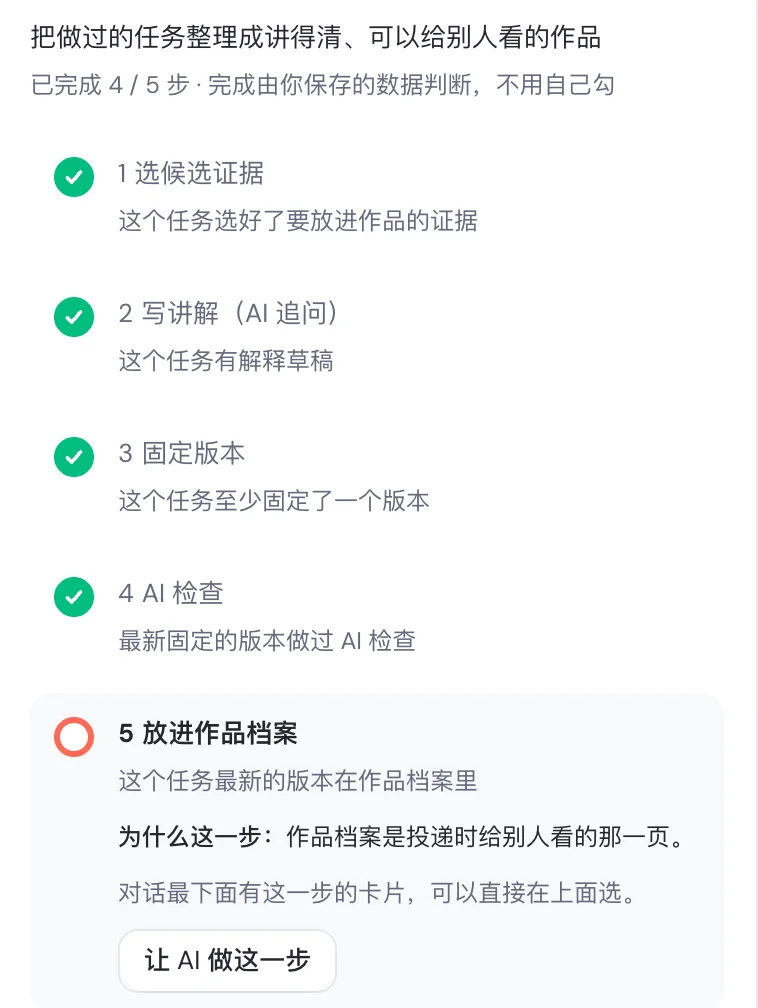
AI check result: fix and tests usable, Tests 14 passed
The AI check only describes what it observed
The five Prove steps on the right panel

1Evidence comes from the project

Code diffs, test results, commits and the output of commands CareerOS ran for you, plus the explanation you write yourself.

2Pinned versions, append-only

Each pin creates a new version and keeps the old ones. Your portfolio points to a specific version, so later code changes never quietly alter what someone has already seen.

3AI check first, then human review

The AI check only states what it observed in that version and never raises the evidence tier. Human review is a later-stage service; reviewers and arrangements are not yet decided.

Safety boundaries

  • Read-only by default: read-only tasks get no write access, and any file change asks you each run.
  • Runs on your own computer; model calls go through your own Claude Code or Codex account.
  • Reads only the project folder you authorise. No keystroke logging, screen recording or whole-disk monitoring.
  • Your career profile and evidence records stay on your machine; you decide who gets an exported portfolio.
CareerOS Skills

"Analyse my resume" means different things for a Graduate and a Senior

CareerOS packages abilities such as resume analysis, JD matching and cover letters as skills, then picks the most specific version for your role family × level × target market. If no specific version exists it falls back to the general one and says so in the chat.

First planned skills

  • Resume analysis
  • JD matching
  • Resume tailoring
  • Cover letter
  • STAR stories
  • Interview questions
  • Referral message
  • GitHub README
  • Salary negotiation

Role families and levels

  • Software Engineer · Data Analyst · Business Analyst · DevOps / Cloud · AI Engineer · Product Manager
  • Intern / Graduate · Junior · Mid · Senior · Lead

Software Engineer at every level × Australia comes first. Other combinations use the general version, labelled as such under each result.

Switch career profile
Version usedSoftware Engineer · Intern / Graduate · Australia
10 criteria

Criteria checked one by one

  • Level-specificProjects listed before work experience
  • Level-specificKept to one page
  • Level-specificGPA shown with its scale
  • Level-specificProjects show the problem, your part and a link
  • Level-specificShows testing and pull-request habits
  • Level-specificShows learning speed and what you owned
  • Tech keywords inside project and work bullets
  • Skills, Projects and Experience sections present
  • How you use and check AI coding tools
  • Australian contact details and format

The AI's first suggested fix

“This is the only evidence on the whole resume, but it only lists technologies. It doesn't show what problem it solved, what you were responsible for or the hardest problem, and a reviewer can't open the project.”

Each criterion is only judged as met, partly met or not seen. CareerOS counts them; it is not a score.

The same fictional resume is analysed under three career profiles. The suggestions shown are translated from the AI’s original Chinese responses.

The 30 days series

30 days: a planned 30 days, built inside CareerOS

30 days is a series. Each course is a planned 30 days: one theme, Day 1 to Day 30, a small deliverable every day, moving forward by date.

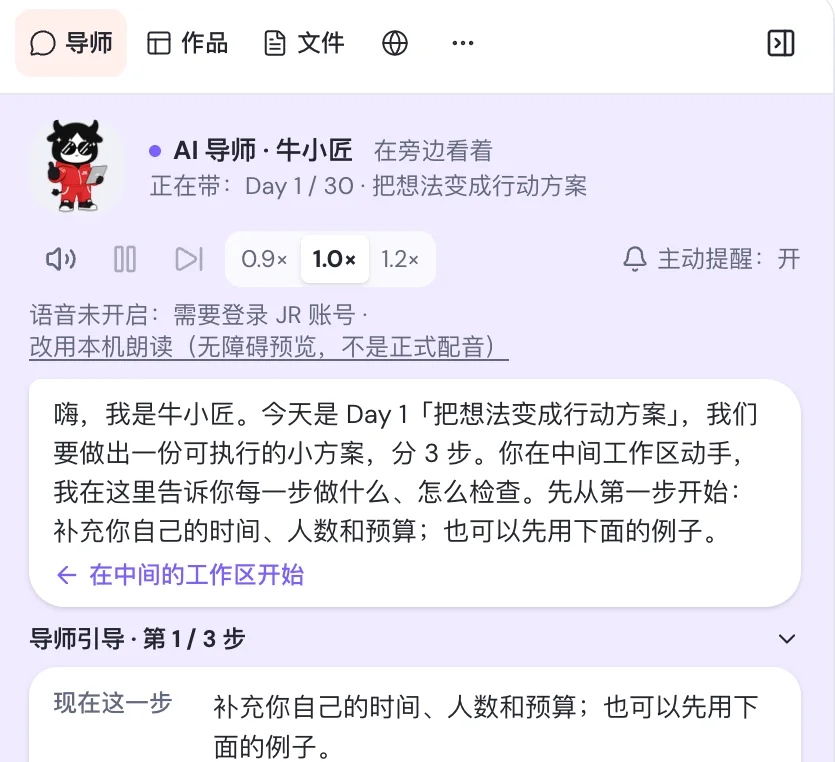
30 days, Day 1: the AI tutor 牛小匠 explains the three steps to a workable mini-plan
  • Each day you build it in the centre workspace with your local Claude Code or Codex, not just read about it.
  • The AI tutor on the right walks you through each step and how to check it.
  • The day's work can be pinned as evidence and added to your portfolio.
Available30 天玩转 AI (Master AI in 30 days)A$69 + GST · one-off purchase
In preparation
  • 30 days of hands-on DevOps
  • 30 days to your company's first AI automation
  • 30 days to build your first app with AI
  • 30 days to build your AI knowledge base

Courses in preparation are not on sale yet and have no price.

Where it stands

What you can do now, and what the pilot brings

CareerOS for macOS is available to download now, for Apple silicon and Intel Macs; the first pilot is still being prepared. Here is what you can do today, and what comes later.

  • Pilot not open yet
  • macOS download available (Apple silicon / Intel)
  • CareerOS pricing not announced
  • macOS first

You can do today

  • Download CareerOS for macOS (Apple silicon or Intel) and connect your own Claude Code or Codex
  • Learn about the first live 30 days course, Master AI in 30 days
  • Book 1:1 career coaching to talk through your target role
  • Tell us your target role on the contact page and we will reach out when the pilot opens

When the pilot opens

  • Start from your resume and target role, go through all six stages and leave with a portfolio and application material
  • The first complete track, Junior Software Engineer: 12 tasks over about 5 weeks

Later stages

  • Human mentor review and real projects
  • Time-limited, revocable portfolio sharing
  • Windows and Linux versions, and dedicated skills for more role families

Want to join the first pilot?

Pilot places, dates and pricing have not been announced. Use the email, phone or consultation options on our contact page to tell us the role you are aiming for, and we will reach out when the pilot opens.

FAQ

Before you start

What's the difference between the website and the desktop app?

Assessment and planning are free on the JR Academy website: describe where you are and the role you want, and you get a list of gaps with their sources and a week-by-week plan. Act, Prove, Connect and Grow happen in the CareerOS desktop app: you work on tasks in a project you authorise, pin code changes, test results and your write-up as evidence, then write applications against a job ad and log interview feedback.

Do I need to know how to code?

Not for assessment and planning on the website. The first complete route in the desktop app is Junior Software Engineer, and its tasks happen in a code project, so you need to be able to write code already. Other role families use the general skill versions for now, and the result says so.

What do I need?

A Mac, plus either Claude Code or Codex signed in with your own Claude or ChatGPT paid plan or API credits. Model costs for running tasks are billed to your account and never pass through CareerOS; the AI tutor is provided by CareerOS.

Does it run on Windows?

Only macOS for now, for Macs with Apple Silicon (M-series chips). The installer is signed and notarised by Apple. Windows and Linux versions don't have a release date yet.

Where are my resume and project data kept?

Your career profile, resume text and evidence records stay on your own computer. The agent can only read project folders you authorise, and read-only tasks never get write access. An exported portfolio PDF lands in your Downloads folder, and you decide who receives it.

How much does CareerOS cost?

CareerOS subscription pricing and the free tier have not been decided; they will be announced during the pilot. 30 days courses are bought separately: the first, Master AI in 30 days, is A$69 + GST as a one-off purchase.

Does CareerOS guarantee a job?

No, and we make no job or income promises. CareerOS turns your learning, projects and job-search actions into a process backed by evidence; interviews and offers depend on the market, the role and you.

Can I use it if I'm not a software engineer?

The first complete track is Junior Software Engineer: 12 tasks over about 5 weeks. Role families such as Data Analyst, Business Analyst, DevOps / Cloud, AI Engineer and Product Manager start with general skills, and results state that they are not yet calibrated for your role and level.

How does it relate to JR Academy courses?

Courses fill capability gaps. Confirmed gaps in your career profile point you to matching JR Academy courses, 30 days lessons or hands-on labs, and you can open your enrolled courses from the CareerOS sidebar.