AI Data Analysis Learning Hub -- Let AI Handle Weekly Reports, EDA & SQL Queries
Why Use AI for Data Analysis?
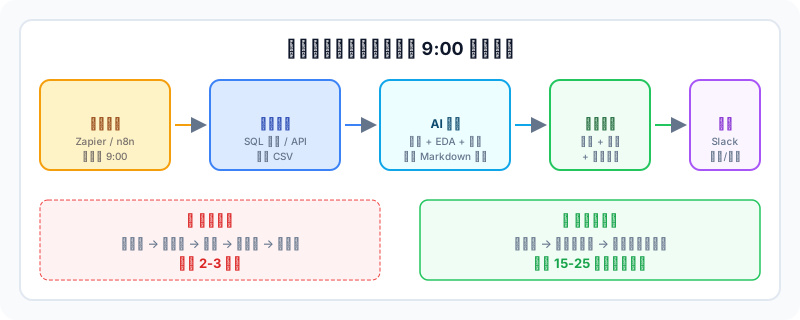
In data analysis, 80% of time is spent on cleaning and formatting, while the truly valuable insight phase gets compressed. We observed a typical scenario in our teaching: an operations team member spent 3 hours every week on reports -- exporting CSV, writing Pandas scripts for missing values, drawing charts, writing conclusions. After using ChatGPT Code Interpreter, the same workflow took just 25 minutes, and she used the saved time for cross-analysis and A/B test design.
This is the core value of AI data analysis: not replacing the analyst's judgment, but automating mechanical steps like data import, coding, and charting so you can focus on business hypotheses and decision validation.
What This Course Teaches
- Data Acquisition & Cleaning
- You get a CSV with null values, messy date formats, and Chinese field names -- extremely common in real work. The course walks you through using AI to generate Pandas and SQL cleaning scripts, with emphasis on checking whether AI-generated code silently drops data.
- EDA & Visualization
- Let AI run descriptive statistics first, then recommend suitable chart types. For order data, AI typically suggests a time-series trend + distribution histogram + regional comparison bar chart combo, but you need to judge which charts are actually useful for business decisions.
- SQL Copilot
- Paste your table structure and field descriptions to AI and let it write SQL. The course emphasizes: first have AI restate its understanding of the fields before writing SQL -- this step avoids many issues where AI confidently writes a logically incorrect JOIN.
- Business Insight Output
- Analysis is done -- how do you write conclusions? We use the Finding-Evidence-Recommendation structure, with each finding backed by specific data and chart references.
- Automated Weekly Reports
- Use Zapier or n8n to set up a scheduled task that automatically runs data every Monday morning, generates a Markdown report, and pushes it to Slack. One student said after setting this up: finally no more rushing reports on Sunday nights.
- Security & Review
- Anonymize data before uploading -- everyone knows this. But what is easy to overlook: AI-generated SQL may miss filters in WHERE clauses, causing result bias. The course includes a review checklist to help you avoid these pitfalls.
Who Is This For
If you are a data analyst or operations professional who works with Excel and SQL daily, this course can multiply your efficiency on repetitive tasks. Most of our students fall into this group -- they have data thinking but coding is not their strength, and they want to use AI to fill this gap.
Complete beginners can follow along too. ChatGPT Code Interpreter supports natural language interaction -- no coding needed for basic analysis. However, if you are not sure what mean and median are, we recommend spending 1 hour on a statistics primer first for better results.
Tools Used
- ChatGPT Code Interpreter -- Upload CSV for direct analysis, best for quick EDA
- Claude Projects -- Handle long documents and complex code generation
- Gemini -- Screenshot recognition and multimodal analysis
- Pandas / Polars -- Primary Python data processing libraries
- DuckDB / BigQuery -- SQL analysis engines
- Tableau / Looker / PowerBI -- BI dashboards and visualization
- Zapier / Make / n8n -- Build automation workflows
Course Structure
12 chapters in four stages. The first 3 chapters build foundations (tool selection, data cleaning), the middle 4 chapters cover core analysis skills (EDA, SQL, insight output, automation), and the final 5 chapters cover security review and advanced techniques (multimodal analysis, LLM cross-validation). At a pace of 2-3 chapters per week, expect to finish in about 4-6 weeks.
About JR Academy
JR Academy specializes in AI skills training, covering AI programming, data analysis, Prompt Engineering and more. Course content is continuously iterated based on real teaching feedback, with the goal of helping students apply AI tools in their daily work rather than just knowing about them.
Last updated: March 2026