
Image Editing & Style Consistency
Most commercial content doesn't fail on the first draft. It fails on the last 20% of image editing. Getting AI to produce a first image isn't hard. Getting it to a point where it can go into a campaign, product page, or sit alongside existing brand assets without looking off -- that's the hard part. Without an editing workflow, the faster AI generates images, the faster you'll be reworking them.
This page isn't about "showing off parameters." It's about going from random edits to controlled visual revision.
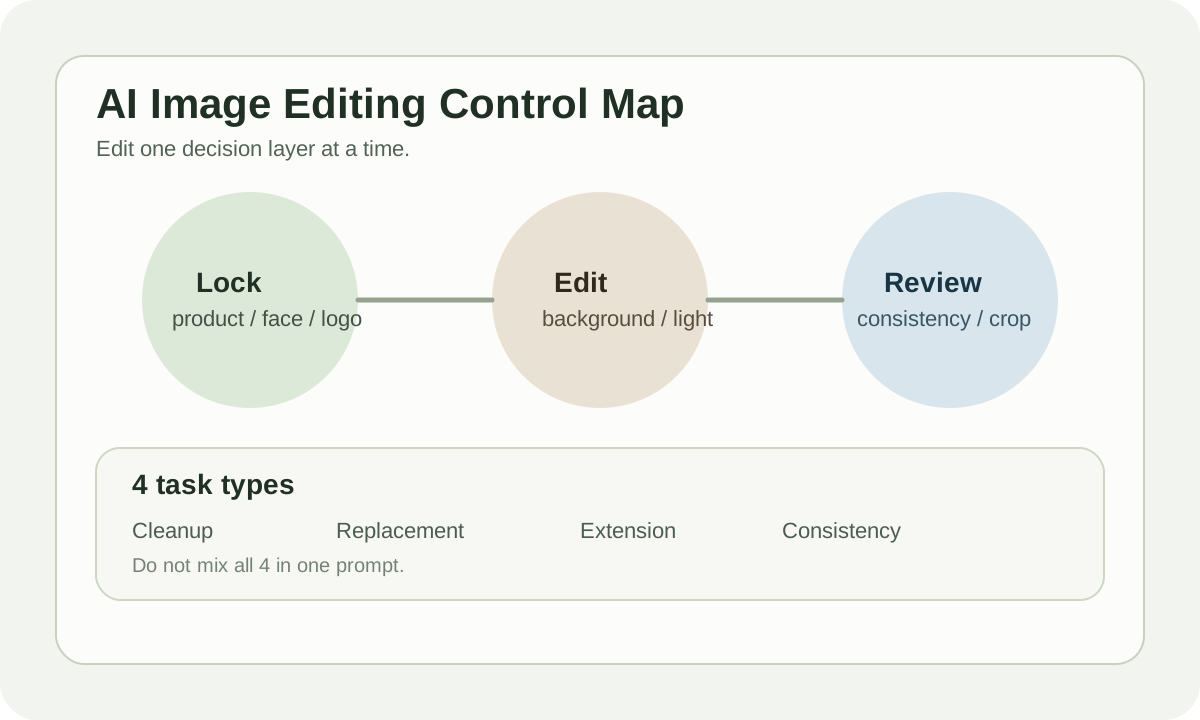
Bottom Line: Good Editing Isn't Editing More -- It's Editing Precisely
The most common mistake is trying to change background, expression, clothing, composition, and lighting all at once. The model will "helpfully" break something else each time.
Two more stable principles:
- Change only one decision layer at a time
- Lock down what shouldn't change first
Stick to these two and rework drops significantly.
Editing Isn't One Feature -- It's 4 Task Types
| Task type | Problem being solved | Common methods |
|---|---|---|
| Cleanup | Remove pedestrians, objects, fix details | Inpainting, erase, heal |
| Replacement | Swap background, objects, clothing | Mask + prompt |
| Extension | Expand ratio, add scene, add whitespace | Outpainting, expand |
| Consistency | Keep character, material, style consistent | Reference image, seed, style lock |
Many people mix all 4 into one prompt. No wonder the model loses control.
A More Controllable Editing Flow
Base image
  -> Decide what must stay
  -> Mask / reference setup
  -> Single-purpose edit
  -> Consistency check
  -> Export variants
The most important step is the second one. If you haven't defined "what must be preserved," AI can't preserve it for you.
Which Elements to Lock Down First
In commercial scenarios, typically lock these first:
| Must-lock element | Why |
|---|---|
| Product shape | E-commerce images can't have product deformed |
| Logo / typography | Any distortion makes it commercially unusable |
| Face identity | Portrait campaigns can't have face-swapping |
| Brand palette | Style breaks and the whole asset set loses coherence |
| Composition hierarchy | Subject and whitespace placement determines downstream layout |
If you're doing ad creatives, decide which area gets the headline and which gets the CTA before doing any expansion or background swap.
When Inpainting Is Most Valuable
Inpainting isn't just "fixing a region." It's best for:
- Cleaning up dirty product edges
- Fixing broken hand details, earrings, sleeve cuffs on models
- Removing distracting objects from backgrounds
- Replacing one local element without redoing the entire image
One experience rule: don't make the mask too tight. If you only frame the broken finger, the model often can't connect it. Include a bit of surrounding context for more natural blending.
Outpainting Isn't Adding Canvas -- It's Rebuilding Composition
Many people treat outpainting as "automatic edge expansion." That's too shallow.
In real business, outpainting commonly handles:
| Scenario | Goal |
|---|---|
| 1:1 to 16:9 | Make room for hero banner copy |
| 4:5 to 9:16 | Short video cover or story format |
| Headshot to half-body | Add body language and scene context |
| Product close-up to lifestyle scene | Add commercial feel and narrative |
Without pre-planning copy placement, expansion easily becomes "bigger image, but less useful."
Style Consistency Relies on a Reference System
The hardest thing in a content set isn't one image looking good. It's 6 images looking like they belong together.
Lock down at least these 4 items:
| Control item | Example |
|---|---|
| Color direction | Warm neutral / cool tech / dark luxury |
| Lens feeling | Close-up, 35mm, top-down, wide shot |
| Material language | Matte, chrome, glass, paper grain |
| Post-processing | Film grain, soft contrast, sharp commercial finish |
This reference system matters more than "switching to a stronger model." Change models but keep the system -- results stay stable. No system? Even the strongest model will drift.
Practical Example 1: E-commerce Product Background Swap
Original need: keep the product form, just swap the plain tabletop for a more premium campaign background.
Better operation sequence:
- Lock bottle / packaging in place
- Mask the background and overly messy shadow areas
- Prompt only describes the new environment, don't re-describe the product
- Generate 3-4 background variants
- Finally unify shadow and color grade
If your prompt describes product materials AND background AND lighting, the model will likely redraw the product too.
Practical Example 2: Keeping the Same Face Across Character Visuals
This is the most common pain point for content teams. "Same character across a series, but every image looks like a different person."
Viable approaches:
| Method | Purpose |
|---|---|
| Reference face | Lock basic features and hairstyle |
| Fixed styling notes | Lock makeup, clothing, color palette |
| Shot list | Pre-define close-up / medium / full body |
| Batch review | Compare 4-6 images at once, not one at a time |
Don't generate one by one and then pick by feel. Series content must use batch review.
Practical Example 3: Turning Static Images Into Ad-Ready Visuals
Many original images are "pretty" but not ad-ready -- no copy space, no hierarchy, subject too scattered.
You can fix it like this:
Goal:
Create a cleaner paid-ad visual with clear negative space on the right side.

Keep:
- product shape
- front label
- overall luxury tone

Change:
- simplify background
- increase contrast around the product
- leave copy space on the right
This kind of brief is way more effective than just writing "make it more premium."
Common Crash Points
| Problem | Cause | Fix |
|---|---|---|
| More edits = less like original | Changed too many layers at once | Split into two edit rounds |
| Dirty edges, fake blending | Mask too tight or hard | Include some surrounding context |
| Style drift across series | Each image has its own prompt | Fix reference system first |
| Ad images can't be laid out | No copy space reserved | Do layout planning first |
Human Review Checklist
- Does this edit have only one primary goal
- Were product, logo, or character identity accidentally changed
- Does this image still look consistent alongside other assets in the series
- Is there space left for copy and CTA
- For commercial use: are text, logo, and copyright elements safe
Practice
Take an existing product image. Don't regenerate. Just do this one round of edits:
- Keep the subject
- Only swap the background
- Leave room for a headline area
- Output 3 variants to compare
This kind of practice best helps you build a "commercial editing" rather than "playing with models" sensibility.