
In JavaScript When I creating copies primetives and array or object wondering after see the result,primitives didn’t change the origion but array and object copy change the origin values,so here we will see how to handle this problem with Deep copy.
let a = 0;
let b = a;
b = 1;
console.log(‘b =’+b);//b =1
console.log(‘a =’+a);//a =0
Thats fine to primitives, then make a copy with array.
let c = [1,2,3];
let d = c;
d[0] = 0;
console.log(c)//[0, 2, 3]
console.log(d)//[0, 2, 3]
OMG, It’s going to be changed the origin. Why is that happen, It is happen with “Shallow copy”. In javascript, When creating copies of arrays or objects one can make a deep copy or a shallow copy. so we will see what’s deep copy and shallow copy, and how to handle this problem.
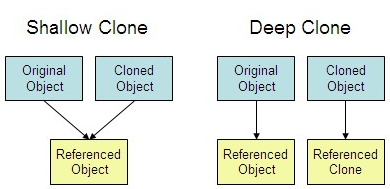
Deep copy or deep clone
A deep copy means actually creating a new array and copying over the values, since whatever happends to it will never affect the origin one.
Shallow copy shallow clone
Shallow copy is a bit-wise copy of an object. A new object is created that has an exact copy of the values in the original object. just the reference addresses are copied i.e., only the memory address is copied.it will affect the originone.
Are you ready to solve
Array.from() and Object.create()
For array we will use ‘Array.from()’. The Array.from() method creates a new Array instance from an array-like or iterable object.
let a = [1,2,3];
let b = Array.from(a);
b[0] = 0;
console.log(a); // [1, 2, 3]
console.log(b); // [0, 2, 3]
Here we have the solution for array, But for object inside array?
let a = [{x:1,y:2,z:3}];
let b = Array.from(a);
b[0].x = 0;
console.log(JSON.stringify(a)); // [{"x":0,"y":2,"z":3}]
console.log(JSON.stringify(b)); // [{"x":0,"y":2,"z":3}]
The JSON.stringify() method converts a JavaScript value to a JSON string,Yes now we know it is not a correct solution.
For object we will use Object.create()
let a = {x:1,y:2,z:3};
let b = Object.create(a);
b.x = 0;
console.log(JSON.stringify(a)); // {"x":1,"y":2,"z":3}
console.log(JSON.stringify(b)); // {"x":0}
Here ,This is not a perfect solution, but it’s not affect the origin. And ‘$.extend’ and ‘Object.clone’ also give correct solution.That is also shallow copy. What about object inside array?
let a = [{x: 1,y: 2,z: 3}];
let b = Array.from(Object.create(a));
b[0].x = 0;
console.log(JSON.stringify(a)); // [{"x":0,"y":2,"z":3}]
console.log(JSON.stringify(b)); // [{"x":0,"y":2,"z":3}]
So we decided This all makes shallow copy.
Object.assign()
let a = {x: 1,y: 2,z: 3};
let b = Object.assign({},a);
b.x = 0;
console.log(JSON.stringify(a)); // {"x":1,"y":2,"z":3}
console.log(JSON.stringify(b)); // {"x":0,"y":2,"z":3}
Object.assign() working fine for objects. but for json objects its going to be wrong.
let a = { x: {z:1} , y: 2};
let b = Object.assign({}, a);
b.x.z=0

console.log(JSON.stringify(a)); // {"x":{"z":0},"y":2}
console.log(JSON.stringify(b)); // {"x":{"z":0},"y":2}
Then what is the solution?
Deep copy solutions
$.extend
I find $.extend is the deep copy solution for nested objects and objects inside array.
//Deep Clone
let a = { x: {z:1} , y: 2};
let b = $.extend(true,{},a);
b.x.z=0;
console.log(JSON.stringify(a)); // {"x":{"z":1},"y":2}
console.log(JSON.stringify(b)); // {"x":{"z":0},"y":2}
This is also solution for deep copy objects inside array.
//Deep Clone
let a = [{ x:{z:1} , y: 2}];
let b = $.extend(true, [], a);;
b[0].x.z=0
console.log(JSON.stringify(a)); //[{"x":{"z":1},"y":2}]
console.log(JSON.stringify(b)); // [{"x":{"z":0},"y":2}]
JSON.parse and JSON.stringify
Finally I find JSON.parse and JSON.stringify is the best and simple way to Deep copy. The JSON.stringify() method converts a JavaScript value to a JSON string.The JSON.parse() method parses a JSON string, constructing the JavaScript value or object described by the string.
// Deep Copy
let a = { x:{z:1} , y: 2};
let b = JSON.parse(JSON.stringify(a));
b.x.z=0

console.log(JSON.stringify(a)); // {"x":{"z":1},"y":2}
console.log(JSON.stringify(b)); // {"x":{"z":0},"y":2}
This is also solution for deep copy objects inside array.
//Deep Clone
let a = [{ x:{z:1} , y: 2}];
let b = JSON.parse(JSON.stringify(a));
b[0].x.z=0
console.log(JSON.stringify(a)); //[{"x":{"z":1},"y":2}]
console.log(JSON.stringify(b)); // [{"x":{"z":0},"y":2}]
That’s it. Hope you all get clear undestanding of JavaScript Deep copy for array and object. See you :)






