
Claude Code + GLM 4.6 Setup
I was at home wanting to keep coding with Claude Code, but ran into a real problem: my work computer has a stable US IP and runs Claude Code fine. But my personal computer at home? Claude Code won't even connect (it has the strictest geo-restrictions of any Anthropic tool -- worse than the Claude desktop app).
Lucky timing: Zhipu's GLM just upgraded to 4.6 and launched a GLM Coding plan (very affordable). So I swapped in GLM-4.6 as the model behind Claude Code.
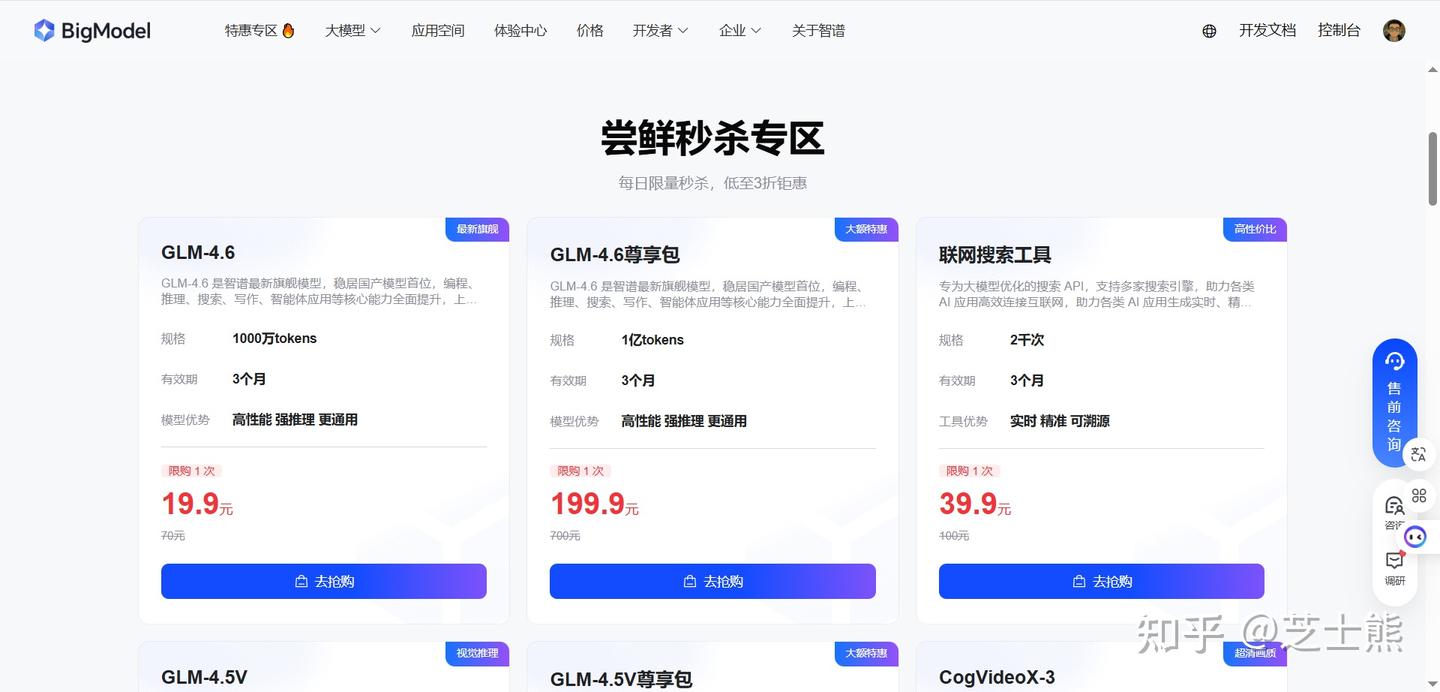
With the right setup, Claude Code can work 24/7 nonstop. After installing, I checked usage -- 5 hours burned through 270 million tokens (without hitting any limit). Basically pays for itself in 2 hours. Compare that to the official per-token pricing (200 RMB / 100M tokens).
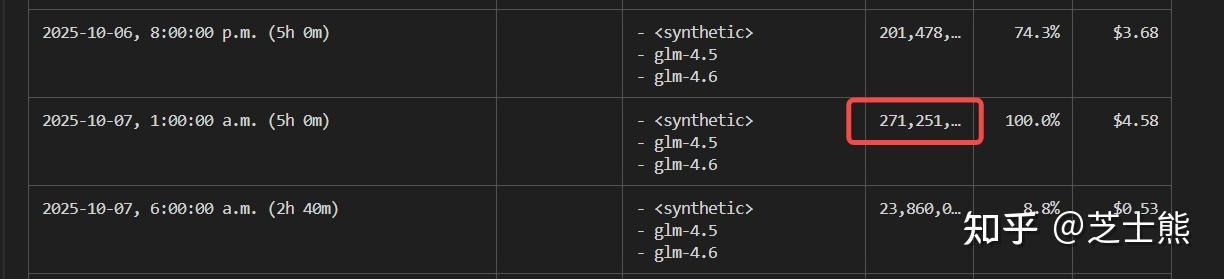
The experience turned out pretty solid:
- All Claude Code features and MCP plugins work as expected
- Performance-wise, according to Claude Code expert Liu Xiaopai's benchmarks, it reaches Claude 4 level
 These are subjective impressions -- try it yourself to judge. My own experience has been positive.
- The GLM Coding plan is much cheaper than Claude API. Pro is 100 RMB/month, cheapest tier is 20 RMB/month (not recommended). Reportedly, GLM's 100 RMB quota is 3x Claude Code's $100 quota, though I haven't verified this.
So here's the complete Claude Code + GLM-4.6 setup.
Prerequisites
- Register a Zhipu AI Open Platform account Link: Zhipu AI Open Platform
This is a referral link -- saves another 30 RMB, so a quarterly plan is 270 RMB. BTW, you can upgrade plans, but only the first referral purchase gets the 10% discount. I upgraded from quarterly to annual and lost the 10% -- so just buy the duration you actually want upfront.
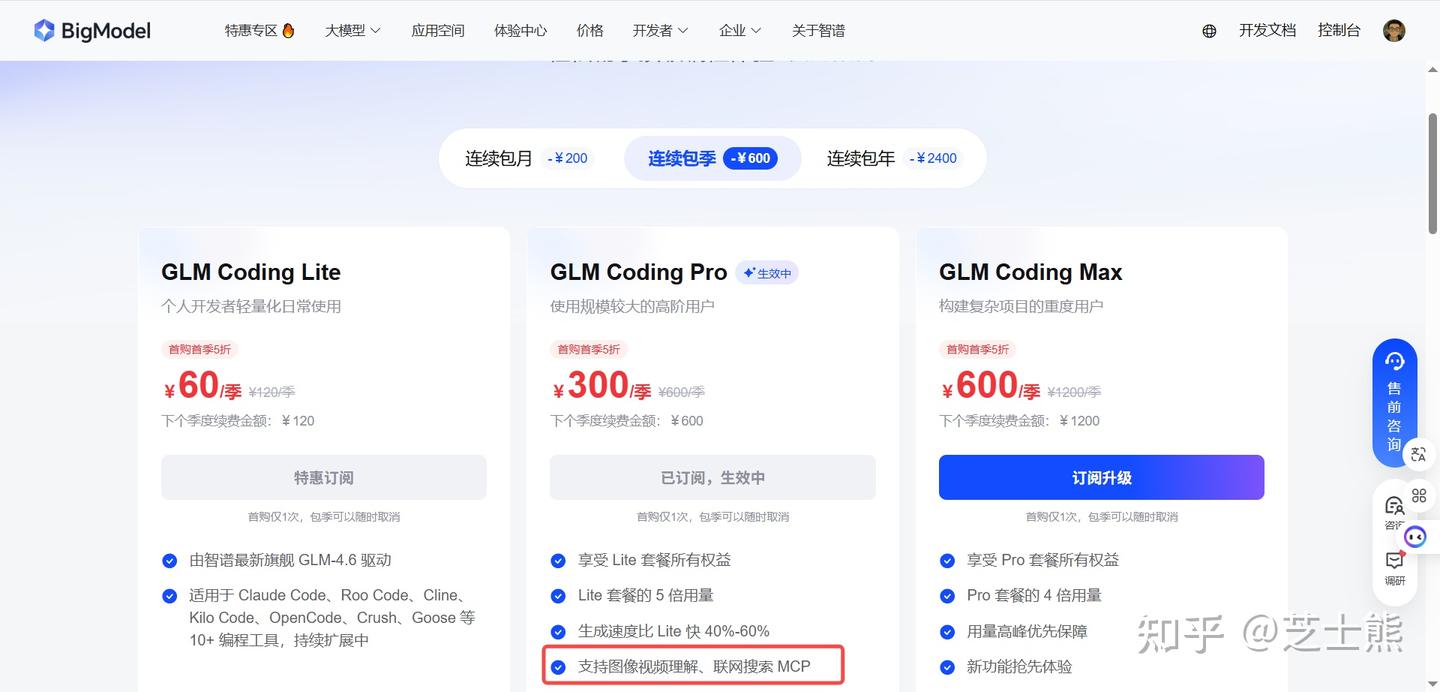
- Lite: ~120 calls per 5 hours
- Pro: ~600 calls per 5 hours (recommended)
- Max: ~2400 calls per 5 hours
These are estimates -- actual numbers depend on task complexity, auto-approve settings, etc.
Get at least Pro. Lite's rate limit isn't enough. Pro can handle a single terminal running 10 concurrent task agents (from my experience). Multi-terminal + task agents might need Max.
Also, GLM-4.6 isn't a native multimodal model. You can supplement with GLM's image and video understanding MCPs.
If you can't log into Claude Code's Anthropic account, search won't work either -- and web search is essential when information is missing. Use GLM's search MCP to fill the gap. See Essential Claude Code + GLM 4.6 Config
Claude Code Environment Variables
Find your Claude Code config file (usually ~/.claude/settings.json, Windows: C:\Users\<username>\.claude\settings.json). Add:
{
	"env": {
		"ANTHROPIC_AUTH_TOKEN": "yourkey here",
		"API_TIMEOUT_MS": "3000000",
		"ANTHROPIC_BASE_URL": "https://open.bigmodel.cn/api/anthropic",
		"MCP_TOOL_TIMEOUT": "30000"
	},
	"permissions": {
		"defaultMode": "bypassPermissions"
	},
	"alwaysThinkingEnabled": false
}
Besides env config, I also set
"defaultMode": "bypassPermissions". The whole point of using Claude Code is having it auto-complete long tasks. I absolutely don't want it asking for permission.
Run it:

It works!
One gotcha: you need to switch the model to default. Claude Code still thinks it's using Sonnet, but we've pointed the URL at GLM.

Verifying GLM 4.6 Is Working
Use a PowerShell command to call GLM's Anthropic-compatible endpoint -- it'll echo the actual model name:
This reuses your already-configured
ANTHROPIC_AUTH_TOKENandANTHROPIC_BASE_URL.
$BASE = $env:ANTHROPIC_BASE_URL
$KEY  = $env:ANTHROPIC_AUTH_TOKEN

$headers = @{
  "x-api-key"         = $KEY                     # Most compatible endpoints support x-api-key
  "Authorization"     = "Bearer $KEY"            # Some also support Bearer; using both is safer
  "anthropic-version" = "2023-06-01"
  "Content-Type"      = "application/json"
}

$body = @{
  model = "default"                               # Use your current default to see where it routes
  max_tokens = 1
  messages = @(
    @{
      role = "user"
      content = @(
        @{ type = "text"; text = "Return only your current model ID" }
      )
    }
  )
} | ConvertTo-Json -Depth 8

$r = Invoke-RestMethod -Method Post -Uri "$BASE/v1/messages" -Headers $headers -Body $body
$r.model   # ← This prints the actual model, e.g. glm-4.5 or glm-4.6
- If it outputs
glm-4.5, that's 4.5;glm-4.6means 4.6.
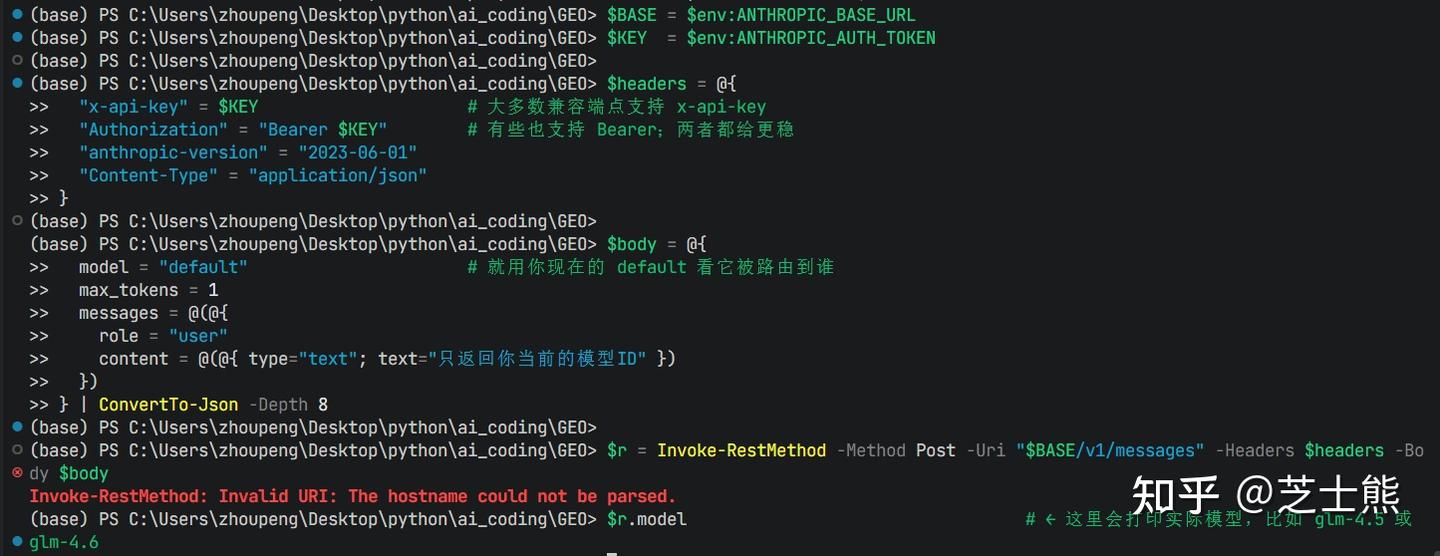
GLM 4.6 is confirmed working.
MCP Supplements
Enabling Web Search MCP
Run this in your terminal:
claude mcp add-json web-search-prime '{"type":"http", "url":"https://open.bigmodel.cn/api/mcp/web_search_prime/mcp","headers":{"Authorization":"Bearer <your GLM API Key>"}}' --scope user
GLM's Pro plan includes this web search MCP. Once configured, you can call it directly from Claude Code.
Quick note: when using claude mcp add, always add --scope user at the end for global installation. Learned this the hard way. If you edit the JSON file directly, this isn't an issue.
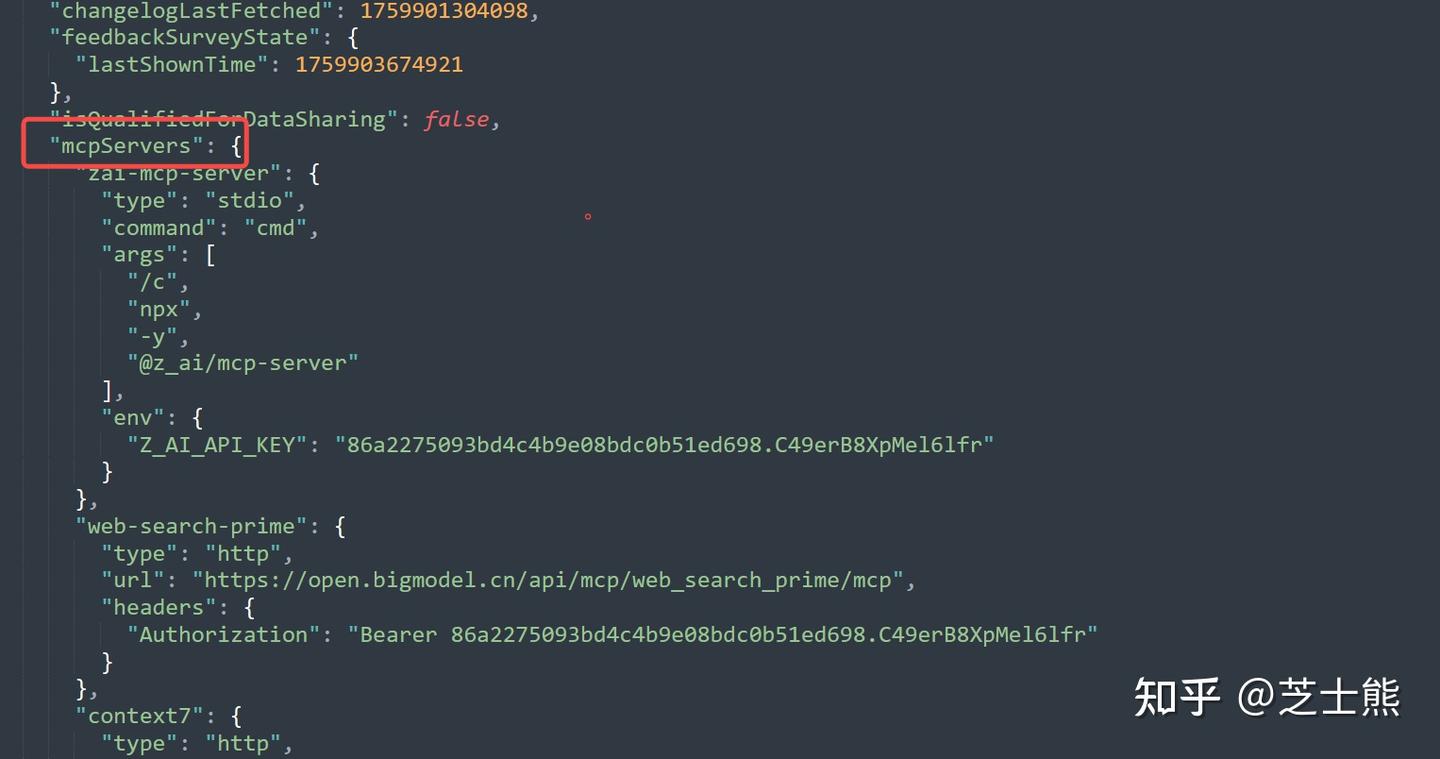
Enabling Image/Video Understanding MCP
Same deal, run this:
claude mcp add-json zai-mcp-server '{"type":"stdio","command":"cmd","args":["/c","npx","-y","@z_ai/mcp-server"],"env":{"Z_AI_API_KEY":"<your GLM API Key>"}}' --scope user
This MCP supports image + video parsing. After installation, Claude Code can read images or video frames directly in conversations.
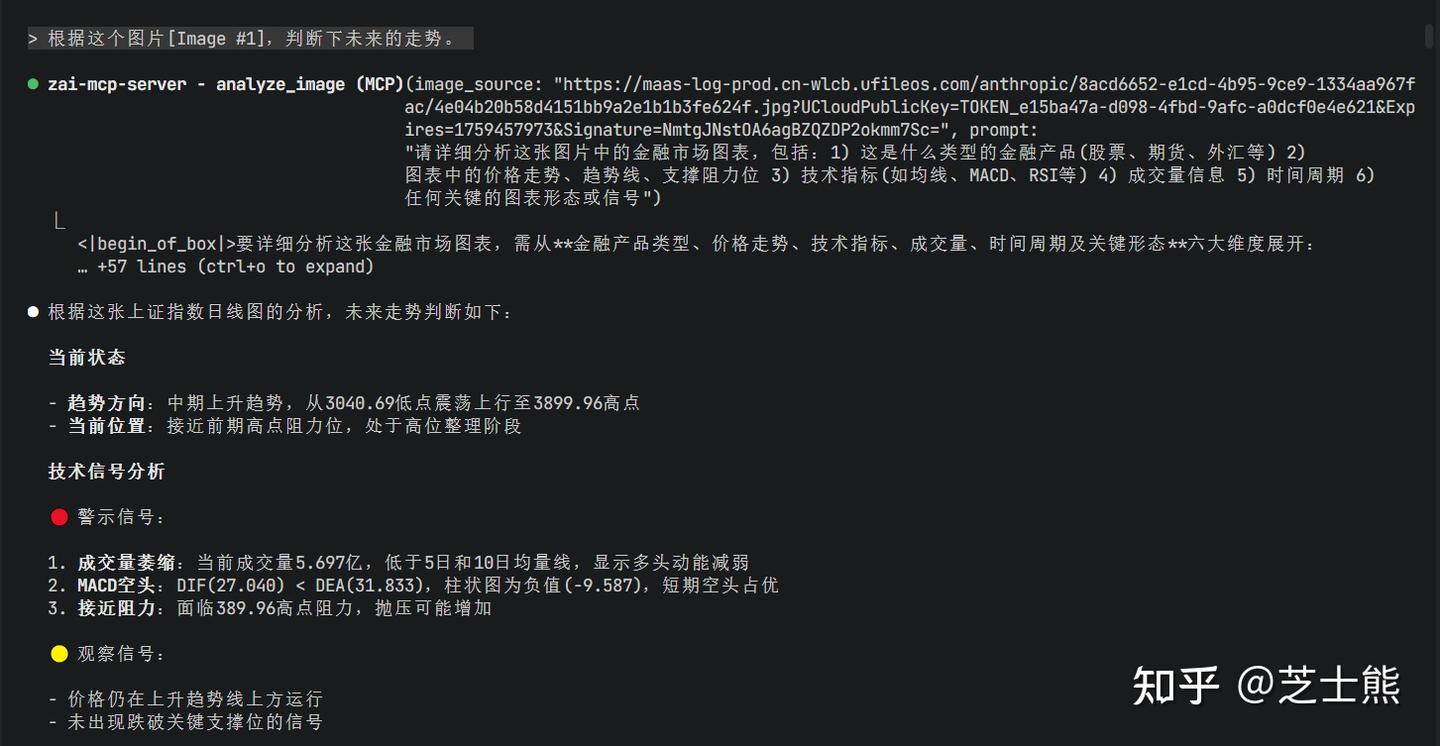
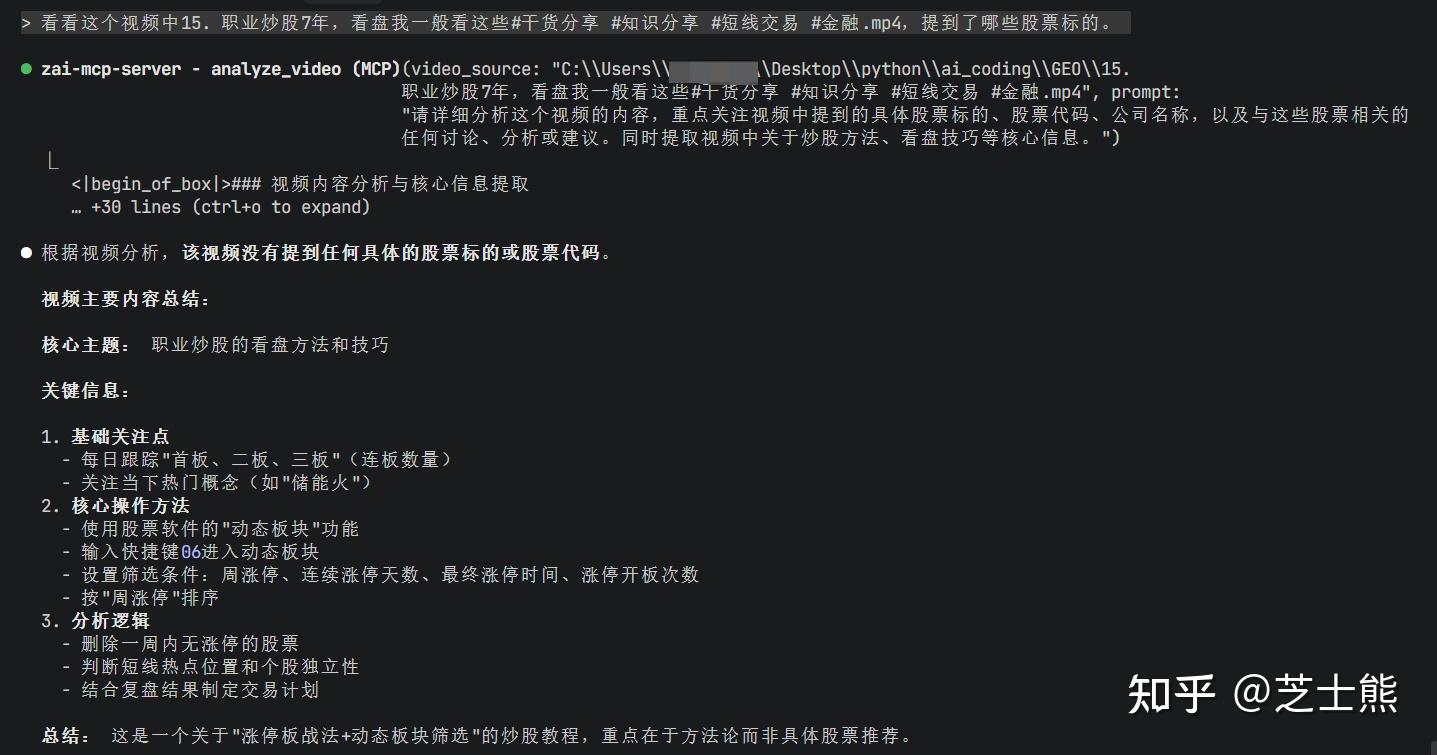
Browser MCP Is Also a Must
I used to recommend BrowserMCP because it remembers login sessions.
But now that Chrome's official Chrome DevTools MCP is out, obviously go with the official one. And it remembers login sessions too.

https://www.zhihu.com/account/scan/login/YjVlZWExMmItMDcy?/api/login/qrcode (QR code auto-detect)
Log in, close Chrome, reopen:

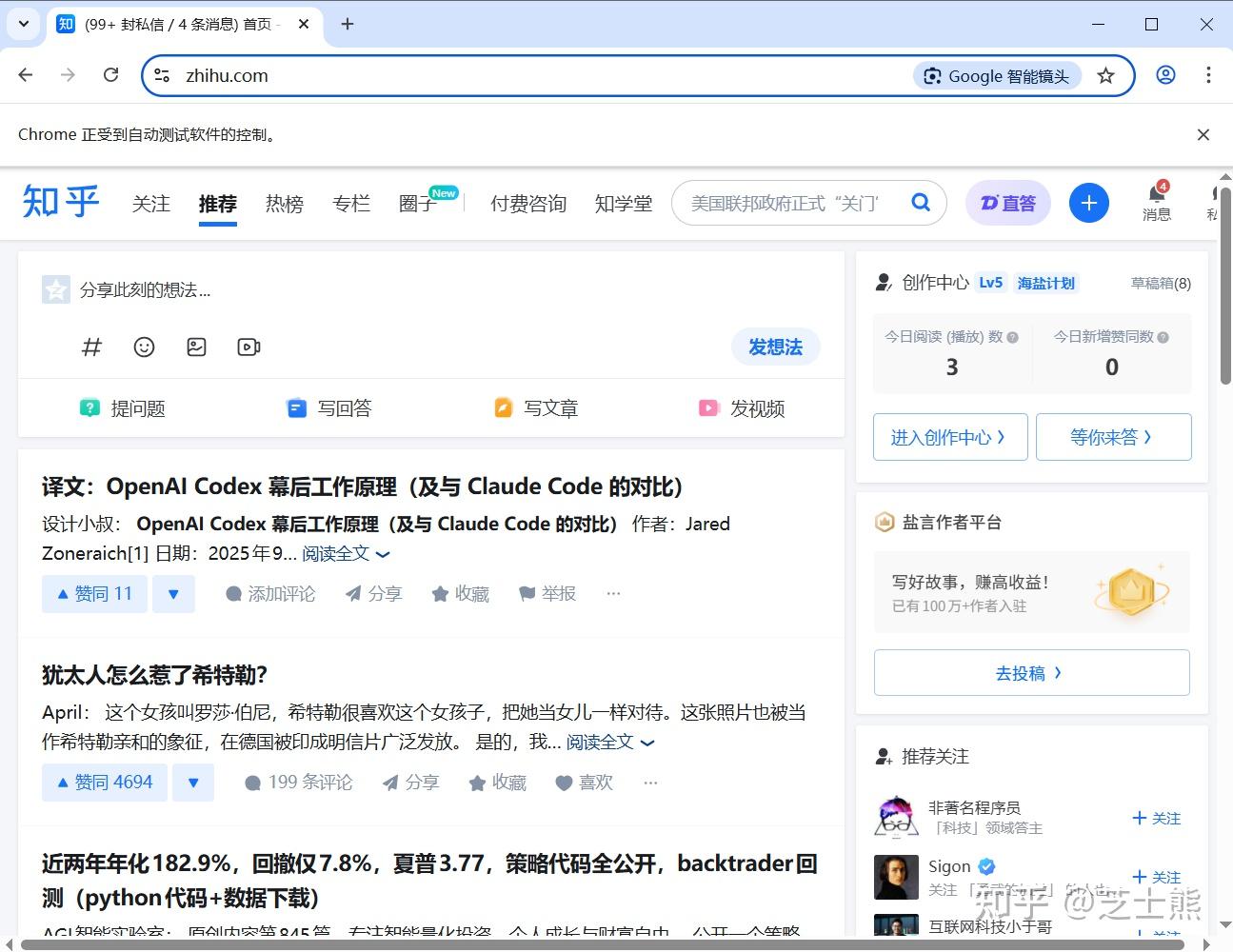
MarkItDown
A Microsoft tool that converts PDFs and other file types into LLM-readable formats.
Has an MCP. Install if you need it -- won't go into detail here.
Verifying MCP Installation
Check your installed MCPs:
claude mcp list

Usage tips:
- If you're running automated tasks, periodically check which pages Chrome DevTools opened and log into them all. Chrome DevTools remembers sessions, but uses a fresh profile -- not your usual one.
- Also, when running autonomously, the model often opens Google and other foreign sites (probably from training data). Make sure your network setup handles that. Or add a memory note telling it to search domestic sites.
Usage Monitoring
Installation
Install globally:
npm install -g ccusage
Common Commands
ccusage                      # = ccusage daily (default daily summary)
ccusage daily --since 20241201 --until 20241231
ccusage weekly               # Weekly summary
ccusage monthly              # Monthly summary
ccusage session              # Per-session view
ccusage blocks               # Per 5-hour billing window (includes Active/prediction)
ccusage blocks --active      # Current active window only
ccusage blocks --recent      # Recent windows
ccusage daily --breakdown    # Per-model breakdown
ccusage monthly --json > usage.json  # Export JSON for analysis
ccusage blocks shows 5-hour windows and can estimate remaining quota.
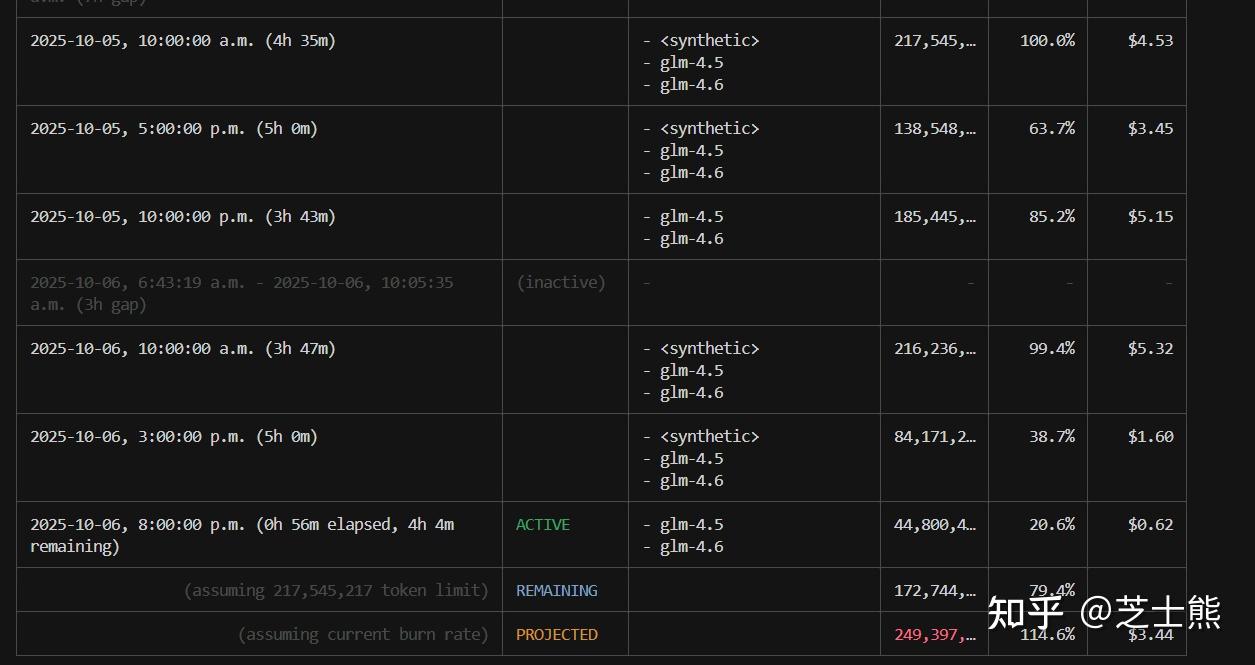 In my usage, 5 hours peaked at 200M+ tokens.
ccusage daily shows per-day usage.
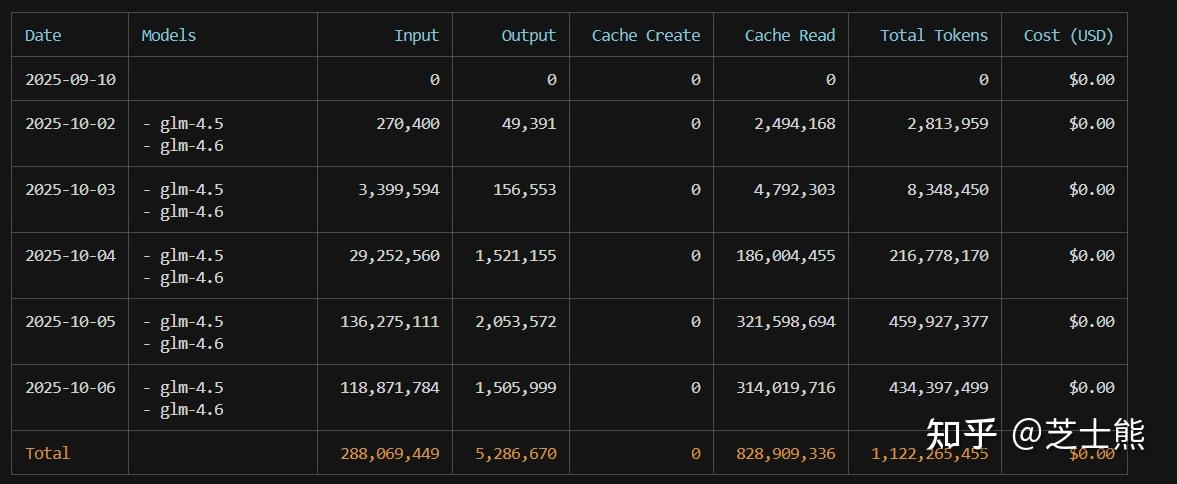 I average 300M+ tokens per day.
But the real winner is:
ccusage blocks --live
Refreshes every second in real time. Enjoy watching those API tokens burn. For more, see my other article: How to Keep Claude Code Running Stable
Addendum: Concurrency and Rate Limits
Official concurrency limits (paying more increases concurrency):

Recently Zhipu halved GLM 4.5 concurrency too -- from 20 down to 10. Looks like they onboarded a ton of paying users and resources got tight. But 15 combined concurrency is still workable. That said, the limit doesn't always trigger. Around Programmer's Day it hit constantly, but recently even 10 concurrent calls seem fine. Depends on Zhipu's resource situation. The default fallback strategy degrades to glm-4.5-air. I'd manually change the config to glm-4.5 instead. Who wants the budget model, right? And if you're coding at 4 AM, you might experience peak speeds...
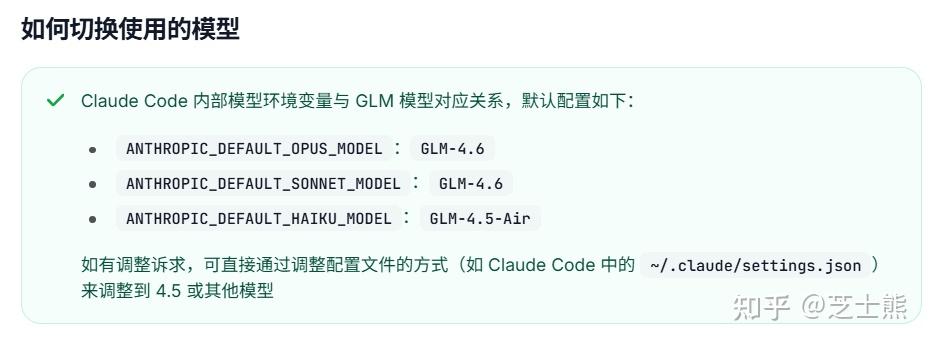
The concurrency limit is intermittent in my testing. On weekends, even 20 concurrent GLM 4.6 calls didn't trigger it. Maybe Zhipu is shifting 4.5 resources to 4.6, or peak/off-peak limits differ.
On weekdays though, it's strictly 5 concurrent -- one more and you get an error.
If you need more, use GLM 4.5 which gets 20 concurrent slots. 4.5 and 4.6 were released close together, so performance is comparable. Some community members even say 4.5 is better for certain use cases -- it's subjective.
If you really need high parallelism, here's a hack:
claude --model glm-4.5
Open a separate terminal using GLM 4.5 and let it run 20 parallel. This gives you 10 (4.6) + 20 (4.5) combined. Tested and confirmed.
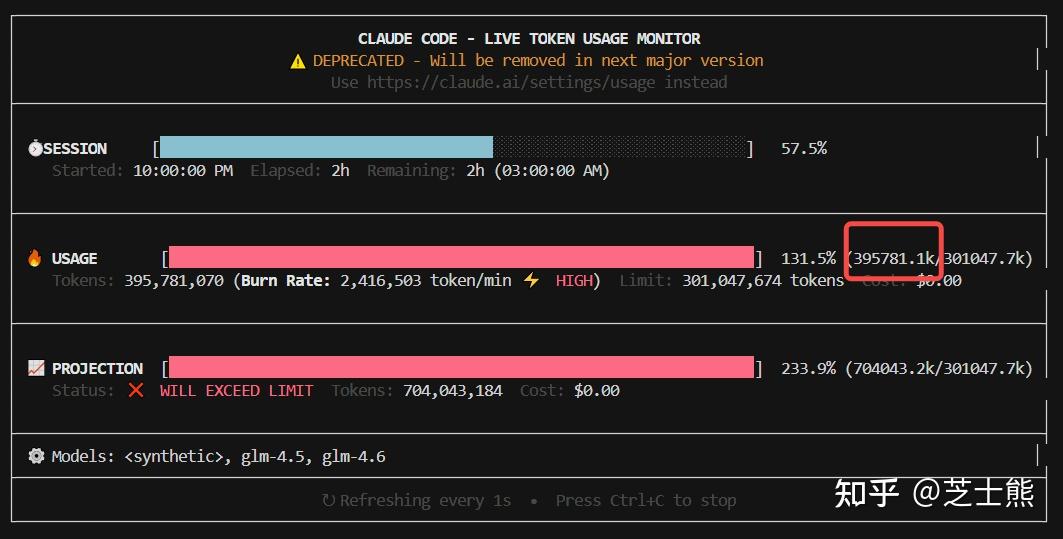
Here's my peak consumption test: 2.35 million tokens per minute -- that's 700 million tokens per 5 hours. Definitely burning through quota.

Addendum: 5-Hour Rate Limit
Finally hit the 5-hour limit. Not easy. As Andrew Ng says, AI coding really is exhausting.
429 {"type":"error","error":{"type":"1308","message":"Usage limit reached for 5 hour. Your limit will reset at 2025-10-18 03:03:23"}
About 400 million tokens. I'm on the Pro plan. Max should be roughly 4x that according to the official docs.
Addendum: GLM's Spatial Awareness
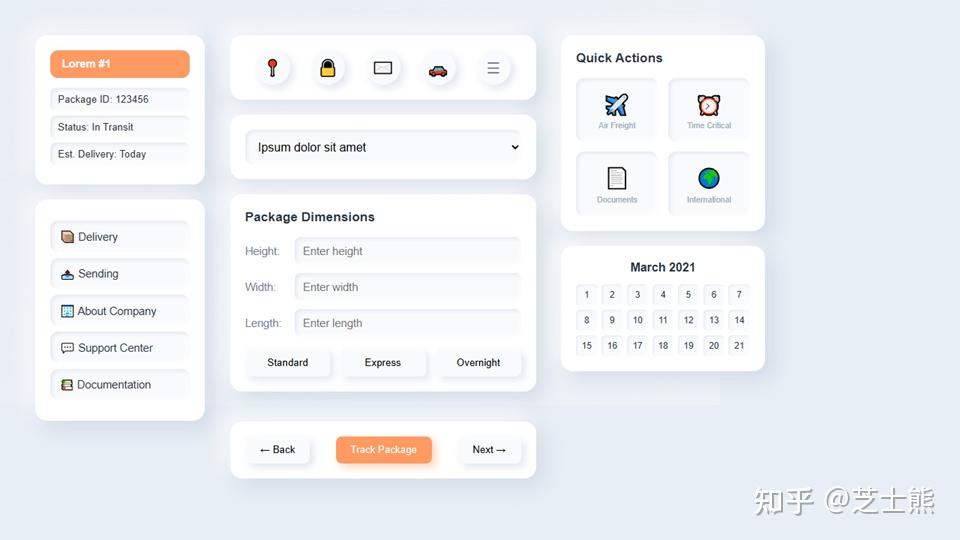
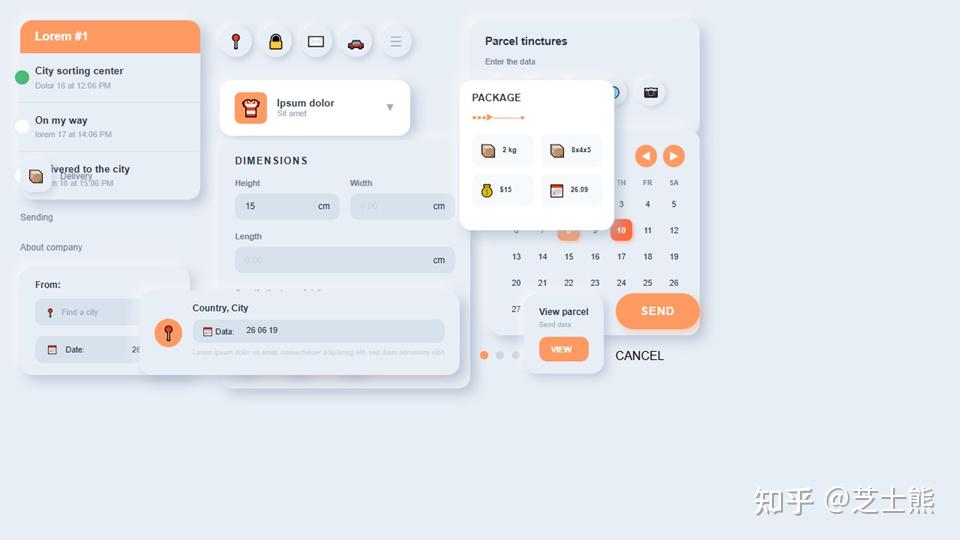
While experimenting with LLM-generated PPTs (essentially frontend generation), I noticed GLM's spatial awareness seems better than Claude 4.5. Surprising.
Spatial awareness is a hard problem in LLM frontend generation -- I've discussed this with game engine company leaders. Positioning element A relative to element B is something LLMs often get wrong.
Same prompt, GLM 4.6:
Claude 4.5:
Addendum: Model Config Switching Trick
If you're subscribed to both Claude and GLM Coding plans, add a dummy field in settings.json like "_GLM_settings":
  "env": {
    "API_TIMEOUT_MS": "3000000",
    "MCP_TOOL_TIMEOUT": "60000",
    "_GLM_settings": {
      "ANTHROPIC_AUTH_TOKEN": "your key here",
      "ANTHROPIC_BASE_URL": "https://open.bigmodel.cn/api/anthropic",
      "ANTHROPIC_DEFAULT_HAIKU_MODEL": "GLM-4.5"
    }
  },
When switching, just move the GLM-related lines in/out of the {} and add/remove a comma. Takes about 5 seconds.
There are open-source tools for systematic config management, but I find them overkill. Manual approach is fast enough.
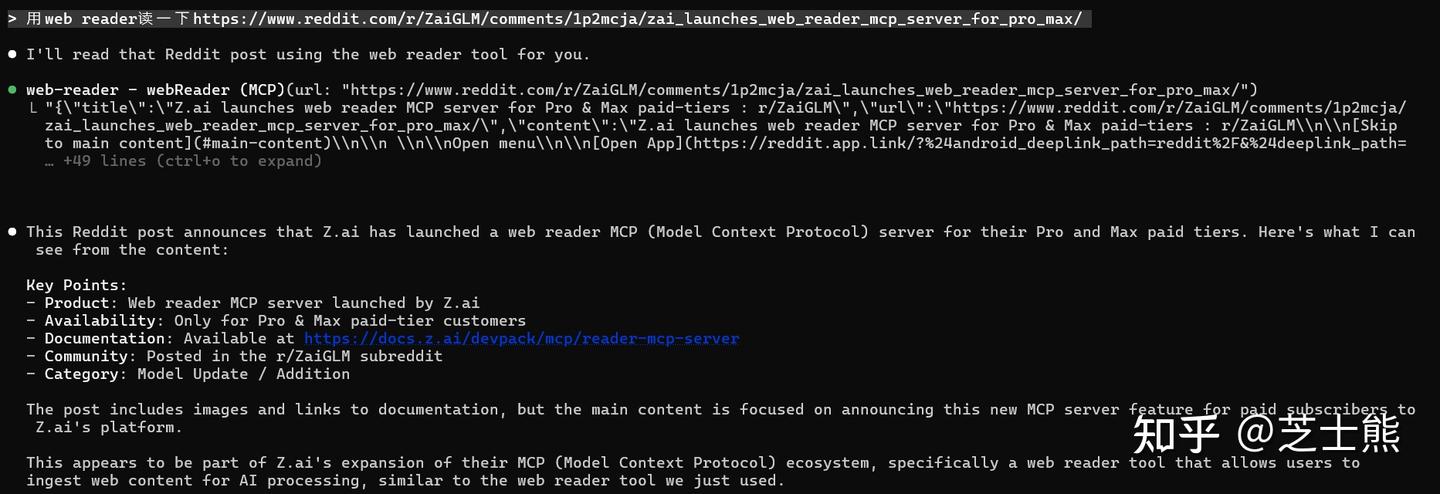
Addendum: GLM Recently Added a Web Reader MCP
Equivalent to Claude Code's native [WebFetch](https://zhida.zhihu.com/search?content_id=263773808&content_type=Article&match_order=1&q=WebFetch&zd_token=eyJhbGciOiJIUzI1NiIsInR5cCI6IkpXVCJ9.eyJpc3MiOiJ6aGlkYV9zZXJ2ZXIiLCJleHAiOjE3NjgzMDAyOTEsInEiOiJXZWJGZXRjaCIsInpoaWRhX3NvdXJjZSI6ImVudGl0eSIsImNvbnRlbnRfaWQiOjI2Mzc3MzgwOCwiY29udGVudF90eXBlIjoiQXJ0aWNsZSIsIm1hdGNoX29yZGVyIjoxLCJ6ZF90b2tlbiI6bnVsbH0.rcDMSV14FFPJCp6W4zM-5kpEnp0gIcYLVicBQtaRBw0&zhida_source=entity) tool -- parses HTML into LLM-friendly markdown.
GLM's MCP emphasizes structured parsing: headings, body text, metadata, link lists are all returned as separate fields.
Result:
GLM keeps iterating and filling gaps in the coding ecosystem. That's a good sign.
Source: Zhihu original, curated
📚 Related resources
❓ Common questions
Open a question to review the practical answer.
How much does Claude Code with GLM 4.6 save compared to Anthropic direct?
Pro tier is 100 RMB/month with ~600 calls per 5h window. The author hit 270M tokens in 5h without throttling. Against Anthropic's listed 200 RMB / 100M tokens, you break even in ~2 hours of use. GLM tiers are Lite (120 calls / 5h) / Pro (600) / Max (2400) — Pro is the minimum the author recommends because a single terminal running 10 parallel task agents barely fits.
How do I configure the GLM 4.6 env vars in settings.json?
Edit `~/.claude/settings.json` (Windows: `C:\Users\<user>\.claude\settings.json`) and add `ANTHROPIC_AUTH_TOKEN` (your GLM API key), `ANTHROPIC_BASE_URL` set to `https://open.bigmodel.cn/api/anthropic`, `API_TIMEOUT_MS: 3000000`, and `MCP_TOOL_TIMEOUT: 30000`. Critical detail: switch the model in Claude Code to `default` — it still thinks it is calling Sonnet, but the URL is now GLM.
How do I add web search to Claude Code with GLM?
Without an Anthropic login, search is dead — patch it with GLM's Web Search MCP: `claude mcp add-json web-search-prime '{"type":"http", "url":"https://open.bigmodel.cn/api/mcp/web_search_prime/mcp","headers":{"Authorization":"Bearer <YOUR_GLM_KEY>"}}' --scope user`. The Pro plan bundles this MCP for free — the gotcha is the trailing `--scope user`, without it the install only applies locally.
How do I work around GLM 4.6's concurrency limit?
On weekdays GLM 4.6 enforces a hard 5-way concurrency cap (one extra and you get errors); GLM 4.5 allows 20. The hack: open two terminals — one default (4.6), one with `claude --model glm-4.5`, combining to 25 parallel slots. Verified by the author, peaking at 2.35M tokens/minute (~700M per 5h window).
How do I monitor GLM usage in real time?
Install globally with `npm install -g ccusage`. Useful commands: `ccusage daily` for daily totals, `ccusage blocks` for the 5-hour billing window (with remaining budget estimate), `ccusage blocks --live` for 1-second refresh. The author's measured ceiling: 200M+ tokens per 5h, ~300M average per day, hard cap on Pro is ~400M tokens — overshoot returns error code 1308 and you wait for window reset.