
Front-end web development, also known as client-side development is the practice of producing HTML, CSS and JavaScript for a website or Web Application so that a user can see and interact with them directly. The challenge associated with front end development is that the tools and techniques used to create the front end of a website change constantly and so the developer needs to constantly be aware of how the field is developing.
The objective of designing a site is to ensure that when the users open up the site they see the information in a format that is easy to read and relevant. This is further complicated by the fact that users now use a large variety of devices with varying screen sizes and resolutions thus forcing the designer to take into consideration these aspects when designing the site. They need to ensure that their site comes up correctly in different browsers (cross-browser), different operating systems (cross-platform) and different devices (cross-device), which requires careful planning on the side of the developer.
https://en.wikipedia.org/wiki/Front-end_web_development
HTML, CSS, & JavaScript:
A front-end developer architects and develops websites and applications using web technologies (i.e., HTML, CSS, DOM, and JavaScript), which run on the web platform or act as compilation input for non-web platform environments (i.e., NativeScript).
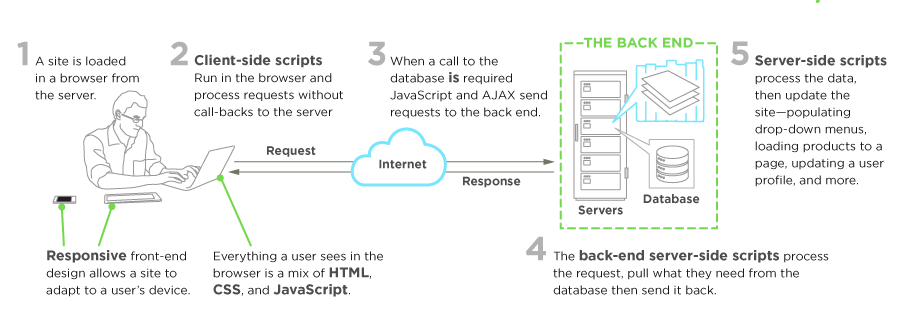
Image source: https://www.upwork.com/hiring/development/front-end-developer/
Typically, a person enters into the field of front-end development by learning to develop HTML, CSS, and JS code, which runs in a web browser, headless browser, WebView, or as compilation input for a native runtime environment. These four run times scenarios are explained below.
Web Browsers
A web browser is software used to retrieve, present, and traverse information on the WWW. Typically, browsers run on a desktop or laptop computer, tablet, or phone, but as of late a browser can be found on just about anything (i.e, on a fridge, in cars, etc.).
The most common web browsers are (shown in order of most used first):
- Chrome
- Internet Explorer (Note: not Edge, referring to IE 9 to IE 11)
- Firefox
- Safari
Headless Browsers
Headless browsers are a web browser without a graphical user interface that can be controlled from a command line interface programmatically for the purpose of web page automation (e.g., functional testing, scraping, unit testing, etc.). Think of headless browsers as a browser that you can run from the command line that can retrieve and traverse web pages.
The most common headless browsers are:
Webviews
Webviews are used by a native OS, in a native application, to run web pages. Think of a webview like an iframe or a single tab from a web browser that is embedded in a native application running on a device (e.g., iOS, android, windows).
The most common solutions for webview development are:
- Cordova (typically for native phone/tablet apps)
- NW.js (typically used for desktop apps)
- Electron (typically used for desktop apps)
Native from Web Tech
Eventually, what is learned from web browser development can be used by front-end developers to craft code for environments that are not fueled by a browser engine. As of late, development environments are being dreamed up that use web technologies (e.g., CSS and JavaScript), without web engines, to create native applications.
Some examples of these environments are:






