
AI Model Comparison
Picking a model is one of those things where teams get distracted by leaderboards right away. In real projects, what actually determines the experience isn't "who's strongest" -- it's whether your specific task needs better reasoning, speed, stability, or lower cost.
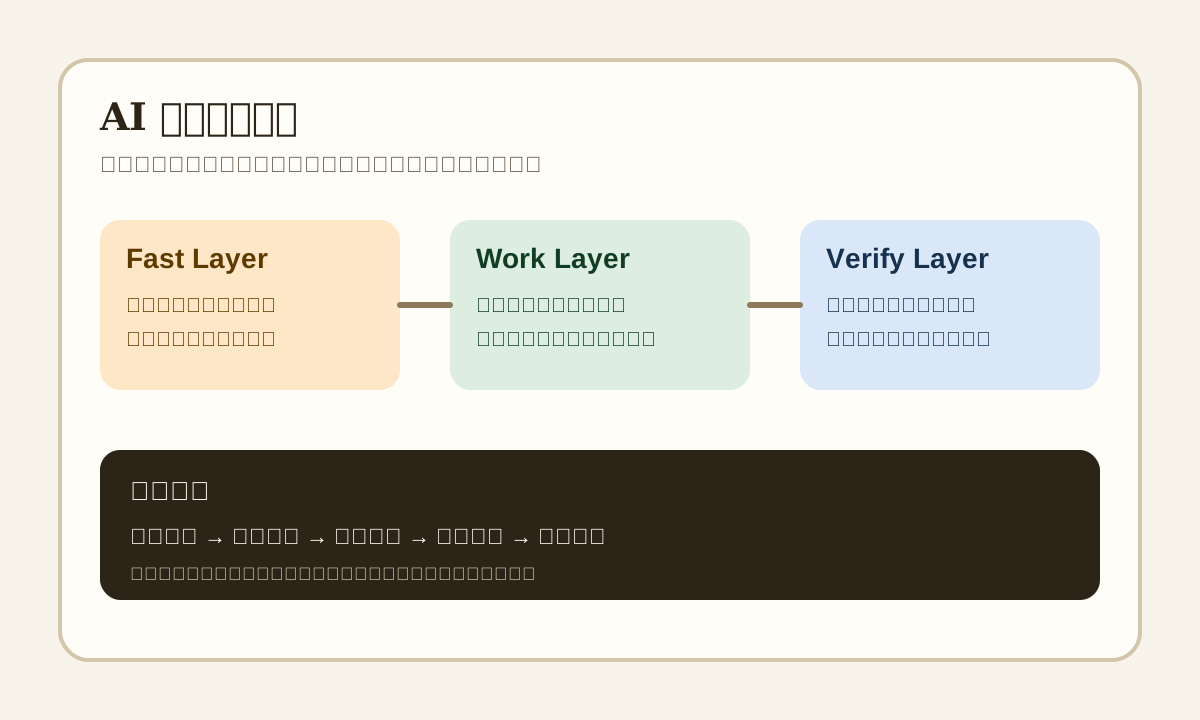
Start with a decision sequence
Don't jump straight to "which model is best." A more useful order:
- What type of task is this?
- How bad is it if the model gets it wrong once?
- Can users tolerate a 2-5 second wait?
- Do you need tool calling, long context, or JSON output?
- Is this a demo budget or a production budget?
If you haven't thought through these five questions, model comparisons tend to stay at "everyone online says it's good."
Different tasks have different model requirements
| Task type | What matters most | Typical mistake | Selection advice |
|---|---|---|---|
| Chat / QA | Response speed, natural tone | Too slow, too verbose | Start with a mid-tier model |
| Code generation | Instruction following, long context, tool calling | Breaking existing code, missing edge cases | Prioritize engineering stability over benchmarks |
| Document summary | Long context, structured output | Missing key points, hallucinated conclusions | Pair with chunking and output templates |
| Agent workflow | Tool calling, recoverability | Infinite loops, wrong tool calls | Limit tool scope first, then worry about model strength |
| Review / classification | Consistency, low cost | Classification drift, unstable explanations | Small model + clear label set is usually cheaper |
| High-risk scenario | Stability, traceability, refusal boundaries | Hallucination, unauthorized actions, false promises | Multi-model verification or human fallback |
The 6 dimensions that actually matter for selection
1. Task Completion Rate
It's not about whether the model "sounds smart" -- it's about whether it finishes your task.
For example:
- A customer service bot: did it hit the knowledge base and give a correct answer?
- A code assistant: does the patch actually run?
- Form extraction: are the JSON fields stable?
Without task completion rate, a lot of "the model feels great" feedback really just means the language sounds more human.
2. Latency
Users generally won't forgive you being 8 seconds slow just because the answer is smarter.
Especially in these scenarios, latency directly determines whether the product is usable:
- Search box real-time Q&A
- IDE completions
- Form filling assistance
- Sales and customer service chat
One rule of thumb: get the first response out fast, then put complex reasoning into a two-stage workflow.
3. Cost
Cost isn't just token price. It also includes:
- System prompt length
- Context concatenation strategy
- Retry count
- Tool call count
- Fallback cost after failures
Many teams get the per-token price down but still get ugly bills at month's end because prompts are too long and request counts are too high.
4. Instruction Following
When you need the model to output a fixed structure, stay within boundaries, or only answer based on provided materials -- this dimension matters way more than "good writing."
Especially for:
- JSON-only output
- No fabricated sources
- No unauthorized tool calls
- No responses about unauthorized data
5. Context Capability
Long context doesn't mean "bigger window = magic."
What really matters is whether the model can still:
- Find the actually relevant chunk in a long context
- Not ignore constraints in the second half
- Not treat user-uploaded content as system instructions
A huge window with unstable retrieval and citation will still cause engineering problems.
6. Ecosystem & Engineering Integration
A strong model doesn't mean it's easy to integrate.
In practice, you also need to check:
- Is the SDK mature?
- Is JSON / tool calling stable?
- Is the streaming experience good?
- Are rate limiting, retries, and logging solid?
- Does it support your region and compliance requirements?
A more production-realistic model layering
| Layer | Primary role | What model fits |
|---|---|---|
| Fast Layer | First response, classification, routing | small model or low-cost model |
| Work Layer | Main task execution: writing, code, summary | mid-to-high-tier general model |
| Verify Layer | Structure validation, content review, double-check | dedicated review model or rule engine |
The benefit: you don't need "the most expensive model doing everything."
When to use a large model vs. when not to
Better suited for large models
- Requirements are vague and need strong reasoning and completion
- Task spans multiple documents with complex context
- Code changes require architectural understanding
- You need planning, generation, fixing, and explanation in one conversation
Better suited for small/mid models
- Classification, extraction, label mapping
- FAQ rewriting
- Standard format conversion
- Large-scale batch processing
- Workflows where users accept "upgrade to a stronger model when needed"
One-liner: high-value, low-frequency tasks deserve a strong model. High-frequency, standardized tasks deserve optimized unit cost.
A selection scorecard you can use right now
| Metric | Weight | What to record |
|---|---|---|
| Task completion rate | 30% | Did it correctly finish the core task? |
| Latency | 20% | Time to first token, full response time |
| Cost | 15% | Per-request cost, daily average cost |
| Structure stability | 15% | Is JSON stable? Are fields missing? |
| Security | 10% | Prone to overreach, hallucination, leaks? |
| Integration effort | 10% | SDK, logging, monitoring, retry ease |
Don't just do one subjective comparison. Prepare at least 20-50 representative samples and run a small eval.
A simple but effective A/B test method
Prepare sample set
  -> 20 high-frequency real tasks
  -> 10 edge cases
  -> 10 high-risk tasks

Same input for each model
  -> Same system prompt
  -> Same retrieval results
  -> Same output format requirements

Record results
  -> success / failure
  -> failure reason
  -> response time
  -> average cost

Review
  -> Which tasks require upgrading the model?
  -> Which tasks can downgrade to save cost?
Production environment recommendations
- Multi-model fallback: When the primary model hits rate limits, timeouts, or quality drops, auto-switch to a backup.
- Hybrid strategy: Intent recognition, classification, and preprocessing go through a lightweight model; complex generation and code changes go to a stronger model.
- Regular re-evaluation: Model capabilities and pricing change fast. Review quarterly.
- Log your routing decisions: Record why a given task went to a given model so you can optimize routing later.
Common mistakes
| Mistake | Actual problem | Fix |
|---|---|---|
| Only looking at public leaderboards | Benchmark tasks aren't your real tasks | Build your own small eval set |
| Only looking at model price | Ignoring retry, long prompt, context cost | Look at total request cost |
| One prompt for all models | Different models have different format sensitivities | Do provider-aware adjustments |
| Defaulting to the strongest model | Could be slow, expensive, overengineered | Try layered routing first |
| Only testing success cases | Edge cases only surface after launch | Add dirty data, long text, abnormal input |
Hands-on Exercise
- Pick one of your real tasks, like "turn customer service conversations into ticket summaries."
- Write the same input and let two models run it.
- Score on four dimensions: accuracy, speed, cost, format stability.
- Then decide: single model, dual model, or layered routing.
Summary
Model selection isn't a ranking game -- it's an engineering decision.
If you remember just one thing: look at the task first, then experience and cost, and only then at model reputation.
📚 Related resources
❓ Common questions
Open a question to review the practical answer.
How do I pick a model — should I trust public benchmarks?
Public leaderboards are misleading. Answer five questions first: what is the task, how expensive is one wrong answer, can users wait 2-5 seconds, do you need tool calls / long context / JSON, and is the budget demo or production? Then run 20-50 real samples in A/B and score on task completion rate, latency, cost and structure stability. A benchmark winner is not automatically your task winner.
When should I use a large model versus a small one?
Reach for a large model when the spec is vague, the task spans multiple documents, code edits touch architecture, or one turn must plan+generate+fix at once. Use small models for classification, extraction, label mapping, FAQ rewriting and batch format conversion. Rule of thumb: high-value low-frequency goes large, high-frequency standardised goes small, and a layered router stitches them — far cheaper than running GPT-5 on every call.
How do I design a production model tier?
Three tiers: Fast Layer for first-response, classification and routing (small or low-cost models); Work Layer for main task, writing, code and summarisation (mid- to high-tier general models); Verify Layer for structure validation, sensitive-content checks and second-pass review (a dedicated reviewer model or a rule engine). Wire it up with multi-model fallback so rate limits, timeouts or quality drops on the primary auto-switch to a backup.
Does a cheaper per-token model actually save money?
Not always. True cost = unit price × system-prompt length × retry count × tool-call count × fallback cost. Plenty of teams lower the per-token price only to blow the bill on bloated prompts, retries and long tool chains. Track cost per request and cost per day, not cost per million tokens.
Which dimensions should a model selection scorecard cover, and how do I score them?
Run a six-dimension scorecard: task completion rate 30%, latency 20%, cost 15%, structure stability 15%, safety (over-reach / hallucination / leakage) 10%, integration effort (SDK / logging / monitoring / retry) 10%. Sample set: 20 high-frequency real tasks + 10 edge cases + 10 high-risk cases. Re-evaluate every quarter — model capability and pricing move that fast.