
Prompt Engineering
Prompt Engineering is a core skill for AI engineers. A well-crafted prompt can multiply output quality and cut iteration costs dramatically.
1) Basic Prompt Structure (Recommended Template)
[Role/Style] You are a...
[Task] Help me with...
[Input Constraints] Input format/language/domain
[Output Format] JSON/Markdown/table; field definitions
[Boundaries] Say "I don't know" when unsure; don't fabricate citations
[Examples] Optional few-shot examples
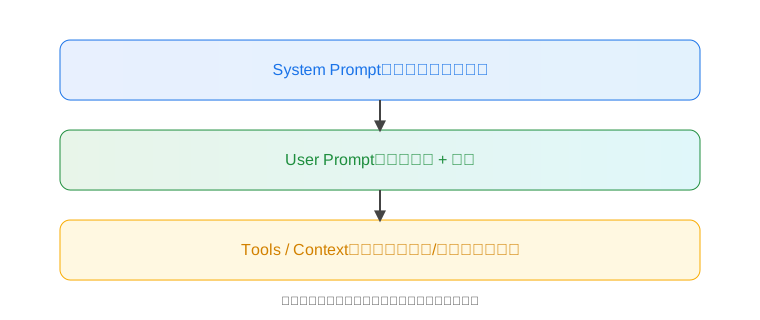
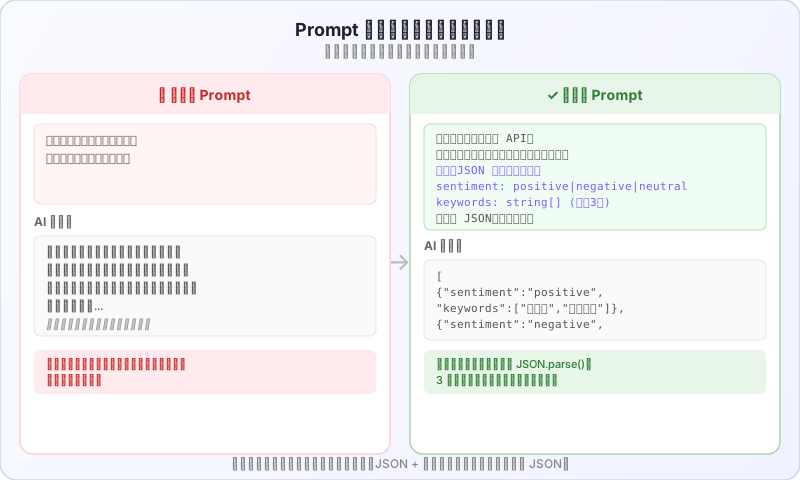
This template looks simple, but it solves 80% of prompt quality problems in real projects. The most common mistake? Only writing the task without specifying output format — then the AI returns something different every time and downstream code can't parse any of it.
The comparison below shows the same task (extracting sentiment and keywords from customer reviews) with a vague prompt vs. a structured prompt:
2) Common Patterns & Examples
- Instructions & rewriting: rewrite in formal tone; compress to a 100-word summary.
- Classification: multi-label or single-label with a predefined label set; require output of labels only.
- Information extraction: pull entities from text with defined field names and types.
- Q&A: answer based on context; reply "Unknown" when the answer isn't there.
- Transformation: format/language conversion (JSON ↔ Markdown).
- Code: explanation, refactoring, unit test generation.
Curated free materials and tools collection
One-stop access to courses, tools, and materials.
3) Example-Driven: Few-shot / CoT / ToT
Once you've got the basic structure down, the next step is learning to "teach" the model with examples. Different example strategies fit different scenarios:
- Few-shot: Provide 2–5 examples with perfectly consistent input/output format — avoid mixing styles. In production, we've found that 3 high-quality examples beat 10 low-quality ones every time. Consistency between examples is what matters.
- Chain of Thought (CoT): Ask for "step-by-step reasoning" — great for complex math/logic. But set a step limit. One gotcha: without a step limit, the model sometimes unrolls 20 reasoning steps, burning tokens like crazy with no quality improvement.
- Tree of Thoughts (ToT): Have the model propose multiple approaches then pick the best one. Good for creative/planning tasks; you can define scoring criteria.
- Self-critique: Model gives an answer, then self-reviews against a checklist and corrects itself. Especially effective for code generation — let the model check its own edge cases.
- ReAct: Think-act-observe loop for tool calling and search workflows.
4) Role & Style Control
With example strategies covered, the next thing is controlling the model's "personality" and boundaries:
- Define a clear role (architect/lawyer/editor), constrain tone (concise/formal/friendly).
- Hard boundaries: no fabrication, no sensitive content, language/length restrictions.
- Output format: specify "output JSON only" and provide an example.
A common production issue: you set a role but no boundaries, so the model starts making stuff up when it doesn't know the answer. Adding one line — "If you're unsure, reply 'I'm not sure, recommend manual verification'" — fixes it.
5) Structured Output & Validation
This part is especially important for AI engineers — because your prompt output usually gets parsed by code, not read by humans.
- JSON Mode: OpenAI
response_format={"type":"json_object"}; or demonstrate with examples in the prompt. - Validation: Check against a JSON schema; on failure, ask the model to "fix only the structure and retry." In production, we cap at 3 retries — if it fails 3 times, the prompt itself needs work, not more retries.
- Tables: Specify headers and field meanings to prevent freestyling.
6) Constraints & Anti-Hallucination
Structured output handles formatting, but model "hallucination" (making up facts) needs separate treatment:
- Source boundary: state "answer only based on the provided context"; if not found, return "Not found in the provided context."
- Citation requirement: include snippet numbers/line numbers in answers for traceability.
- Fact-checking: require the model to list evidence first, then give the conclusion.
- Negative instructions: explicitly state "don't answer questions unrelated to the task" and "don't fabricate citations."
From real testing: the single instruction "answer only based on the provided context" cuts hallucination rates by over 60%. But when context gets too long (50K+ tokens), the model's attention scatters — that's when you need retrieval to shorten the context.
7) Iteration & Debugging Tips
Writing the prompt is just the beginning. Getting it to actually work well is the real craft.
- Shrink step size: first ask the model for "approach/steps," then have it write the final result.
- A/B prompts: compare two prompts on output quality and token cost, pick the better one.
- Prompt layering: system handles principles; user handles the task; assistant handles history.
- Observability: log prompt, model, temperature, tokens for replay and optimization.
- Versioning: save prompt version numbers and sample output screenshots for easy rollback.

One trap we see constantly: people iterate on prompts without version control, spend an hour tweaking, then realize the previous version was actually better — but it's gone. Use Git for your prompt files. Write down what changed and why.
8) Code & Reasoning Prompts
Switching from general use to code-specific scenarios, there are a few special considerations:
- Prerequisites: specify language/version/dependencies/platform. Skip this and the model might give you Python 2 syntax or use a library you don't have installed.
- Test-first generation: ask for test cases before implementation. This ordering matters — writing tests first helps the model understand your requirements more accurately.
- Debugging: provide the error log and ask for "reproduction steps + suspected cause + direct patch."
- Safety net: limit the scope of changes (e.g., "only modify the function body, don't touch anything else").
9) Multi-Turn Conversations & State
Once you've nailed single-turn prompts, multi-turn conversations are the next challenge:
- Keep critical constraints in system, sent every turn; only retain essential info in history to avoid bloat.
- Re-declare: when topics shift, restate role and output format.
- Stickiness checks: occasionally ask the model to restate its current constraints to prevent drift. In long conversations (20+ turns), the model easily "forgets" the original system instructions — periodic re-declaration helps a lot.
- Thread ID: use
conversation_idor traceId to correlate logs for reproduction.
10) Quality Evaluation
How do you know if your prompt is good enough? Manually eyeballing a few outputs won't cut it.
- Manual evaluation dimensions: relevance, completeness, factual accuracy, format, conciseness.
- Automation: prepare a test set, write check scripts to verify format/keywords/citations.
- Negative samples: test "should refuse" scenarios to prevent unauthorized output. Many people skip this, then users find creative ways to bypass restrictions after launch.
- Example check script (pseudocode):
const cases = loadCases(); // {input, expectedKeys, allowCitations}
for (const c of cases) {
	const out = await callModel(c.input);
	assert(hasKeys(out, c.expectedKeys));
	if (c.allowCitations) assert(hasCitations(out));
	assert(!containsBanned(out));
}
11) Common Pitfalls & How to Avoid Them
These are problems we see over and over in teaching and real projects:
- Prompt too long: Trim the context, avoid hitting limits; use summaries or retrieval when necessary. We've seen people dump an entire document in, then their token bill comes in 10x higher than expected.
- Vague requirements: Add input format and boundary conditions. "Write me a summary" and "Compress this 500-word meeting transcript to under 100 words, keeping key decisions and action items" produce wildly different quality.
- Freeform output: You must specify format, or the model will wander off topic.
- Language mixing: Explicitly state "respond in Chinese/English only." Without this in multilingual prompts, the model might mix languages.
12) Practice Exercises
Theory's done — time to get your hands dirty. These three exercises cover the most common scenarios:
- Write a "requirements clarification prompt": input is a vague requirement, output is a list of clarifying questions (JSON).
- Write a "code review prompt": input is code + error log, output is reproduction steps, suspected cause, and patch recommendation.
- Write a "citation-based Q&A prompt": given context with numbered sections, answers must include citation numbers.
Run each exercise at least 3 times and check if the output is consistent — if it isn't, your prompt constraints aren't tight enough and need more iteration.
📚 Related resources
❓ Common questions
Open a question to review the practical answer.
If my prompt outputs are messy or inconsistent, is there a template I can copy?
Use a six-section structure: [role/style] + [task] + [input constraints] + [output format] + [boundaries] + [examples]. That template fixes about 80% of prompt-quality issues. The classic failure is writing only the task and no output format, so the model returns a different shape every call and downstream parsers explode. Specify "output JSON only" plus a schema example and it stabilises immediately.
Which should I use — few-shot, CoT, ToT, self-critique or ReAct?
Few-shot for fixed output formats — 2-5 consistent examples (three high-quality beats ten mediocre). CoT for heavy reasoning, but cap the steps or tokens spike. ToT for creative or planning work where you need several candidates ranked. Self-critique for code generation — make the model scan its own edge cases. ReAct for tool-calling or search loops. Pick by task, do not stack them all.
How do I reduce hallucination — the model making things up?
Three things: (1) say "answer only from the supplied context, otherwise return 'not found in context'" — that single line cuts hallucination ~60%; (2) require citation IDs like [1][2]; (3) make the model list evidence before stating the conclusion. Past 50K tokens, attention thins out — shorten with retrieval first. Add a fallback line: "if unsure, reply 'I'm not sure, please confirm with a human'".
What do I do when JSON output keeps coming back malformed?
Three layers of defence: (1) enable OpenAI's JSON Mode (`response_format={"type":"json_object"}`) or paste a schema example into the prompt; (2) validate the response with a JSON schema; (3) on failure, prompt the model to "repair structure only" and retry up to three times. If three retries still fail, the prompt itself is broken — fix the prompt, do not loop.
In multi-turn chats the model drifts and forgets the original instructions — how do I fix it?
Drift kicks in around 20+ turns. Fixes: (1) keep critical constraints in `system` and resend every call, leave only necessary history in user/assistant; (2) re-declare role and output format whenever the topic shifts; (3) occasionally make the model restate the current constraints as a stickiness check; (4) carry a conversation_id / traceId in logs for replay. Trim history aggressively or token bloat makes drift worse.