
LLM API Basics
Large Language Model (LLM) APIs are the foundation of AI engineering. This chapter takes you from account setup and environment config through robust API calls, cost management, security, and observability — everything you need to get started.
1) Ecosystem Overview & Selection
| API | Strengths | Best For |
|---|---|---|
| OpenAI (GPT-5/4.1/4o) | Mature ecosystem, broad compatibility | General chat, code, product integration |
| Anthropic Claude 3 | Long context, strong safety | Document processing, code review |
| Google Gemini 3 (Pro/Flash) | Native multimodal | Mixed image/video/document input |
Selection advice: Default to OpenAI for general use; long docs or safety-critical work → Claude; multimodal → Gemini 3 Pro/Flash; tight budget → start with a smaller model.
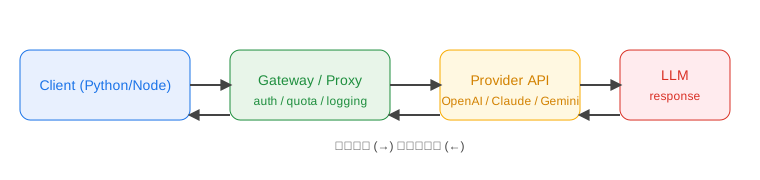
Diagram: LLM API Call Flow
2) Environment & Key Management
- Create and save API keys: OpenAI [platform.openai.com], Claude [console.anthropic.com], Gemini [ai.google.dev].
- Put keys in
.env— don't hardcode them or expose them in frontend code:
OPENAI_API_KEY=sk-xxx
ANTHROPIC_API_KEY=sk-ant-xxx
GEMINI_API_KEY=xxx
- Install SDKs (common ones):
- Python:
pip install openai anthropic google-generativeai - Node:
npm i openai @anthropic-ai/sdk @google/generative-ai
- Python:
- Network & timeouts: you may need a proxy in some regions; set client timeout to 30s+, with reconnection if needed.
3) Your First API Call (Python & Node)
Python (OpenAI):
from openai import OpenAI
import os

client = OpenAI(api_key=os.getenv("OPENAI_API_KEY"))
messages = [
    {"role": "system", "content": "You are a concise technical assistant"},
    {"role": "user", "content": "Explain what an API is in one sentence"}
]
resp = client.chat.completions.create(model="gpt-5", messages=messages)
print(resp.choices[0].message.content)
print("tokens:", resp.usage.total_tokens)
Node (Claude):
import Anthropic from '@anthropic-ai/sdk';

const client = new Anthropic({ apiKey: process.env.ANTHROPIC_API_KEY });
const resp = await client.messages.create({
	model: 'claude-3-haiku-20240307',
	system: 'You are a concise technical assistant',
	messages: [{ role: 'user', content: 'Explain what an API is in one sentence' }],
	max_tokens: 200
});
console.log(resp.content[0].text);
console.log('tokens:', resp.usage.input_tokens + resp.usage.output_tokens);
Multi-turn conversations: maintain a messages/history array on the client side and send the full context with each turn.
4) Key Parameters & Tuning
- model: Start with the latest "small" model (cheaper), upgrade when you need better quality.
- temperature / top_p: Controls randomness. 0–0.7 is common; bump higher for creative tasks.
- max_tokens: Caps output length — prevents runaway billing.
- presence_penalty / frequency_penalty: Reduce or increase repetition.
- stop: Define stop sequences to control output format.
- System prompt: Use the system role to set persona and style for consistent output.
5) Response Formatting & Structured Output
- Request JSON output: specify the format explicitly in your prompt, or use vendor JSON Mode (e.g., OpenAI
response_format={"type":"json_object"}). - Validate output: check against a JSON schema; retry or degrade gracefully on failure.
- Tables/lists: specify field names, ordering, and examples to keep things on track.
6) Streaming & UX
- Enable
streamfor incremental delivery:- OpenAI Python:
stream=True, iterate withfor chunk in resp - Node: iterate over AsyncIterable, concatenate in real time
- OpenAI Python:
- Frontend/terminal tips: append character by character, keep cursor visible, support cancellation.
7) Error Handling & Reliability
- Common errors: 401 (key/permissions), 429 (rate limit/quota), 5xx (server-side).
- Retry strategy: exponential backoff (e.g., 0.5s, 1s, 2s...), cap max retries; for 4xx, check config first.
- Timeouts & cancellation: set HTTP client timeouts; provide abort for long streams.
- Logging: include request ID, model, latency, token usage; send to APM when needed.
8) Cost & Quota Management
- Token basics: input and output are billed separately; control conversation length, trim history.
- Cost-saving strategies: prefer smaller models; compress context (summaries / top-k retrieval); set
max_tokens. - Monitoring: watch each platform's quota/usage dashboard; alert on anomalous usage.
9) Security & Compliance
- Never expose keys in frontend code; use a backend proxy/gateway for unified auth, rate limiting, and auditing.
- Data minimization: send as little PII as possible, redact when necessary; don't send sensitive files directly to models.
- Content safety: use vendor safety filters (e.g., Gemini safety levels) or add secondary checks at the gateway.
- Access control: separate keys by environment (dev/uat/prod), least privilege, rotate regularly.
10) Engineering Abstractions & Multi-Provider Setup
- Abstract the call layer: unify request format, logging, and error codes so you can swap models or providers easily.
- Multi-provider fallback: auto-switch to a secondary model on failure; for critical paths, race multiple providers and take the fastest.
- Observability: track model name, latency, success rate, and tokens on a dashboard.
11) Performance & Latency Optimization
- Concurrency & queuing: use a queue or token bucket for high-concurrency entrypoints to avoid 429s; rate-limit per user.
- Request templating: template common system prompts and formats to avoid repeated string concatenation.
- Context compression: summarize history, include only necessary fields; for long documents, retrieve relevant segments first.
- Caching: cache deterministic answers (FAQs, static knowledge) upstream and return on hit.
- Transport optimization: enable HTTP/2; strip unnecessary headers; avoid giant JSON payloads.
12) Local Debugging & Mocking
- Before using a real key, validate locally with a minimal prompt.
- Mocking: for frontend/integration tests, use a mock service with fixed responses to avoid burning quota.
- Quick debugging: print the full request (redacted) and response headers to troubleshoot rate-limiting or region issues.
13) Production Readiness Checklist
- Key management: separate by environment, revocable, rotatable; never expose in frontend.
- Error handling: clear messages for 401/403/429/5xx; retry and timeout strategies configured.
- Monitoring: success rate, P95 latency, token cost, rate-limit hits, fallback count.
- Security: input redaction, output review; logs don't leak sensitive user content.
- Gradual rollout: new models/params go through canary or small-traffic A/B testing to compare quality and cost.
14) Exercises
- Write a script that accepts user input, calls an LLM, and supports switching
temperatureand model. - Add 429/5xx retry with exponential backoff + 30s timeout, and print token usage / cost estimate.
- Enable streaming output that displays incremental text in the terminal; auto-fallback to non-streaming on failure.
📚 Related resources
❓ Common questions
Open a question to review the practical answer.
Which LLM API should I start with — OpenAI, Claude, or Gemini?
Pick OpenAI (GPT-5 / 4.1 / 4o) for general chat, code and product embedding — best ecosystem. Pick Claude 3 for long-document and code-review work — long context plus tighter safety. Pick Gemini 3 Pro/Flash for image/video/doc mixed input — native multimodal. On a tight budget, start with each vendor's small model and only upgrade when quality demands it.
Where should I store API keys? Can I call them from the frontend?
Never expose keys from the frontend. Put OPENAI_API_KEY / ANTHROPIC_API_KEY / GEMINI_API_KEY in `.env` and route every call through a backend gateway that handles auth, rate limiting and audit. Split keys per environment (dev/uat/prod), grant least privilege, and rotate on schedule. Frontend talks to your backend, which talks to the model vendor.
How do I handle 429 rate limit errors? What retry strategy should I use?
Use exponential backoff — 0.5s → 1s → 2s → 4s, capped at 3-5 attempts. Branch by error type: 401/403 means key/permission, do not retry; 429 means rate limit, back off then retry; 5xx is server-side, retry but also fall back to a secondary model. Set HTTP timeout above 30s and log request ID, model, latency and token usage on every call.
What values should I set for max_tokens and temperature?
Always set max_tokens — leaving it unbounded burns budget. Use 200-2000 depending on the task. For temperature, 0-0.7 covers most jobs (0 for deterministic, 0.7 for creative). Leave top_p at default unless you really know why; do not crank both at once. Stabilise output by pinning role and tone in `system`, and use `stop` sequences to enforce format.
How do I enable streaming output, and what should I watch for on the frontend?
In OpenAI Python set `stream=True` and iterate `for chunk in resp`; in Node iterate the AsyncIterable and append chunks in real time. The frontend needs three things: token-by-token append, a live cursor, and a cancel button. On stream errors, fall back to non-streaming so the user does not stall. HTTP/2 with reasonably small chunks gives the smoothest UX.