
Data Governance & Privacy
When building LLM features at a company, the thing that gets overlooked most isn't model quality -- it's data flow.
Many demos work because they default to "send everything to the model." And many projects stall at launch because nobody can explain where data comes from, where it goes, or how long it stays when compliance review comes knocking.
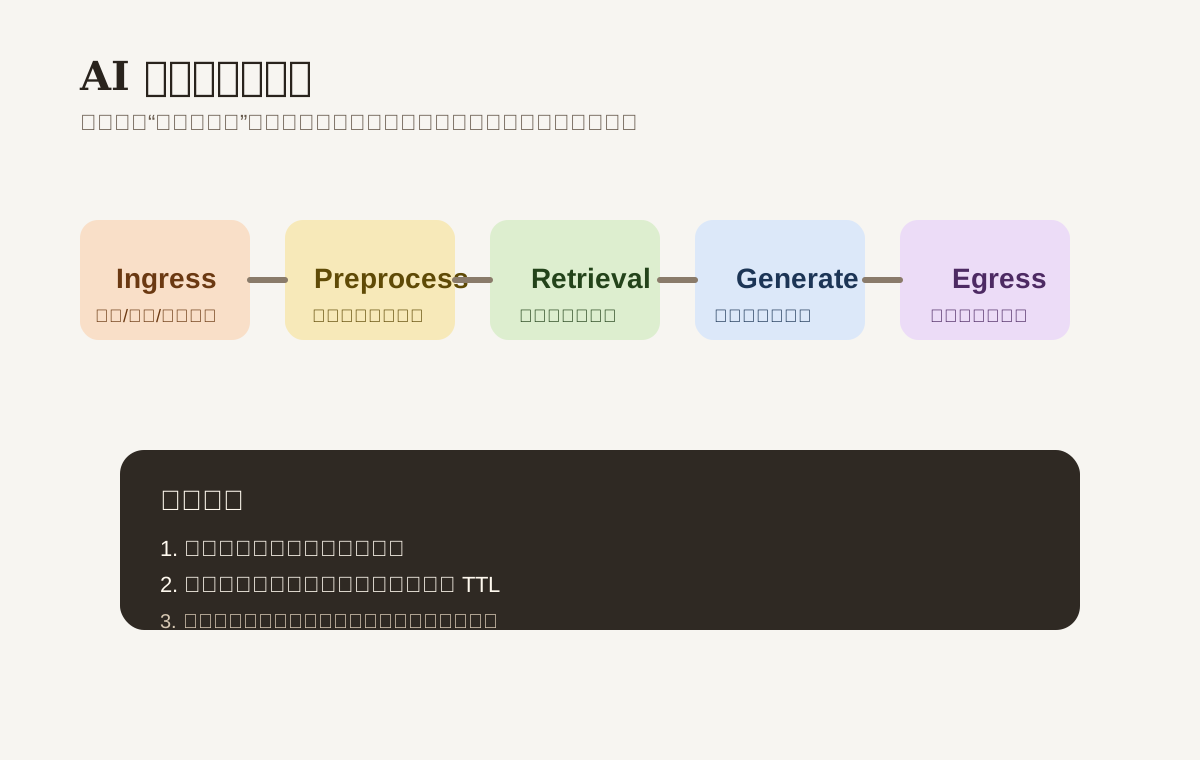
What this chapter solves
You need to be able to answer these questions:
- What data is actually being sent with this model call?
- Which data must be redacted, and which data shouldn't be uploaded at all?
- How long are temporary files, chat logs, and retrieval snippets kept?
- Can data from different regions or different customers be stored together?
- If something goes wrong, can you trace who accessed what?
If these questions don't have clear answers, your product won't make it into enterprise scenarios no matter how smart it is.
Three bottom-line principles
1. Minimum necessary
Only send the model data that's required to complete the task.
For example, when summarizing meeting notes, you typically don't need the entire CRM record, the user's ID number, or payment details tagging along.
2. Purpose limitation
Data is only used for the currently declared task.
Data uploaded today for document summarization shouldn't automatically become a training sample or long-term memory.
3. Environment isolation
Secrets, logs, and storage across dev, test, and production must be separated.
Don't copy production conversations into a local prompt playground for debugging.
A complete data handling pipeline
| Stage | What to do | Common mistake |
|---|---|---|
| Ingress | Validate file type, size, source | Accept everything, figure it out later |
| Preprocess | Redact, classify, chunk | Send raw text straight to the model |
| Retrieval | Filter data by tenant and permission | Retrieval scope too broad |
| Generation | Only provide context needed for current task | Stuff entire history into context |
| Egress | Redact output, content review | Return raw snippets directly to users |
| Storage | Define TTL, encrypt, audit | Keep temporary files forever |
Data classification needs to be actionable, not just a slide
A good-enough classification:
| Data level | Examples | Handling guidance |
|---|---|---|
| Public | Website copy, public FAQ | Can be used directly in retrieval |
| Internal | Internal SOPs, training materials | Control access scope, maintain audit trail |
| Confidential | Contracts, quotes, business reports | Strict permission control, restrict outbound |
| Sensitive / PII | Phone numbers, emails, ID numbers, addresses | Redact by default, don't send to model directly |
| Secret | API keys, database passwords, private keys | Never enters prompts or logs |
Classification isn't about looking professional -- it's about deciding whether each data type can be uploaded, cached, logged, and displayed.
Redaction & Preprocessing
Common fields that need handling:
- Phone numbers, emails, addresses
- User IDs, order numbers, account numbers
- Banking info, identity documents
- Internal project codenames, client lists
Make redaction a standalone preprocessing step rather than scattering it across business logic.
That way you can upgrade rules uniformly and do tenant-level configuration more easily.
Storage & Retention Strategy
What shouldn't be retained long-term
- Temporary audio/video transcript uploads
- Intermediate reasoning drafts
- Debug-phase prompts / responses
- Failure logs containing sensitive context
What can be retained, with limits
- Structured task results
- Redacted audit logs
- Model call metadata
- User-authorized conversation summaries
A retention policy you can adopt directly:
| Data type | Suggested TTL |
|---|---|
| Temporary files | 24 hours to 7 days |
| Intermediate parse results | 1 to 3 days |
| Audit logs | Per compliance requirements |
| Business results | Managed by the business system, not model cache |
Region & Tenant Isolation
A common trap in enterprise projects: "logically separated by tenant, physically mixed together."
A more reliable approach at minimum:
- All retrieval and database access includes
tenant_id - Vector stores or indexes are logically isolated by tenant
- Different regions route to different storage and provider endpoints
- Certain customers can disable training, log retention, or external model calls
If your system serves multiple countries or enterprise customers, decide this at architecture design time. Don't retrofit it after you've signed the contract.
Third-Party Model & Tool Integration
When connecting providers, it's not just about whether the API works. You also need to confirm:
- Whether data training opt-out is supported
- Default log retention duration
- Whether a DPA or enterprise agreement is signed
- Whether data is processed across regions
- Whether tool calling and logs can leak raw content
Self-hosted models aren't inherently secure either. You're still responsible for:
- Image and dependency updates
- Network egress control
- Storage encryption
- Audit and patch cadence
Audit & Access Control
At minimum, log these:
- Who accessed what data
- When the call was initiated
- Which model and which version config was used
- Whether redaction or security policy was triggered
- Whether high-risk tools were called
But be aware: audit logs themselves can become sensitive data sources.
So "traceable" doesn't mean "store all raw content verbatim."
Minimum launch checklist
- Classify data first, then decide if it can go to the model
- Redact sensitive fields before they enter the model
- Set TTL on temporary data
- Isolate retrieval and tool access by tenant
- Audit logs record actions, don't blindly store raw content
- Clarify the provider's retention and training policies
Hands-on Exercise
Take one of your AI workflows and audit it:
- Map the entire path from user input to model output
- Mark where PII is touched
- Mark which data doesn't actually need to be uploaded
- Write a retention duration for each data category
Once you've done this, your "data governance" actually lives in the system instead of just on a slide.
📚 Related resources
❓ Common questions
Open a question to review the practical answer.
What are the three baseline principles of AI data governance?
Minimum necessary, purpose limitation, environment isolation. Minimum necessary: send the model only the data the task requires (a meeting summary does not need the full CRM record + national ID + payment details). Purpose limitation: data uploaded today for summarization must not auto-flow into training or long-term memory. Environment isolation: dev / test / production secrets, logs, and storage must be separated — never copy prod conversations into your local playground.
How should I structure data classification so it is enforceable?
Five tiers cover most cases: Public (marketing copy, public FAQ — direct retrieval OK), Internal (SOPs, training material — scope-controlled + audited), Confidential (contracts, pricing, reports — strict permission + no external sharing), Sensitive/PII (phone, email, ID, address — masked by default, never raw to the model), Secret (API keys, DB passwords, private keys — banned from prompts and logs). Classification exists to decide whether each tier can be uploaded, cached, logged, or shown — not to look good on a slide.
Which AI-related data should not be retained long-term?
Four short-TTL categories: ephemeral uploaded audio/video transcripts (24h–7d), intermediate reasoning drafts (1–3d), debug-stage prompts and responses, and failure logs with sensitive context. Retainable but capped: structured task results, de-identified audit logs, model call metadata, and user-authorized conversation summaries.
Beyond "the API works," what must I confirm with a third-party LLM provider?
Five items: can data training be disabled, what is the default log retention, is there a DPA or enterprise agreement, is data processed cross-region, and do tool calls and logs leak raw content. Self-hosted is not automatically safer either — you now own image and dependency updates, network egress control, storage encryption, and audit/patch cadence.
How do I make tenant isolation more than "logically separated"?
Four hard requirements: every retrieval and database access carries a tenant_id, vector stores or indexes are logically partitioned per tenant, different regions route to different storage and providers, and certain customers get a switch to disable training / log retention / external model calls. Decide this at architecture time — retrofitting after the contract is signed is painful.