
AI Personal & Team Knowledge Base
Manage prompts, SOPs, and assets with AI — build a searchable repository
Manage prompts, SOPs, and assets with AI — build a searchable repository
A reusable work template with realistic input, a defined output format and a human review point.
Run one real task, verify the critical facts and record the before-and-after time.
Prompts, emails, meeting summaries, SOPs that AI produces — if they just sit in chat history, their value drops fast. You're better off treating them as knowledge assets. Otherwise, the time you saved today gets burned next week on "where did that template go?"
Teams that are actually efficient aren't the ones generating the most with AI. They're the ones who persist the best results.
Why You Should Turn AI Output into a Knowledge Base
Every company hits the same wall when they first start using AI:
- Everyone's writing prompts in their own chat windows
- Good templates stay hidden
- Bad templates never get retired
- New hires start from scratch
This leads to two outcomes:
- Lots of output, but nothing reusable
- Same task, wildly different quality across teams
So this page isn't about "storing files." It's about building a searchable, reusable, iterable knowledge workflow.
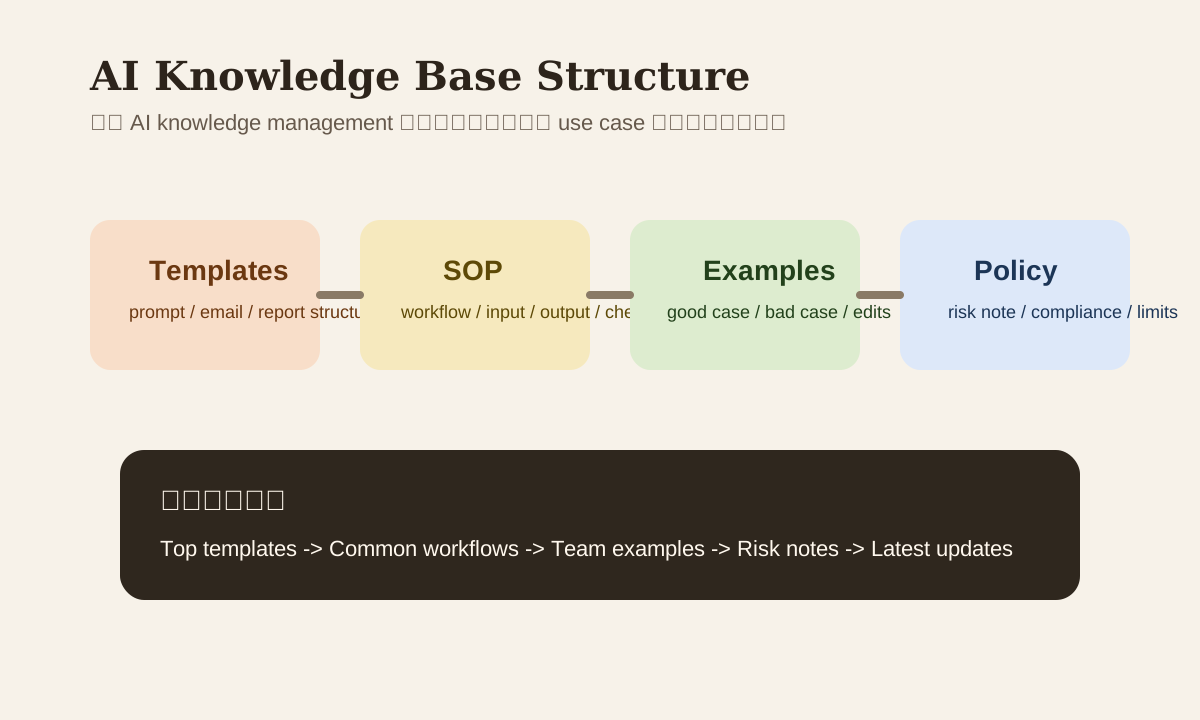
The Most Practical KB Structure
Split into at least 4 layers:
| Layer | What goes here | Example |
|---|---|---|
| Template | Reusable prompts, emails, report outlines | Follow-up email template |
| SOP | Step-by-step execution guides | meeting notes -> summary -> follow-up workflow |
| Example | Success and failure samples | Good client reply vs. bad version |
| Policy | What's allowed, what data can't be sent | AI security / compliance notes |
If everything's dumped into a single Notion page, search will be terrible and maintenance will spiral.
Minimum Fields for Each Template
A template that stays useful long-term needs this metadata:
| Field | Why you need it |
|---|---|
| Use case | So people know when to use it |
| Input requirement | Prevents missing key info |
| Output format | Ensures results are copy-paste ready |
| Tone / style | Keeps brand and team voice consistent |
| Risk note | Flags customer, contract, PII concerns |
| Last updated | Stops people from using stale versions |
Example template card
Title: Client follow-up email
Use case: Follow up 3-5 days after sending a quote with no reply
Input: Client role, product name, last contact date, CTA
Output: concise email, professional tone
Risk note: Don't include price commitments or unconfirmed delivery dates
Last updated: 2026-03-11
Tool Selection: Start Cheap, Then Consider RAG
Not every team needs RAG from day one.
Stage 1: Use existing KB tools first
- Notion
- Confluence
- Yuque
- Google Drive + docs index
Good for:
- Small teams
- Manageable content volume
- Main need is search and reuse
Stage 2: Consider AI search / RAG later
When you start hitting these problems, then invest in something heavier:
- Too many docs, nobody maintains tags
- People want to ask questions instead of browsing pages
- Need to retrieve templates, SOPs, and examples together
At that point, export your KB to Markdown or standard docs and connect to enterprise search or a RAG workflow.
Organize by Use Case, Not by Folder
Many KBs start organized by "department" or "file type." Looks clean, but search is slow. Organize by use case instead:
- email communication
- meeting follow-up
- report drafting
- customer support
- vendor review
- data clean-up
Most people searching for knowledge are thinking "what do I need to do," not "which department owns this file."
Keep Good Samples AND Bad Samples
Only storing best practices isn't enough. For AI content, failure examples are often more educational:
- Prompt too short, output too vague
- No tone guide, wrong voice
- No audience specified, content doesn't fit the reader
- No redaction, sensitive info leaked into the tool
Each high-frequency template should have at minimum:
- 1 good example
- 1 bad example
- 1 improvement note
This noticeably reduces the chance of new team members misusing templates.
Monthly Review Is Critical
A knowledge base doesn't end at creation. If nobody reviews it for 3 months, you'll see:
- Templates that are outdated
- Broken links
- Brand tone changed but old templates still in use
- Old prompts referencing deprecated tools or models
A workable monthly review checklist:
- Delete or archive low-quality templates
- Flag high-traffic templates
- Update expired tool names, processes, and links
- Check for new failure cases worth documenting
A Simple, Actionable Entry Point Design
AI Knowledge Hub
  -> Top templates
  -> Common workflows
  -> Team-specific examples
  -> Risk / policy notes
  -> Latest updates
Don't make the entry point a "document warehouse homepage." Make it a "most common tasks homepage." This kind of structure is also better for SEO — clearer page intent, more stable content hierarchy.
Practice
Pick your 2 most-used AI templates and organize them into your KB with this format:
- use case
- input requirement
- output format
- risk note
- good example / bad example
Once you do this, your team's AI efficiency will usually beat continuing to bookmark scattered prompts.