
Universal Prompt Framework
Office-ready template: role + goal + context + constraints + output format
Office-ready template: role + goal + context + constraints + output format
A reusable work template with realistic input, a defined output format and a human review point.
Run one real task, verify the critical facts and record the before-and-after time.
You probably do know what you want. The problem is that the audience, facts, boundaries, and definition of done are still in your head when you ask AI to produce it. The result sounds fluent, but needs a full rewrite before anyone can use it.
Office prompts do not need special terminology. Make six things explicit: Role / Goal / Background / Constraints / Output format / Examples.
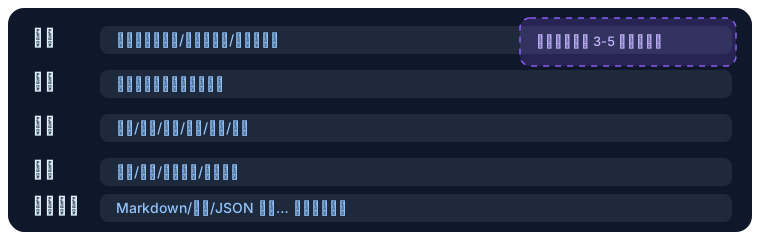
1) Universal Skeleton (Just Replace the Placeholders)
You are [role/audience] (example: product manager / technical writer / review expert).
Goal: [What problem to solve? One sentence].
Background: [Business / project / subject / reader / tone / length / language].
Constraints: [Must / must not / don't fabricate / cite sources].
Output format: [Heading / summary / table / Markdown / JSON], example: ...
If information is insufficient, ask 3-5 clarifying questions before continuing.
Quick Reference Card
Role: ...
Task: ...
Input context: ...
Forbidden: fabrication / outputting sensitive info
Output: Markdown / table / JSON example ...
If info is missing, ask first
2) High-Frequency Office Templates (Copy-Ready)
-
Email drafting/rewriting Include recipient, your position, and deadline in the background. Output example:
Subject: ... \n Body: 1) Opening 2) Background 3) Request 4) Deadline 5) Thanks -
Meeting notes
You are a meeting secretary. Based on the transcript, output:
1) Topic / time / participants (table)
2) Key decisions / open questions
3) Action items (owner / deadline / risks)
Only keep facts. Don't fabricate.
-
PPT/report outline Start with a 3-line executive summary, then a 6-8 page outline (page title + key points + required data/assets).
-
Translation & localization Provide source text + target audience, output "translation + three title options + tone notes." Avoid literal translation.
3) Iteration Rhythm (Framework First, Details Later)
- Get structure first: Ask for an outline/key points, then have AI fill in details.
- Converge gradually: Each round, only change 1-2 dimensions (tone / length / audience).
- Self-check prompt: End with "give 3 self-check items to confirm the output meets the goal."
- Multi-turn clarification: Have AI proactively ask questions. When info is missing, require it to label assumptions.
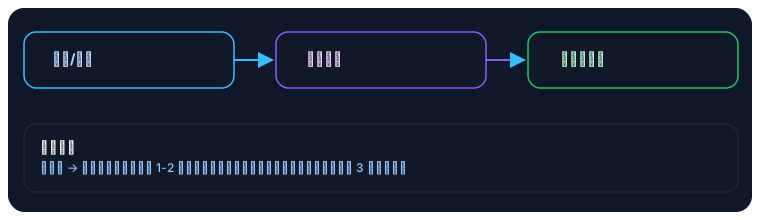
4) Anti-Hallucination & Traceability
- Require "cite source / filename / timestamp" displayed as a Markdown list.
- Ban fabrication:
If you cannot confirm, output "unknown" — do not make things up. - For data/number tasks: require "show calculation process / formula" with intermediate results.
5) Structured Output & Tool Calls (Advanced)
- For tables/JSON: provide a schema example and require "self-check field completeness before output."
- For automation integration:
- Multimodal: with screenshots / tables / long PDFs, prompt "extract key info first, then generate results" to avoid missing important details.
6) Personal Template Library (Recommended)
Save your top 5-8 high-frequency scenarios as snippets: email, meeting notes, outlines, research summaries, translations, spreadsheet formulas, proofreading. Use text expansion / shortcut tools (TextExpander, Raycast Snippets, etc.) for one-click insertion — cuts down on repetitive typing.
7) Turn the Work into a Brief First
A weak prompt is often a weak task definition, not a wording problem. Write the requirements into this table before adjusting the prompt:
| Brief field | Question to answer | Example |
|---|---|---|
| User | Who will read or use the result? | Operations manager without a technical background |
| Decision | What should the result help them decide? | Whether to approve next week's launch |
| Evidence | Which materials can support the answer? | Test report, project plan, meeting record |
| Boundary | What must not be guessed or promised? | Launch date is not approved |
| Deliverable | What must be produced? | One-page status brief |
| Done | When is it usable? | Manager can decide within three minutes |
If the decision and evidence fields are empty, do not ask AI for the final deliverable. It can only fill the gaps with plausible language.
8) Worked Example: Turn Scattered Messages into a Sendable Update
Suppose these are the only notes available:
Login is complete. Payment testing still has two issues. Final designs arrive Thursday.
The director asked whether we can launch next week. Engineering said maybe, but will not commit yet.
“Write a project update” invites AI to convert “maybe” into a confident date. Build the prompt from the brief instead:
You are a project communication editor. You do not make the launch decision.

Goal: Write a one-page update that helps the operations manager decide whether to approve a launch next week.

Confirmed facts:
- Login is complete
- Payment testing has two unresolved issues; severity is unknown
- Final designs are expected Thursday

Unconfirmed:
- Whether the product will be launch-ready next week
- Whether either payment issue blocks launch

Requirements:
1. Use the sections Complete / Risks / Unknowns / Decision Needed
2. Do not present expected dates as commitments
3. Mark missing owner, date, or severity as "to confirm"
4. End with three questions that must be answered before sending
5. Keep the update under 180 words
This works because it separates facts, unknowns, and decision authority. AI organises the information; it does not approve the launch for the team.
Human Work Before Sending
| AI output field | What a person checks | Fix if it fails |
|---|---|---|
| Complete | A real record supports the claim | Add a test, ticket, or delivery link |
| Risks | Impact and trigger are clear | Ask the owner for severity |
| Unknowns | The answer is genuinely unavailable | Do not let AI infer it |
| Decision needed | Decision-maker and deadline are clear | Rewrite it as one answerable question |
9) When “You Are an Expert” Adds Nothing
A role is not a required spell. Direct instructions are clearer for these tasks:
- Format conversion: Turn meeting notes into owner, deadline, and status columns.
- Item-by-item check: Compare contract terms with the approval checklist and report differences only.
- Extraction: Extract invoice number, date, and amount; mark unreadable fields.
Use a role only when it changes the evaluation lens, such as “review from a procurement manager's risk perspective.” Avoid decorative roles such as “world-class expert.”
10) Use a Scorecard Instead of Asking “Is This Good?”
AI saying it followed the instructions is not evidence. Check observable criteria:
| Dimension | 0 points | 1 point | 2 points |
|---|---|---|---|
| Facts | Fabricated or misread | Correct but untraceable | Correct and traceable |
| Action | No next step | Action lacks owner or time | Action, owner, and time are present |
| Boundary | Unknowns become facts | Some ambiguous wording | Facts, unknowns, and assumptions are separate |
| Format | Cannot be used directly | Needs significant cleanup | Matches the requested template |
| Audience | Language is mismatched | Understandable | Detail level fits the reader |
Below 8 out of 10, stop asking for “more professional” rewrites. Return to the brief and add evidence, audience, or completion criteria.
11) Failure Modes and Fixes
| Symptom | Root cause | Fix |
|---|---|---|
| Results change every run | Output format is vague | Specify fields, order, and one example |
| Correct but empty-sounding content | No evidence was provided | Add source material and require citations |
| AI keeps asking questions | The brief lacks critical inputs | Answer high-impact questions; mark the rest unknown |
| Every revision gets longer | Too many dimensions change together | Change only tone, length, or structure in one round |
| Result cannot enter the workflow | Output is designed only for reading | Use table, JSON, or task-system fields |
| Private data is pasted directly | No input safety gate | Redact first and confirm the tool's data boundary |
12) Practice: Repair a Prompt You Need Today
- Choose one real email, meeting, presentation, or spreadsheet task.
- Fill the six-field brief before opening an AI tool.
- Generate version one using only the supplied facts.
- Score it out of 10 and identify the weakest dimension.
- Add only the input needed for that dimension, then generate version two.
Completion Criteria
- A real colleague could use the deliverable; it is not a demo
- Every number, date, name, and commitment has a source
- Unknown information is labelled, not filled by AI
- The format can enter an email, document, or task system
- You can explain why version two is more reliable than version one
13) Chapter Deliverable
Save a reusable Office Prompt Brief containing the real task, evidence, boundaries, output schema, scorecard, and final version. Continue to AI Email and IM Communication and apply the method to a high-frequency office task.