
AI Security, Compliance & Quality
Privacy, sensitive data, fact-checking, and review checklists for AI usage
Privacy, sensitive data, fact-checking, and review checklists for AI usage
A reusable work template with realistic input, a defined output format and a human review point.
Run one real task, verify the critical facts and record the before-and-after time.
Don't think of AI office workflows as "install ChatGPT and efficiency goes up automatically." In real teams, the biggest incidents aren't caused by bad prompts — they're caused by wrong data getting sent, permissions opened too wide, and nobody doing a final check.
One rule to remember: AI can accelerate writing and automation, but it can't take on your security, ethics, and compliance responsibilities.
Why This Page Matters for Both SEO and Real Business
Google is more likely to index and recommend content that "solves real risk problems" rather than pages that discuss concepts vaguely. For AI office users, these search intents are strong:
can ChatGPT handle customer datawhat to watch out for with AI email writinghow to prevent privacy leaks in AI automationoffice AI compliance checklist
So this page isn't about principles — it's a check framework you can plug directly into your workflow.
The 4 Most Common Risk Types
| Risk | Common scenario | Real consequence | Recommended action |
|---|---|---|---|
| Data leak | Pasting client lists, contracts, financial data into public AI | Privacy and business info exposed | Redact first, then decide whether to send |
| Wrong answer | AI writes incorrect quotes, policy explanations, contract summaries | External commitment errors, rework, complaints | Human review required for high-risk content |
| Over-automation | Auto-sending emails, auto-routing tickets, auto-changing status | If the prompt is off, errors happen in bulk | Keep approval gates on critical steps |
| Brand / compliance drift | Output is exaggerated, over-promises, hits industry restrictions | Brand damage, legal risk | Build tone guide and review checklist |
Classify Data First, Then Decide If AI Can Touch It
Many teams get the order wrong:
- Throw stuff at AI
- Results look good
- Only then ask "was it okay to send this data"
The correct order is reversed.
| Data type | Example | OK to send to public AI? |
|---|---|---|
| Public | Website copy, public FAQ, event info | Usually yes |
| Internal | Internal SOPs, weekly reports, training | Cautious — check company policy |
| Confidential | Contracts, quotes, client lists, revenue | Not recommended |
| Sensitive / PII | Phone numbers, emails, addresses, IDs | Default no — redact first |
| Secret | API keys, passwords, financial credentials | Never goes into a prompt |
Simple principle: if this content isn't suitable for a public Slack channel, it probably shouldn't go directly into a public AI chat either.
How to Actually Do Redaction
You don't need a complex system. These steps already put you ahead of most teams:
- Replace names with roles:
Client A,Vendor B - Remove phone, email, account numbers
- Don't paste full contract text — only paste the clause summary you need AI to review
- For number-sensitive content, provide ranges or mock numbers first
Example: bad input
Summarize this client contract and write an email to the other party:
[pastes full contract, contact phone number, payment account]
Example: better input
Summarize the key clauses below and generate an internal review note.

Background:
- SaaS service contract
- Annual fee range: AUD 20k - 30k
- Client info redacted

Focus on:
- SLA
- data retention
- termination clause
Fact-Check Isn't Optional
When AI writes office content, the biggest danger isn't typos — it's "looks professional but is actually wrong."
High-risk content includes:
- Quote explanations
- Contract summaries
- HR / recruiting communications
- Legal, tax, policy interpretations
- External-facing official announcements
Recommended approach
| Output type | Human review required? | Why |
|---|---|---|
| Normal internal notes | Recommended | Lower risk, but could still mislead |
| External email / proposal | Required | Creates external commitments |
| Contract clause summary | Required | AI easily misses or misreads clauses |
| Finance / policy explanation | Required | High error cost |
| Automated batch output | Spot check + rule gates required | One error means bulk errors |
Tone, Brand & Ethics
Many companies don't struggle because the model isn't powerful enough. They struggle because the output style goes off-track:
- Tone too exaggerated
- Wording too advertising-like
- Promises the team can't deliver
- Disrespectful toward sensitive user scenarios
At minimum, prepare a tone guide:
Tone guide:
- professional but direct
- no exaggeration, no manufactured urgency
- don't make commitments the company hasn't confirmed
- clearly mark uncertain info as pending confirmation
These guardrails also help SEO — they keep page and template content more consistent, reducing AI-voice and empty marketing language.
A Real, Implementable Approval Flow
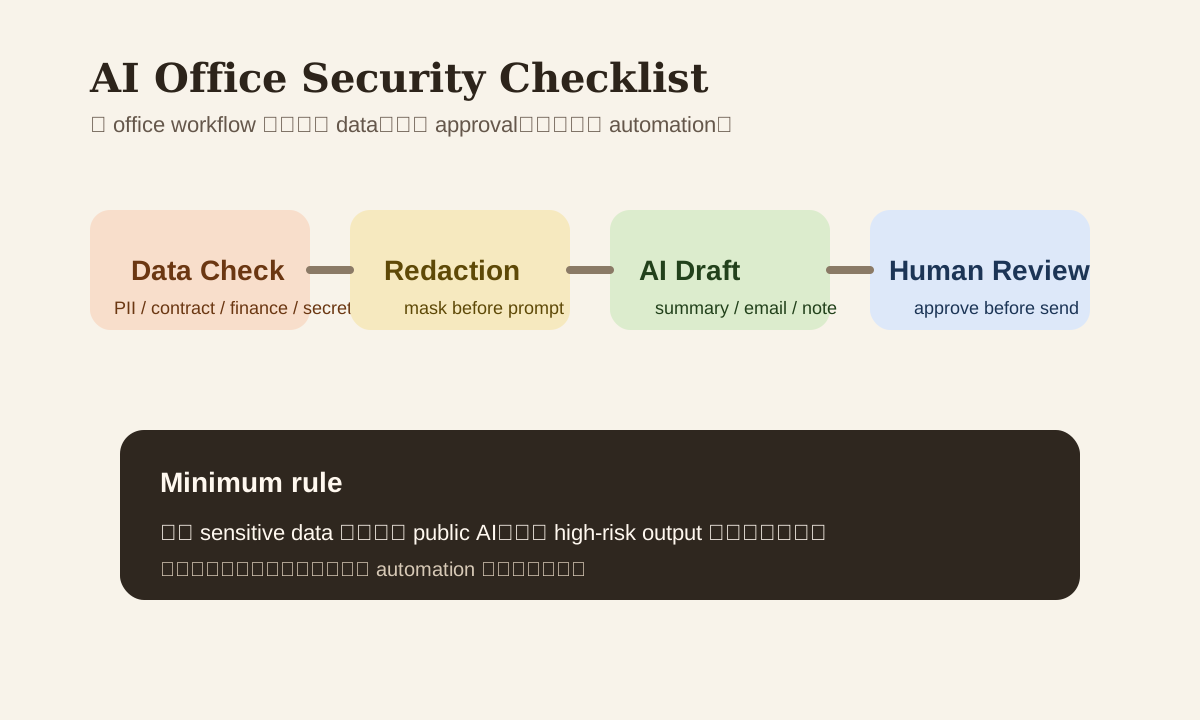
Draft by AI
  -> risk check
  -> sensitive info check
  -> factual review
  -> final human approval
  -> send / publish
If you're already using Zapier, Make, n8n, or an internal workflow system, configure these 4 checkpoints explicitly rather than defaulting to "generate and send."
Minimum Compliance Checklist
- Classify data level first, then decide if it can go to AI.
- Redact PII, contract, and financial content first.
- External output must go through human approval.
- Log which tool was used, which prompt version, and who did final sign-off.
- High-risk flows keep a fallback to human.
Common Mistakes
| Mistake | Why it's dangerous | Better Approach |
|---|---|---|
| "I'm just having AI polish it a bit" | Original text might contain sensitive data | Redact first, then polish |
| "AI wrote it well enough, just send it" | Fluent doesn't mean correct | Fact-check first |
| "We bought enterprise plan, so we're safe" | Plan upgrade doesn't equal process compliance | Still need permissions, logs, review |
| "More automation = more efficiency" | Batch errors amplify damage | Keep human gates on high-risk steps |
Practice
Take your most recent AI office workflow and do a quick audit:
- Write down what the input data is
- Flag which fields need redaction
- Note whether the output will be sent externally
- Determine if an approval gate is needed
Complete these four steps and your AI workflow moves from "it runs" to "it's production-ready."