
Basics
Core concepts of prompting LLMs, including zero-shot and few-shot prompting
Core concepts of prompting LLMs, including zero-shot and few-shot prompting
A reusable prompt, example set, evaluation record or safety rule with its task boundary preserved.
Run at least one representative case, inspect the result and record what still requires human review.
Prompting LLMs
You can get a lot of results with simple prompts, but the quality scales with how much information you provide and how well-crafted it is. A prompt can contain instructions, questions, context, input data, or examples — all of which help steer the model toward better results.
Here's a simple example:
Prompt:
The sky is
Output:
blue.
If you're using the OpenAI Playground or any other LLM Playground, you can prompt the model as shown in the screenshot below:
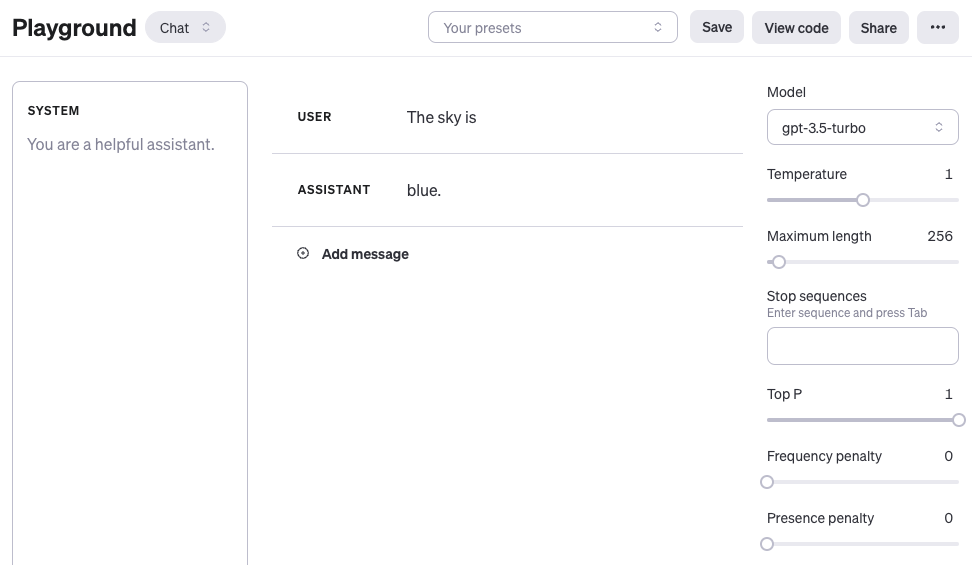
One thing to note: when using OpenAI's chat models like gpt-4 or gpt-3.5-turbo, you can structure prompts with three different roles: system, user, and assistant. The system role isn't required, but it helps set the overall behavior of the assistant — think of it as telling the model who it is and how it should respond. The example above only uses a user message, which works fine as a direct prompt. For simplicity, all examples in this chapter (unless explicitly stated) will just use user messages with the gpt-3.5-turbo model. The assistant message in the example above is the model's response. You can also define assistant messages to show the model examples of desired behavior. More on using chat models here: https://www.promptingguide.ai/models/chatgpt
The takeaway from that example: the language model completed the text based on the context "The sky is". The output might surprise you or miss the mark entirely. And that's the point — it highlights why you need more context or clearer instructions about what you actually want. That's what prompt engineering is all about.
Let's improve it:
Prompt:
Complete the sentence:

The sky is
Output:
blue during the day and dark at night.
Better, right? We told the model to complete the sentence, so the output makes more sense — it did exactly what we asked ("complete the sentence").
These examples show what today's LLMs can do at a basic level. They handle all sorts of advanced tasks: text summarization, math reasoning, code generation, and more.
Model settings
If you notice the same prompt giving wildly different outputs each time, check your model settings first (like temperature / top_p). Start with the next chapter:
Prompt formats
The examples above used pretty simple prompts. A standard prompt usually follows one of these formats:
<question>?
Or:
<instruction>
You can also use Q&A format (standard in many Q&A datasets):
Q: <question>?
A:
When you prompt like this without providing examples, it's called zero-shot prompting — you're asking the model to respond without any demonstrations of the task. Some LLMs can handle zero-shot prompting well, but it depends on task complexity, knowledge coverage, and how the model was aligned during training.
A zero-shot prompt example:
Prompt:
Q: What is prompt engineering?
With newer models, you can skip the "Q:" part entirely — the model figures out it's a Q&A task from context. So the prompt simplifies to:
Prompt:
What is prompt engineering?
Building on these standard formats, there's a popular and effective technique called few-shot prompting, where you provide examples (demonstrations). Here's the format:
<question>?
<answer>

<question>?
<answer>

<question>?
<answer>

<question>?
Q&A version:
Q: <question>?
A: <answer>

Q: <question>?
A: <answer>

Q: <question>?
A: <answer>

Q: <question>?
A:
Whether you use Q&A format depends on the task type. For instance, you can do a simple classification task with examples like this:
Prompt:
This is awesome! // Positive
This is bad! // Negative
Wow that movie was rad! // Positive
What a horrible show! //
Output:
Negative
LLMs can pick up tasks from just a few examples, and few-shot prompting enables this in-context learning ability. We'll cover zero-shot and few-shot prompting more extensively in later chapters.
Turn this chapter's knowledge into practical skills
Enter the interactive lab and practice Prompt with real tasks. Get started in 10 minutes.
📚 Related resources
❓ Common questions
Open a question to review the practical answer.
What do the system, user, and assistant roles actually do in OpenAI chat models?
When using gpt-4 or gpt-3.5-turbo: system sets the assistant's overall behavior (optional, but useful for defining identity), user is the real question, and assistant is the model's reply. You can also pre-fill assistant messages as demonstrations. Most examples in this chapter just send a user message to gpt-3.5-turbo, which covers basic cases.
Why does 'The sky is' output just 'blue' while 'Complete the sentence: The sky is' produces a longer reply?
The first prompt is just an unfinished string—the model probabilistically continues with the shortest reasonable token, 'blue.' The second adds the explicit instruction 'Complete the sentence,' so the model treats it as a completion task and returns 'blue during the day and dark at night.' The only difference is whether you told it what to do.
If the same prompt gives wildly different outputs each run, do I tweak the prompt or the parameters first?
Check the model settings first—primarily temperature and top_p. If the prompt is fine but the output is unstable, sampling parameters are almost always the cause. Set temperature to 0 and leave top_p at 1.0 first; only then decide whether the wording itself needs work. Otherwise you'll misdiagnose a parameter issue as a prompt issue.
What are the standard prompt formats?
Three base formats: a direct question (`<question>?`), a pure instruction (`<instruction>`), or a Q&A template (`Q: <question>?\nA:`). Newer models infer Q&A from context, so the `Q:/A:` markers are optional. Add them back when working with older models or when strict formatting matters.
How different are zero-shot and few-shot prompts in practice?
Zero-shot asks directly without examples (e.g. `What is prompt engineering?`). Few-shot stacks 1-N demonstration pairs first—like `This is awesome! // Positive` followed by `This is bad! // Negative`—then leaves a blank line for the model to classify. Few-shot triggers in-context learning, where examples align both output style and label space.