
Vertex AI Studio Hands-on
Design, test, and deploy prompts in Google Cloud
Design, test, and deploy prompts in Google Cloud
A reusable prompt, example set, evaluation record or safety rule with its task boundary preserved.
Run at least one representative case, inspect the result and record what still requires human review.
Source: Google Cloud "Introduction to Vertex AI Studio" Course Target: Developers & AI Product Managers Estimated Time: 20 mins
What Is Vertex AI Studio?
Vertex AI Studio (formerly Generative AI Studio) is a cloud-based integrated environment inside the Google Cloud Console. It lets you rapidly develop and test generative AI apps with low-code or even no-code approaches.
For developers, think of it as an AI Playground: tweak prompts, test results, and when you're happy — generate API call code with one click.
Core Workflow
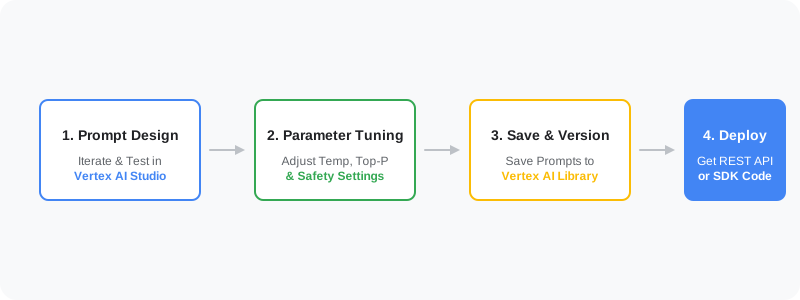
- Prompt Design: Write your prompt in Studio, pick a model (e.g., Gemini 1.5 Pro).
- Parameter Tuning: Adjust parameters to optimize results.
- Save & Version: Save your prompt templates for reuse or team collaboration.
- Deploy: Hit "Get Code" — grab Python/Node.js SDK code or REST API endpoints directly.
Key Parameters Explained
On the right panel in Vertex AI Studio, you'll see a few core parameters that control the AI's "personality":
- Temperature: Controls randomness.
- Low temperature (0.1 - 0.3): More deterministic, more conservative. Good for data extraction, writing code.
- High temperature (0.7 - 1.0): More creative, more varied. Good for poetry, creative copy.
- Top-P (nucleus sampling): Another way to control diversity. The model considers words whose cumulative probability reaches P.
- Safety Settings: Adjust filtering levels for hate speech, harassment, sexual content, etc. based on your needs.
Practical Tip: System Instructions
Vertex AI lets you set System Instructions. These aren't regular conversation messages — they're the model's "highest priority directive."
Good example:
"You are a senior technical documentation translator. Your task is to translate English technical docs into Chinese. Keep all technical terms (like API, Pod, Cluster) in English, and use a natural, conversational bilingual style."
Why Choose Vertex AI Studio?
- Enterprise-grade security: Google guarantees your data won't be used to train public models.
- Model variety: Supports Gemini, PaLM 2, and third-party open-source models from the Model Garden (like Llama).
- Seamless dev integration: Deep integration with other Google Cloud services (BigQuery, Cloud Run, etc.).
Pro Tip: If you want to quickly prototype an idea, run it through Vertex AI Studio first. Way faster than writing code to hit an API.